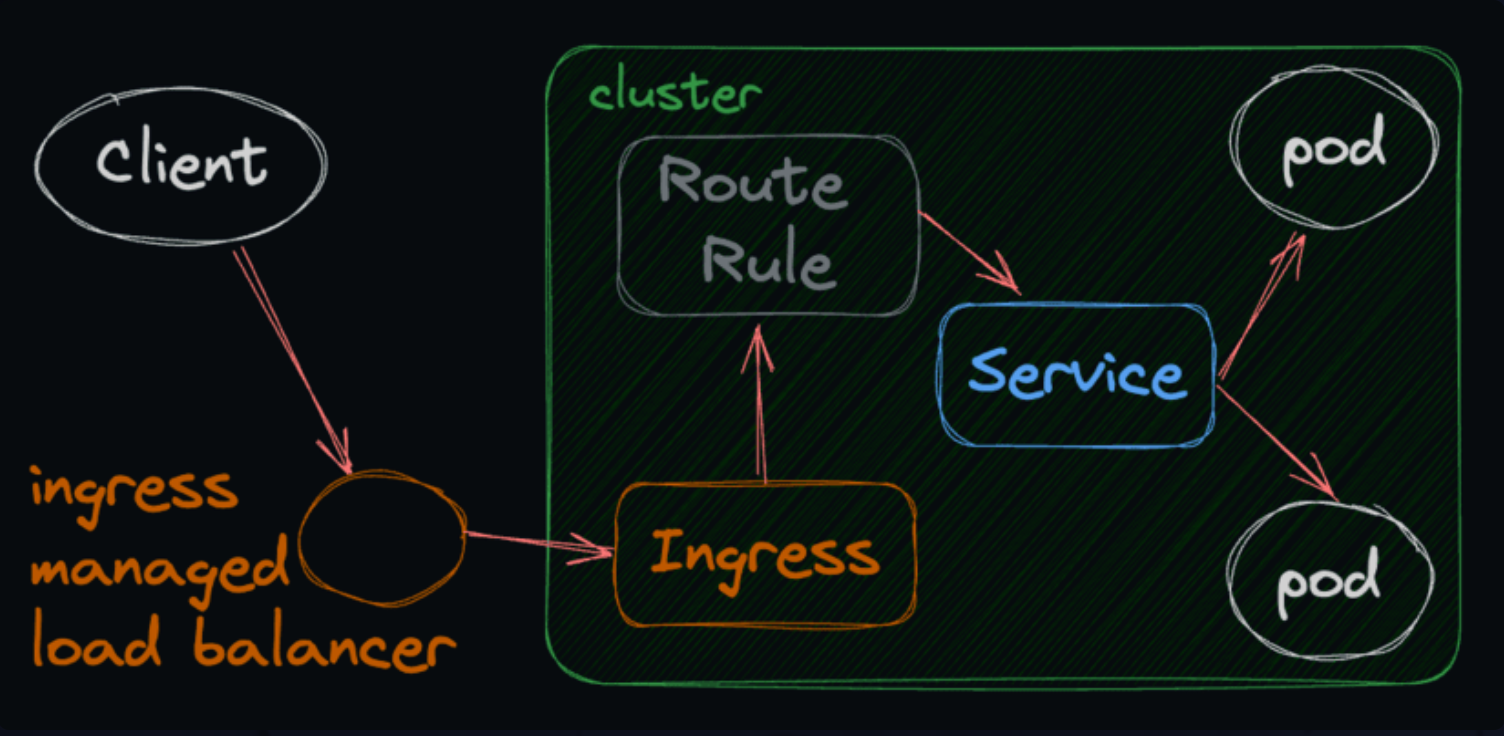
An Ingress may be configured to give Services externally-reachable URLs, load balance traffic, terminate SSL / TLS, and offer name-based virtual hosting. An Ingress controller is responsible for fulfilling the Ingress, usually with a load balancer, though it may also configure your edge router or additional frontends to help handle the traffic.
An Ingress does not expose arbitrary ports or protocols. Exposing services other than HTTP and HTTPS to the internet typically uses a service of type Service.Type=NodePort or Service.Type=LoadBalancer.
It is a command-line tool that allows you to run commands against Kubernetes clusters.
Deploying Images
To deploy an image to a Kubernetes cluster, use kubectl create deployment. (Since v1.18, kubectl run only creates a single bare Pod, not a Deployment, so nothing recreates it if it dies.)
kubectl create deployment <deployment-name> --image=<image-name># single Pod only (useful for quick tests)kubectl run <pod-name> --image=<image-name>
Pods are the smallest deployable units in Kubernetes.
A Pod represents a single instance of a running process in your cluster.
Pods contain one or more containers, such as Docker containers.
A pod is an abstraction over a container, and remember, a container is just a running instance of an image. To oversimplify, a pod is a running application.
kubectl get pods
To get wide output, you can use the -o wide flag.
kubectl get pods -o wide
Edit a Deployment
To edit a deployment, you can use the kubectl edit command.
kubectl edit deployment <deployment-name>
Delete a Deployment
To delete a deployment, you can use the kubectl delete command.
kubectl delete deployment <deployment-name>
Delete a Pod
To delete a pod, you can use the kubectl delete command.
kubectl delete pod <pod-name>
Get all ConfigMaps
ConfigMaps are a Kubernetes resource that allows you to store configuration data in key-value pairs.
ConfigMaps allow you to decouple your configurations from your container images.
kubectl get configmaps
Apply a ConfigMap
To apply a ConfigMap, you can use the kubectl apply command.
kubectl apply -f <configmap-file>
Get all Services
A Kubernetes Service is an abstraction which defines a logical set of Pods and a policy by which to access them.
Services enable a loose coupling between dependent Pods.
kubectl get services
Get all Nodes
A node is a worker machine in Kubernetes.
A node may be a VM or physical machine, depending on the cluster.
Each node has the services necessary to run pods and is managed by the control plane.
kubectl get nodes
Get all Namespaces
A namespace is a way to divide cluster resources between multiple users.
It is a way to divide cluster resources between multiple users.
kubectl get namespaces
Port Forwarding
To forward a port from a Kubernetes pod to your local machine, you can use the kubectl port-forward command.
To access the Kubernetes API server, you can use the kubectl proxy command.
kubectl proxy
Replica Sets
A ReplicaSet ensures that a specified number of pod replicas are running at any given time.
A ReplicaSet is defined with a spec that specifies how many replicas it should maintain.
kubectl get replicasets
Distributed Systems
Whenever you’re dealing with a system that involves multiple machines talking to each other over a network, you’re dealing with a distributed system. Distributed systems are inherently complex, and Kubernetes is no exception, but that complexity is generally abstracted away from you as a K8s user. That’s what makes Kubernetes so cool! It does a lot of the hard work for you.
A distributed system is a system whose components are located on different networked computers, which communicate and coordinate their actions by passing messages to one another.
The components interact with one another in order to achieve a common goal.
Distributed systems are designed to improve performance and scalability.
They are also more fault-tolerant than centralized systems.
Distributed systems are used in many applications, such as cloud computing, big data processing, and social networks.
Examples of distributed systems include the Internet, Google’s search engine, and Amazon’s e-commerce platform.
Resource and Nodes
Resource: A resource is an object that Kubernetes manages. For example, a pod is a resource.
Node: A node is a worker machine in Kubernetes. It may be a VM or physical machine, depending on the cluster. Each node has the services necessary to run pods and is managed by the control plane.
Note: Kubernetes manages the resources that applications require and automatically distributes the load across nodes
Pods are the smallest deployable units of computing that you can create and manage in Kubernetes.
A Pod (as in a pod of whales or pea pod) is a group of one or more containers, with shared storage/network resources, and a specification for how to run the containers.
Epheemeral Containers
Pods die, they die often, and sometimes without warning.
When a pod dies, it is replaced by a new pod (if a controller like a Deployment/ReplicaSet or StatefulSet manages it; a bare pod from kubectl run just stays dead).
The ephemeral (fancy word for “temporary”) nature of Pods is one of the defining features of Kubernetes. Unlike traditional virtual machines (VMs) or physical servers that might run indefinitely (or until hardware failure), Pods are designed to be spun up, torn down, and restarted at a moment’s notice.
Why are they temporary?
Flexibility and resilience. If a Pod encounters a problem, it can be easily terminated and replaced with a new, healthy instance.
This model not only allows for high availability but also promotes immutability. Instead of manually patching or updating existing environments, you spin up new versions of the entire environment.
How does it affect me?
As a developer, it’s crucial to understand that it’s rarely a good idea to store persistent data on a Pod.
They can be terminated and replaced, and any locally saved data will be lost. Plan on your image restarting from scratch often!
Unique IP Address
Every Pod in a Kubernetes cluster has a unique IP address.
This means that each Pod can communicate with other Pods in the cluster using its IP address.
This is a key feature of Kubernetes, as it allows for seamless communication between Pods, regardless of where they are running in the cluster.
Deployments are a Kubernetes resource that manages a replica set of Pods.
Replica Sets
Replica Sets are a Kubernetes resource that ensures a specified number of Pods are running at all times.
Deployments are a higher-level abstraction that manages Replica Sets. (You can think of a Deployment as a wrapper around a ReplicaSet.)
Deployments allow you to define the desired state of your application and automatically manage the Replica Sets to achieve that state.
Thrashing Pods
Pods are ephemeral, meaning they can be terminated and replaced at any time.
Thrashing is a term used to describe the process of Pods being terminated and replaced in quick succession.
Reasons for thrashing include:
The application recently had a bug introduced in the latest image version
The application is misconfigured and can’t start properly
A dependency of the application is misconfigured and the application can’t start properly
The application is trying to use too much memory and is being killed by Kubernetes
CrashLoopBackOff
CrashLoopBackOff is a state that Pods enter when they are crashing on startup.
The container keeps exiting and getting restarted, usually with a non-zero exit code (but even exit 0 counts under restartPolicy: Always, e.g. a script that just finishes).
This state is often caused by a misconfiguration in the application or a dependency.
Because Kubernetes is all about building self-healing systems, it will automatically restart the container. However, each time it tries to restart the container, if it crashes again, it will wait longer and longer in between restarts. That’s why it’s called a “backoff”.
ConfigMaps are a Kubernetes resource that allows you to store configuration data in key-value pairs.
ConfigMaps allow us to decouple our configurations from our container images, which is important because we don’t want to have to rebuild our images every time we want to change a configuration value.
In a Dockerfile we can set environment variables like this:
ENV MY_ENV_VAR=my-value
ConfigMap are Insecure
ConfigMaps are a great way to manage innocent environment variables in Kubernetes. Things like:
Ports
URLs of other services
Feature flags
Settings that change between environments, like DEBUG mode
However, they are not cryptographically secure. ConfigMaps aren’t encrypted, and anyone RBAC lets read them in that namespace can see them. (Secrets aren’t much better by default: just base64, unless encryption at rest is enabled.)
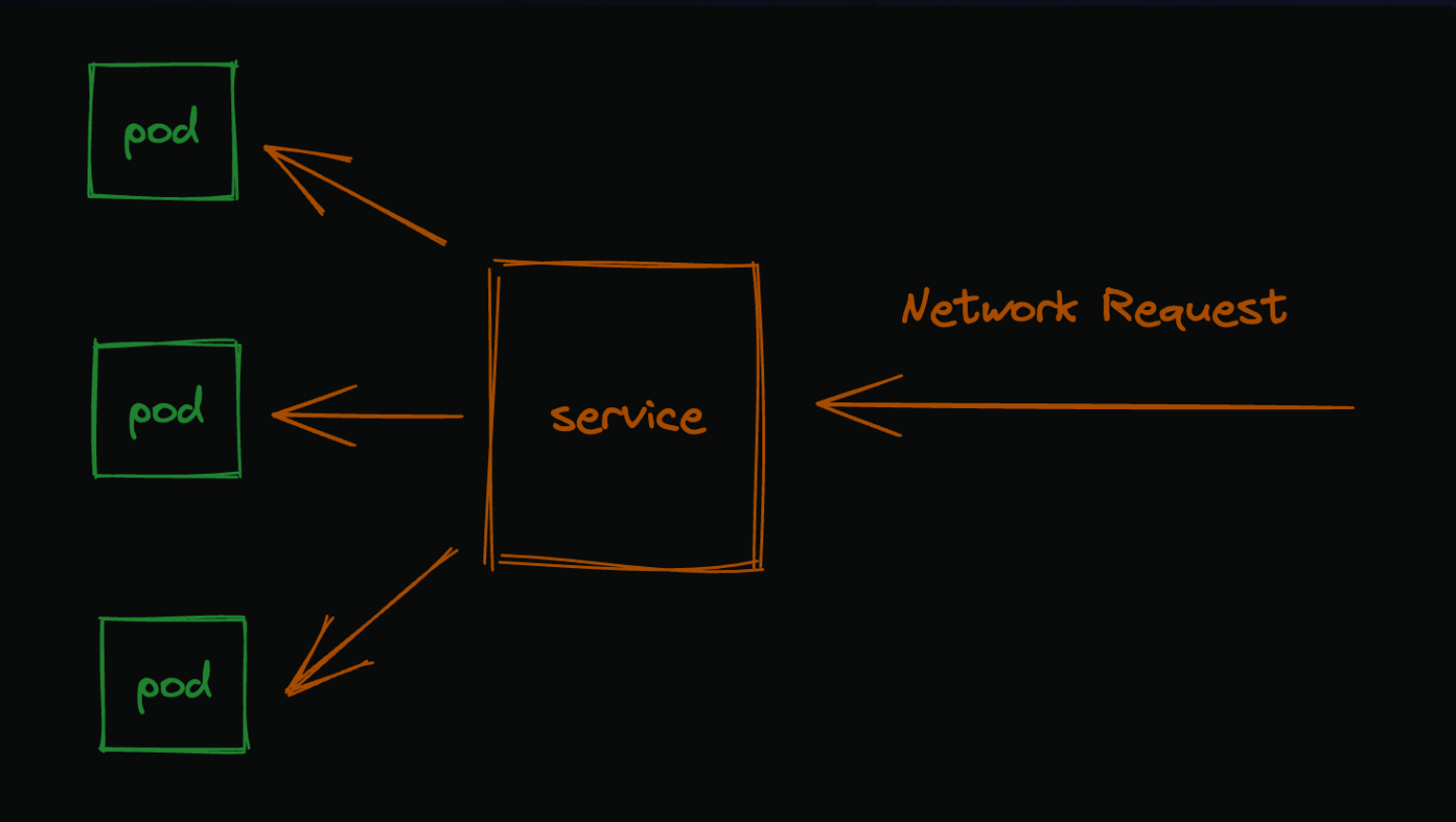
We’ve spun up pods and connected to them individually, but that’s frankly not super useful if we want to distribute real traffic across those pods. That’s where services come in.
Services provide a stable endpoint for pods. They are an abstraction used to provide a stable endpoint and load balance traffic across a group of Pods. By “stable endpoint”, I just mean that the service will always be available at a given URL, even if the pod is destroyed and recreated.
Service Type
There are four types of services in Kubernetes:
ClusterIP
NodePort
LoadBalancer
ExternalName
ClusterIP: Exposes the service on a cluster-internal IP. Choosing this value makes the service only reachable from within the cluster. This is the default ServiceType.
NodePort: Exposes the service on each Node’s IP at a static port (the NodePort). A ClusterIP service, to which the NodePort service will route, is automatically created. You’ll be able to contact the NodePort service, from outside the cluster, by requesting NodeIP:NodePort.
LoadBalancer: Exposes the service externally using a cloud provider’s load balancer. NodePort and ClusterIP services, to which the external load balancer will route, are automatically created.
ExternalName: Maps the service to the contents of the externalName field (e.g. foo.bar.example.com), by returning a CNAME record with its value. No proxying of any kind is set up.
Ingress
Ingress is an API object that manages external access to services in a cluster, typically HTTP. Ingress may provide load balancing, SSL termination and name-based virtual hosting.
Ingress is not a service type, but it acts as the entry point for your cluster. It lets you consolidate your routing rules into a single resource, rather than having to manage each service’s route individually.
Ingress is a layer 7 (HTTP) load balancer, whereas services are layer 4 (TCP/UDP) load balancers.
Ingress is a collection of rules that allow inbound connections to reach the cluster services. It can be configured to give services externally-reachable URLs, load balance traffic, terminate SSL, offer name-based virtual hosting, and more.
Note
Host multiple services on the same IP address
Host multiple services on the same port (path-based routing)
Terminate SSL
Integrate directly with external DNS and load balancers