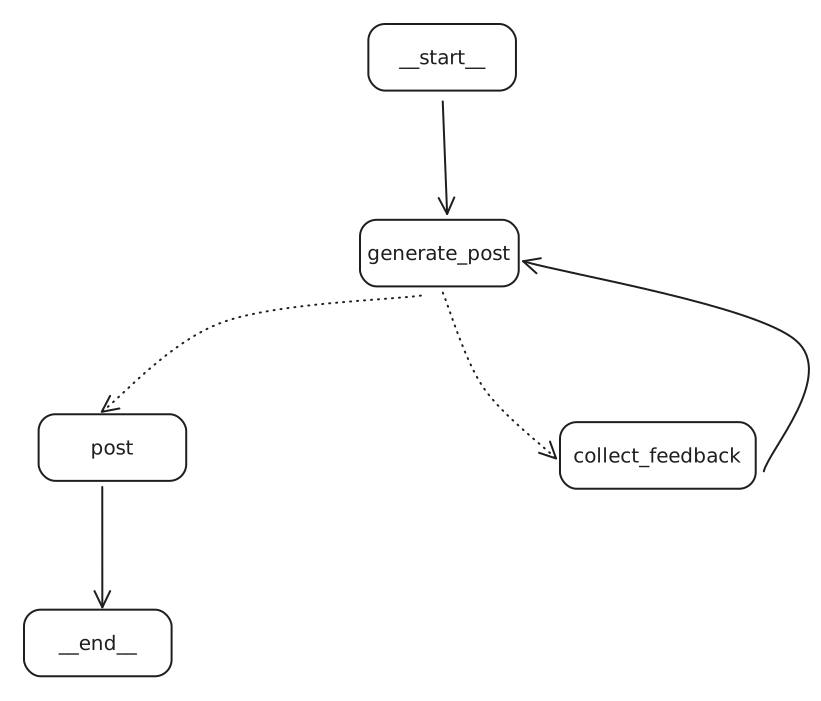
Using input() method
from typing import TypedDict, Annotated
from langgraph.graph import add_messages, StateGraph, END
from langchain_groq import ChatGroq
from langchain_core.messages import AIMessage, HumanMessage
from dotenv import load_dotenv

load_dotenv()

class State(TypedDict):
    messages: Annotated[list, add_messages]

llm = ChatGroq(model="llama-3.1-8b-instant")

GENERATE_POST = "generate_post"
GET_REVIEW_DECISION = "get_review_decision"
POST = "post"
COLLECT_FEEDBACK = "collect_feedback"

def generate_post(state: State):
    return {
        "messages": [llm.invoke(state["messages"])]
    }

def get_review_decision(state: State):
    post_content = state["messages"][-1].content

    print("\n Current LinkedIn Post:\n")
    print(post_content)
    print("\n")

    decision = input("Post to LinkedIn (yes/no): ")

    if decision.lower() == "yes":
        return POST
    else:
        return COLLECT_FEEDBACK

def post(state: State):
    final_post = state["messages"][-1].content
    print("\n Final LinkedIn Post: \n")
    print(final_post)
    print("\n Post has been approved and is now live on LinkedIn!")

def collect_feedback(state: State):
    feedback = input("How can i improve this post?")
    return {
        "message": [HumanMessage(content=feedback)]
    }

graph = StateGraph(State)

graph.add_node(GENERATE_POST, generate_post)
graph.add_node(GET_REVIEW_DECISION, get_review_decision)
graph.add_node(COLLECT_FEEDBACK, collect_feedback)
graph.add_node(POST, post)

graph.set_entry_point(GENERATE_POST)

graph.add_conditional_edges(GENERATE_POST, get_review_decision)
graph.add_edge(POST, END)
graph.add_edge(COLLECT_FEEDBACK, GENERATE_POST)

app = graph.compile()

response = app.invoke({
    "messages": [HumanMessage(content="Write me a LinkedIn post on how AI Agents taking over content creation")]
})

print("\n\nFinal Response:\n")
print(response["messages"][-1].content)
Drawbacks of input()
- Freezes your program completely until someone types something
- Only works in terminals- useless for web apps
- If the program crashes, all teh progress is lost
- Can only handle one user at a time
- Lives only in your terminal session
This is why we use a special method that LangGraph provides called “interrupt”
What is interrupt() & Why use it?
- Special LangGraph function that pauses your workflow nicely
- Saves your program’s state so it can continue later
- Works in web apps, APIs, and other interfaces
- Handles multiple users/sessions at once
- Survives program crashes and restarts
- Lets humans take their time to respond
- Requires for any serious human-in-the-loop system
Two ways to implement interrupt
- Method 1: Interrupt in the compile step
graph = graph_builder.compile(
	checkpointer = checkpointer,
	interrupt_before = ["tool"]
)- Method 2: Interrupt function with Command Class
human_review = interrupt(
	{
		"question": "Is this correct?",
		"tool_call": tool_call,
	}
)

if (review_action == "continue"):
	return Command(goto == "run_tool")