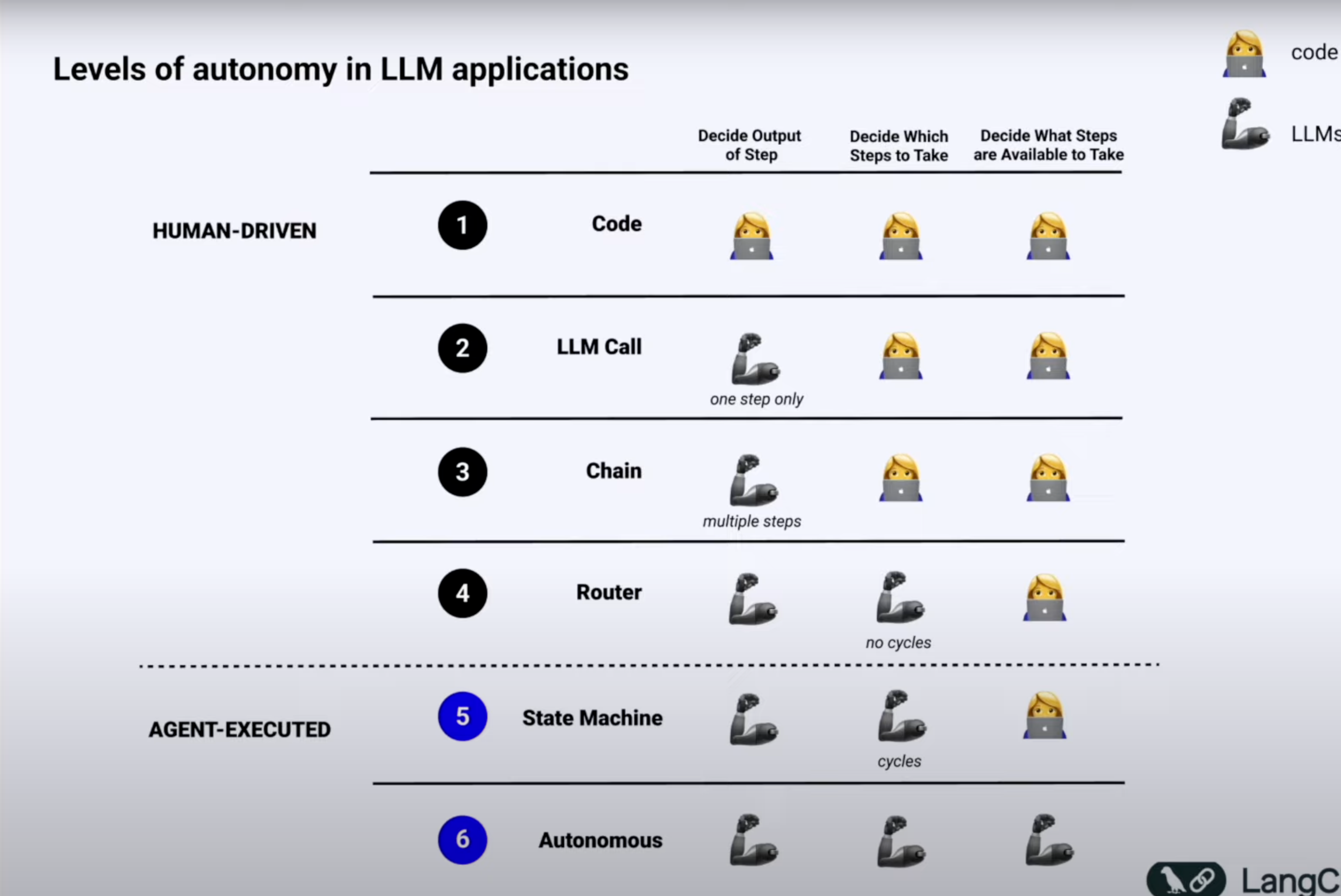
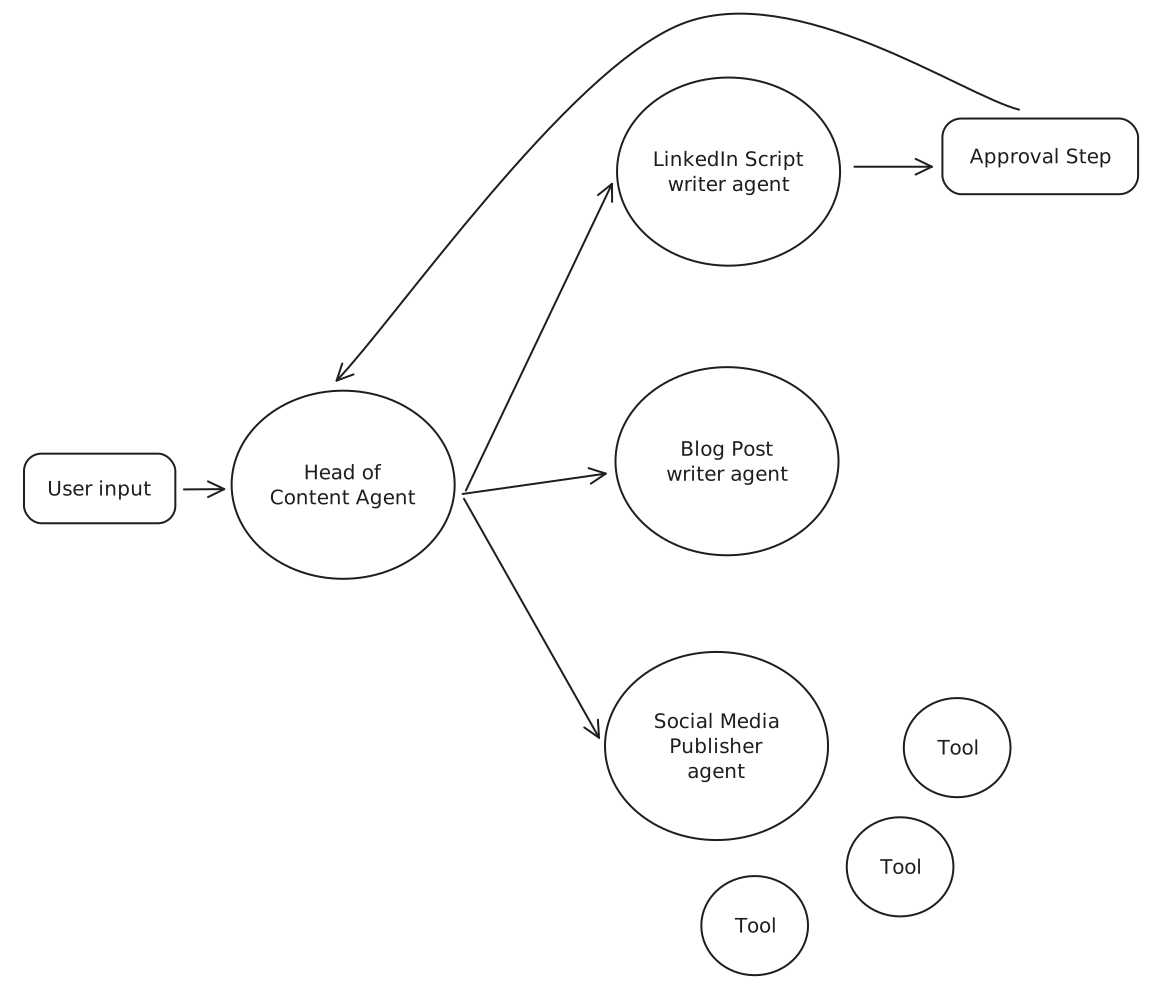
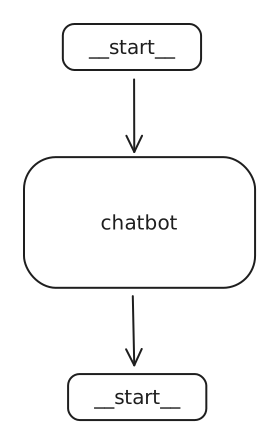
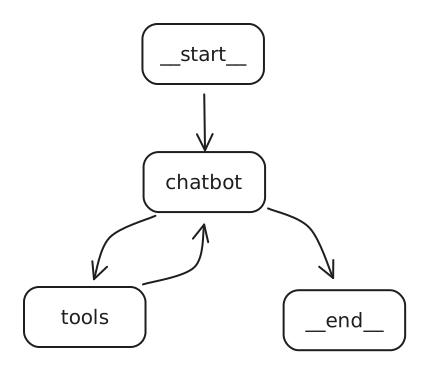
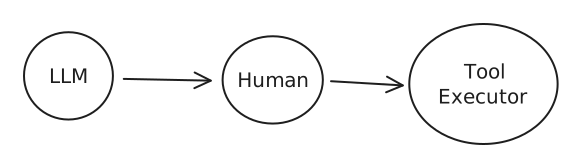
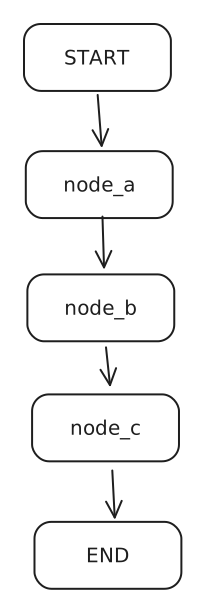
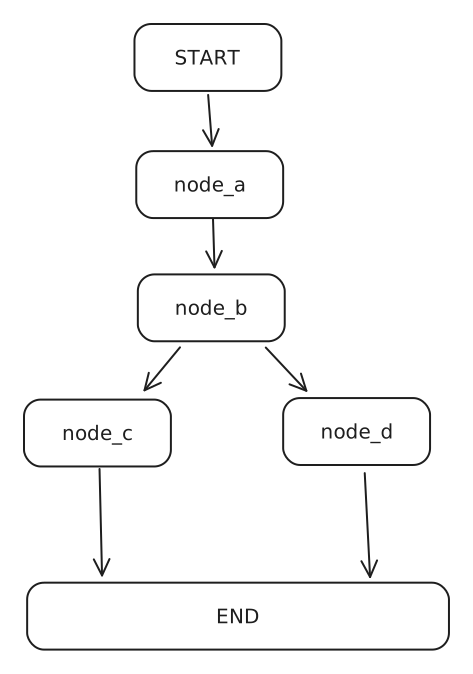
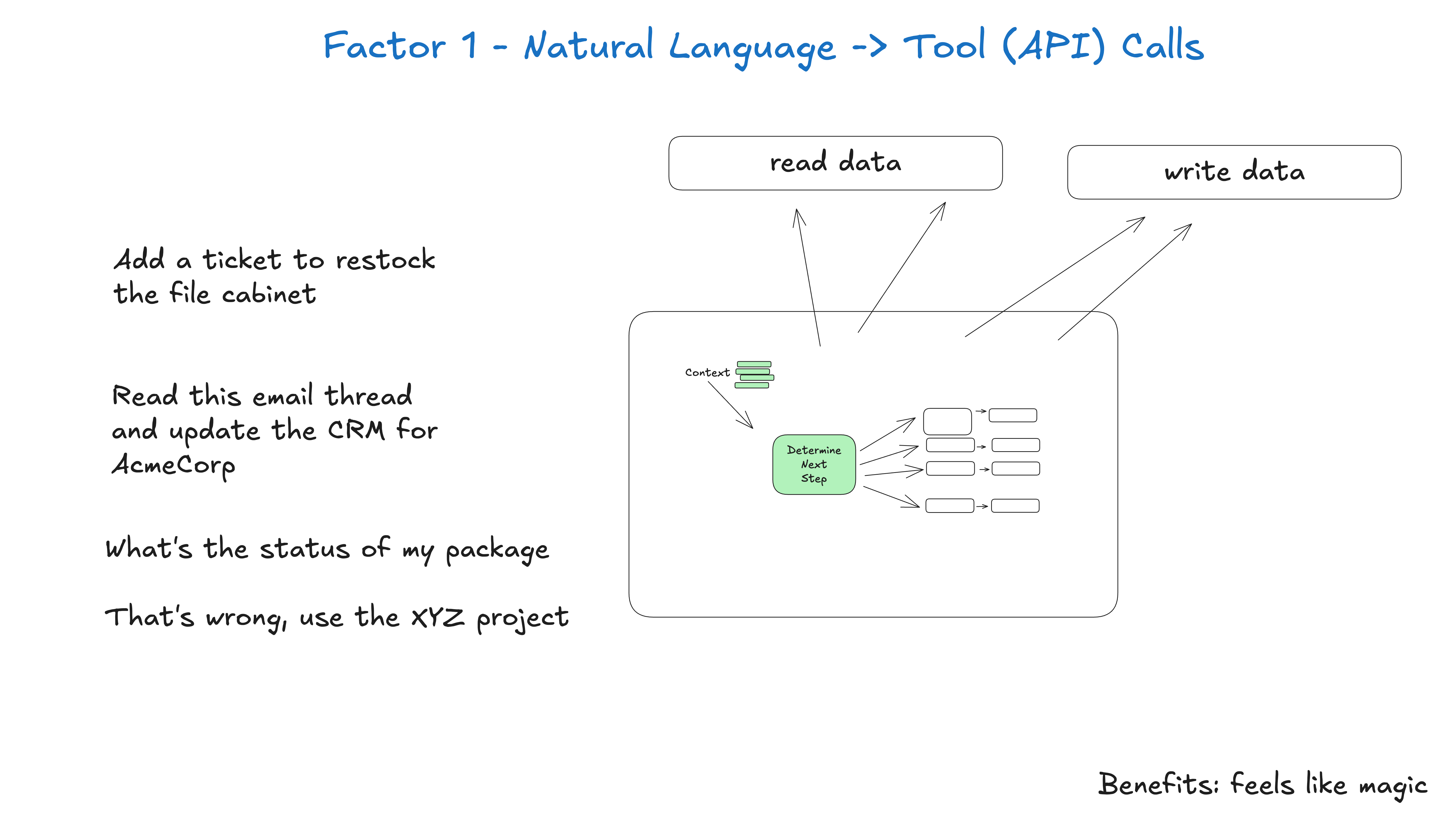
We all know that everything is hard-coded and it is not even really a cognitive architecture.
Disadvantage:
The problem? You’d need to write rules for every possible scenario - making it impossible to handle real-world complexity.
2. LLM call
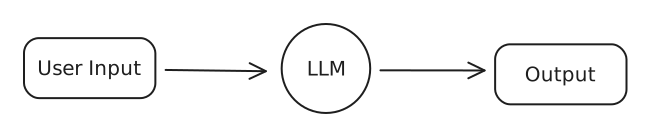
A single LLM call means your app basically does one main thing - you give it an input, it processes it, and gives you back an output.
Think of chatbots that just take your message and respond, or apps that translate text.
This was a huge leap from hard-coded rules, even though it’s still pretty simple and is only in the 2nd stage of autonomy.
Disadvantage:
Trying to get everything done in one shot often leads to confused or mixed-up responses - just like how a single person can’t be an expert at everything.
Example User Input: You are an expert LinkedIn post writer. Write me a post on “AI Agents Taking over Content Creation”
3. Chains
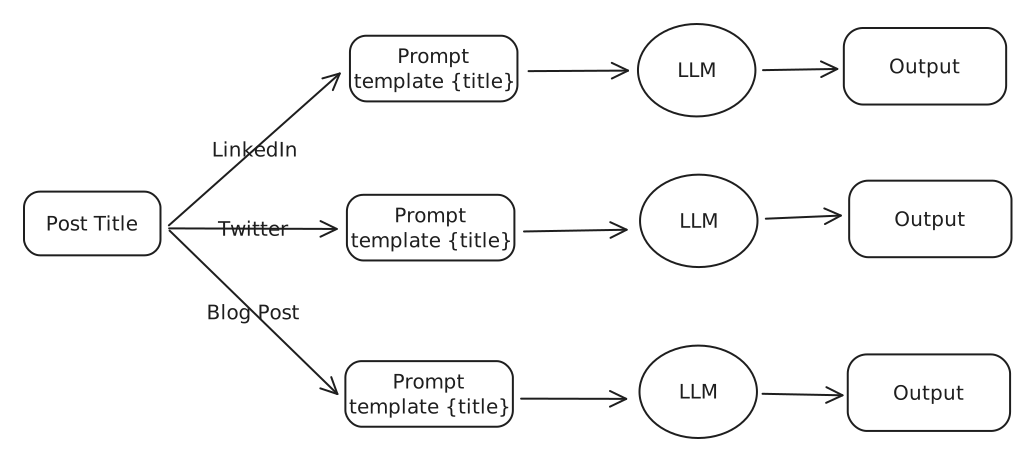
Think of chains like having multiple specialists instead of one generalist. Instead of asking one AI to do everything, we break it down into steps where each AI is really good at one thing.
Imagine a customer service chatbot: The fist AI read your complaint and figures out exactly what product you’re talking about.
The second AI finds the right solution from the company’s help docs, and the third AI turns that solution into a friendly response.
Each step is simple, but together they create a much smarter system than a single LLM call could.
This way we can handle big tasks, breaking down large problems into small pieces.
Disadvantage:
These fixed sequences are like a rigid assembly line - they always follow the same steps defined by the human.
4. Router
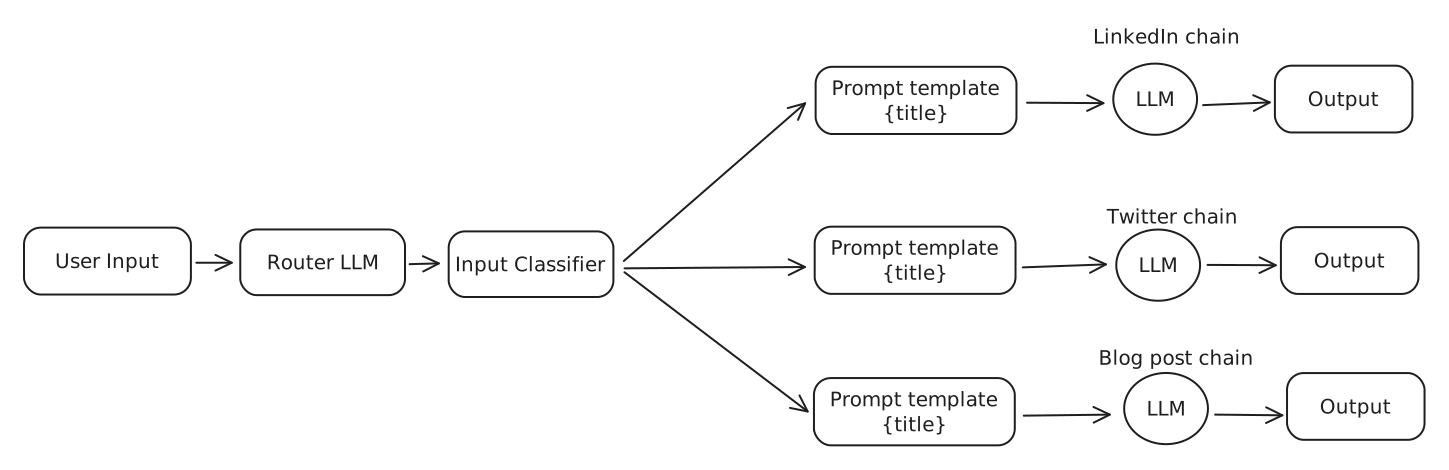
Now this is where it gets interesting - routers are like traffic cops for your AI. Instead of having a fixed path like in chains, the AI itself decides what steps to take next.
Imagine a personal assistant bot : when you ask it something, it first figures out if you need help with scheduling, research, or calculations, then routes your request to the right tool or chain for the job.
Disadvantage:
While it can choose different paths, it still can’t remember previous conversations or learn from mistakes.
5. State Machine (Agent)
This is combining the previous level (router) but with loops.
Agent ~= control flow controlled by an LLM
This involves features like:
Ability to have human-in-loop, ask for approval before moving on
Multi-agent systems
Advanced memory management.
Go back in history and explore better alternate paths.
Adaptive Learning
And many more, and this is where LangGraph comes into the picture
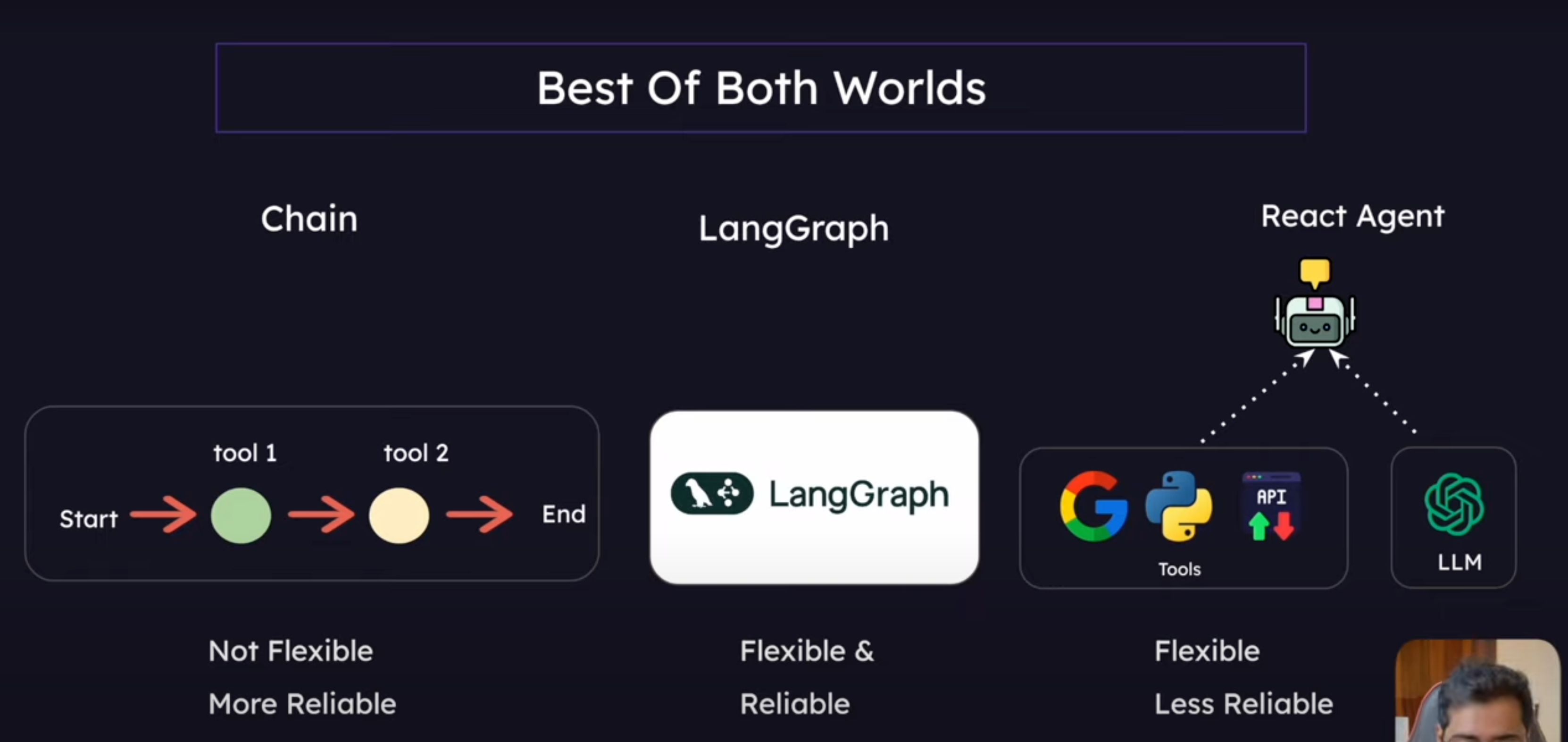
Chain/Router VS Agent
A Chain or even a router is one directional. Hence, it is not an agent
Whereas in a state machine, we can go back in the chain, have cycles and the flow is controlled by the LLM, hence it is called an Agent.
AI Agents & Tools
Agents:
Think of Agents as the “problem-solvers” of the AI world. Agents are capable of thinking on their own.
In other words, it’s AI that can make autonomous decisions.
In the case of Chains and Router, they follow our specific instruction.
But with agents, they actually take it a step further. They can decide for themselves what steps to take on their own.
What are tools then?
Tools are specific functions that Agents can use to complete tasks
Just like a chef’s kitchen tools (knife for cutting, oven for baking, etc), tools are the special abilities we give to AI - like giving it a calculator tool, or a search engine tool, or a calendar tool.
ReACT pattern
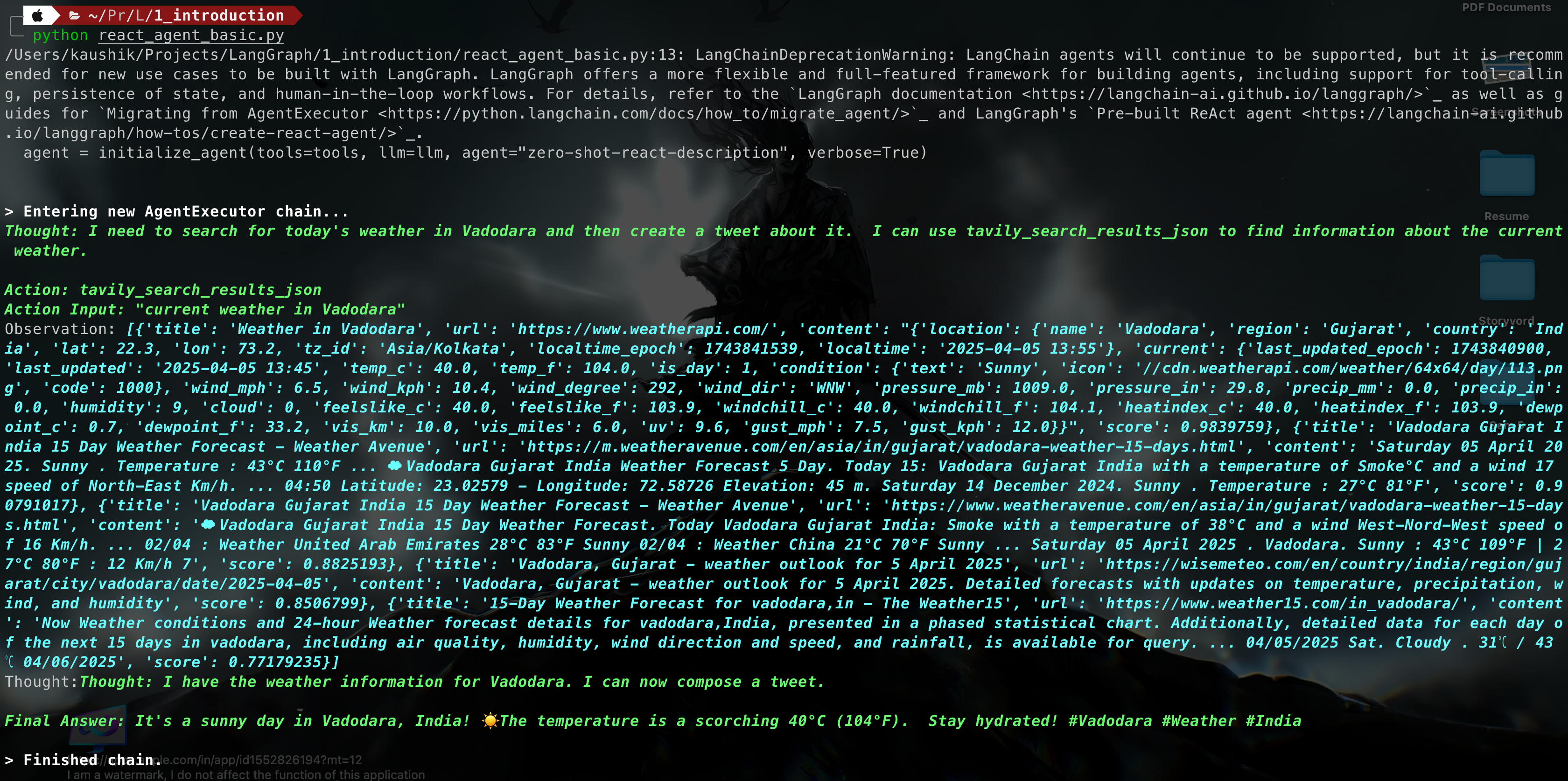
Think: LLM first thinks about the user prompt/problem
Action: LLM decides if it can answer by itself or if it should use a tool
Action Input: LLM provides the input argument for the tool
Here, langChain executes the tool and returns the output to the LLMObserver: LLM observe the result of the tool
Final Answer: “This is your final answer.”
Implementation of LangChain
Code:
from langchain_google_genai import ChatGoogleGenerativeAIfrom dotenv import load_dotenvfrom langchain.agents import initialize_agent, toolfrom langchain_community.tools import TavilySearchResultsimport datetimeload_dotenv()# Define LLM Modelllm = ChatGoogleGenerativeAI(model='gemini-1.5-pro')# result = llm.invoke("Give me a tweet about today's weather in Vadodara.")# Define toolssearch_tool = TavilySearchResults(search_depth='basic')# User defined tool: # @tool: it defines the function is a tool # """ : The comments are are necessory to tell the LLM about the tool. @tooldef get_system_time(format: str = "%Y-%m-%d %H:%M:%S"): """Returns the current system time formatted according to the provided format string.""" current_time = datetime.datetime.now() formatted_time = current_time.strftime(format) return formatted_time# List all the toolstools = [search_tool, get_system_time]# Initialize the agent with LLM model, tools that are needed and agent type# Agent type: # "zero-shot-react-description": Giving no prior Knowledge and agent has to decide everything.agent = initialize_agent(tools=tools, llm=llm, agent="zero-shot-react-description", verbose=True)# Invoke the agentagent.invoke("Give me a tweet about today's weather in Vadodara.")# agent.invoke("When was SpaceX's last launch and how many days ago was that from this instant.")
Output:
Advantage
Flexible : If the given tool is available it will select that tool.
It can run multiple tool as required to generate the response according to the request prompt.
Disadvantage
Infinite loop:
We did not define the tools correctly.
The LLM is not capable enough
The prompting doesn’t define a clear end condition
What is LangGraph?
A framework for building controllable, persistent agent workflows with build-in support for human interaction, streaming, and state management.
It uses the Graph Data Structure to achieve this
Key Features of LangGraph
Looping and Branching Capabilities : Supports conditional statements and loop structures, allowing dynamic execution paths based on state.
State Persistence: Automatically saves and manages state, supporting pause and resume for long-running conversations.
Human-Machine Interaction Support: Allows inserting human review during execution, supporting state editing and modification with flexible interaction control mechanisms.
Streaming Processing: Supports streaming output and real-time feedback on execution status to enhance user experience.
Seamless Integration with LangChain: Reuses existing LangChain components, supports LCEL expressions, and offers rich tool and model support.
After giving a presentation, thinking about how it went
After writing an email, reading it again to check if it’s clear.
After making a decision, considering if it was the right choice.
What is a reflection-agent pattern?
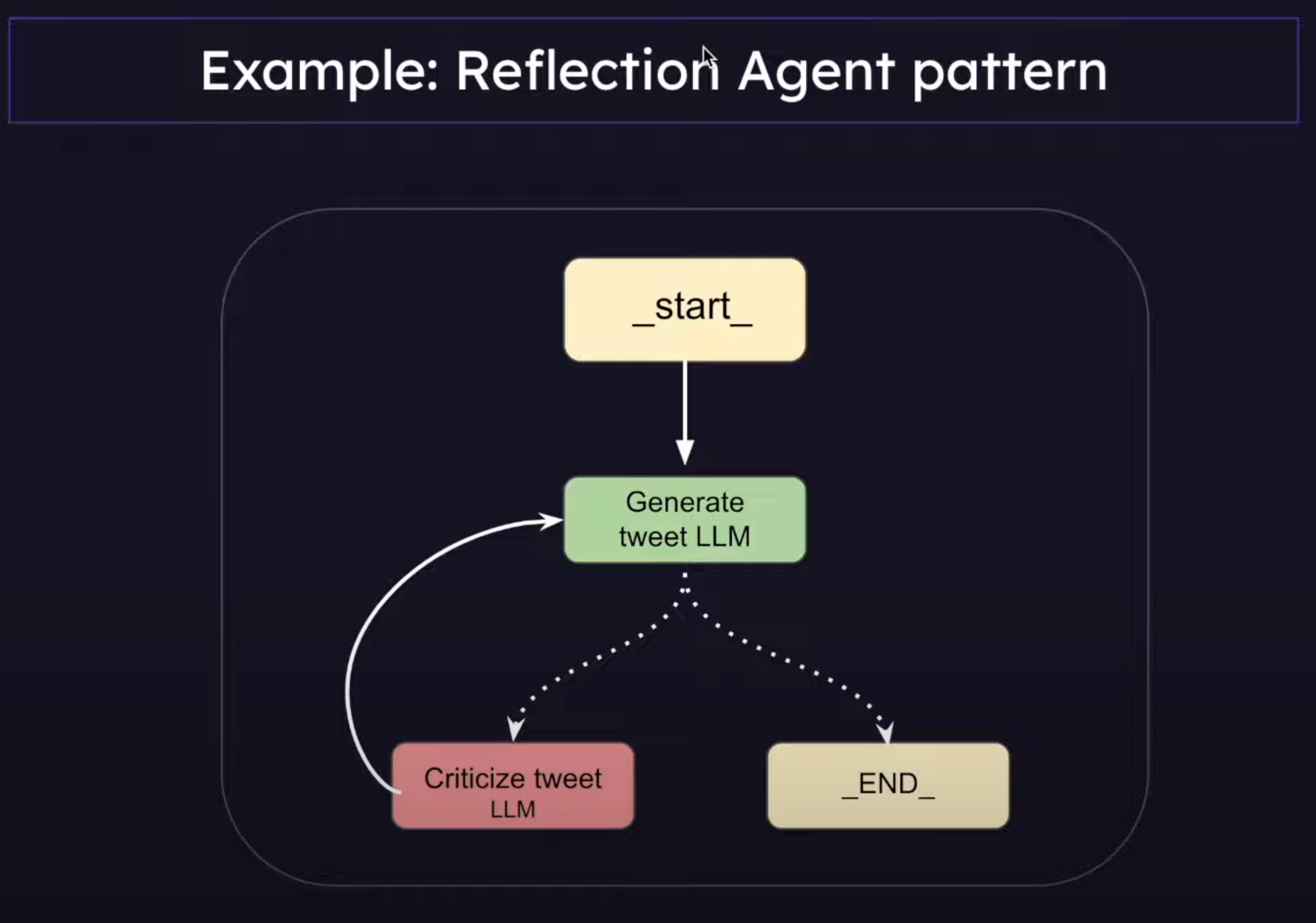
A reflection agent pattern is an AI system pattern that can look at its own output and think about them/make it better- just like how we look at ourself in a mirror and self-reflect, make ourself better.
A basic reflection agent system typically consists of:
A generator agent
A reflector agent
Difference between Chain and LangGraph(Reflection Agent)
System 1
System 2
Fast
Slow
Subconscious
Conscious
Automatic
Effortful
Everyday Decisions
Complex Decisions
Error Prone
Reliable
System 1 is a Prompt Chain
System 2 is a Reflection Agent
Types of Reflection Agents in LangGraph
Basic Reflection Agents
Reflexion Agents
Language Agent Tree Search (LATS)
1. Basic Reflection Agents
What is a Message Graph?
It is a class that LangGraph provides that we can use to orchestrate the flow of messages between different nodes.
Example use cases: Simple routing decisions, simple chatbot conversation flow.
If you just want to pass messages along between nodes, then go for MessageGraph.
If the app requires complex state management, we have StateGraph.
It maintains a list of messages and decides the flow of those messages between nodes.
Every node in MessageGraph receives the full list of previous messages as input.
Each node can append new messages to the list and return it
The updated message list is than passed to the next node
Implementation
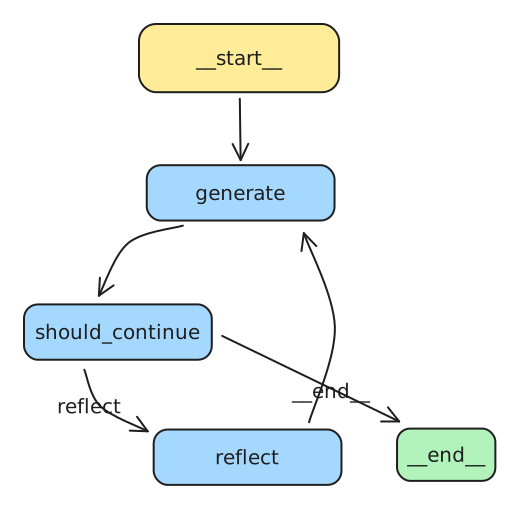
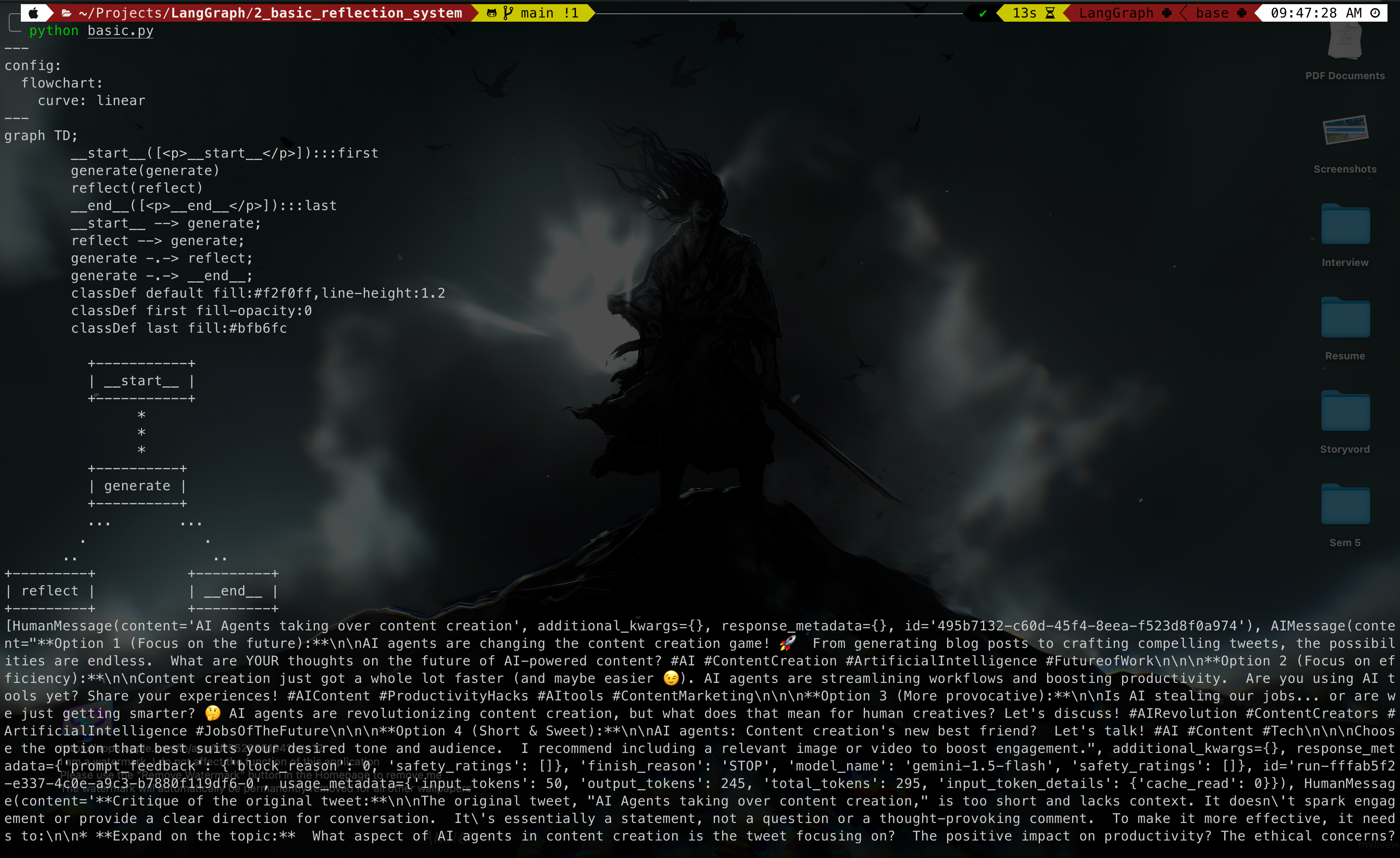
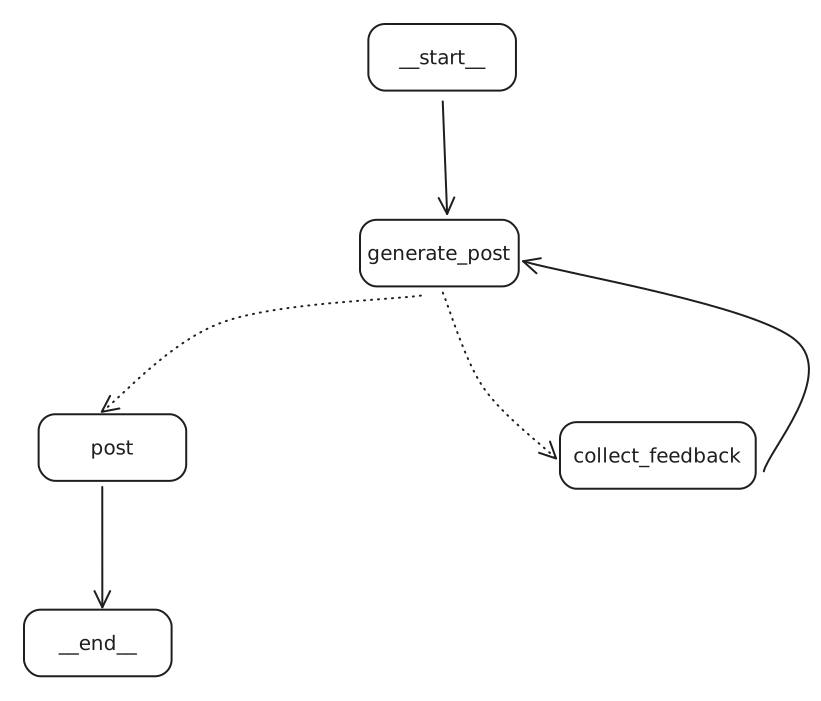
from langchain_core.prompts import ChatPromptTemplate, MessagesPlaceholderfrom langchain_google_genai import ChatGoogleGenerativeAIfrom dotenv import load_dotenvimport osload_dotenv()generation_prompt = ChatPromptTemplate.from_messages( [ ( "system", "You are a twitter techie influencer assistant tasked with writing excellent twitter posts." " Generate the best twitter post possible for te user's request." " If the user provides critique, respond with a revised version of your previous attempts.", ), # previous convo history MessagesPlaceholder(variable_name="messages"), ])reflection_prompt = ChatPromptTemplate.from_messages( [ ( "system", "You are a viral twitter influncer grading a tweet. Generate critique and recommendations for the user's tweet." "Always provide detailed recommendations, including request for length, virality, style, etc.", ), # previous convo history MessagesPlaceholder(variable_name="messages"), ])llm = ChatGoogleGenerativeAI(model="gemini-1.5-flash", api_key=os.getenv("GOOGLE_API_KEY"))# Pipe the prompt with llm, is part of LangChain’s LCEL (LangChain Expression Language). It’s a powerful and clean way to build chains by piping the output of one component into the next — similar to how Unix pipes work.# Takes the output of reflection_prompt and Pass it as input to the llm.generation_chain = generation_prompt | llmreflection_chain = reflection_prompt | llmfrom typing import List, Sequencefrom dotenv import load_dotenvfrom langchain_core.messages import BaseMessage, HumanMessagefrom langgraph.graph import END, MessageGraphfrom chains import generation_chain, reflection_chainload_dotenv()graph = MessageGraph()REFLECT = "reflect"GENERATE = "generate"def generate_node(state): return generation_chain.invoke({ "messages": state })def reflect_node(state): response = reflection_chain.invoke({ "messages": state }) # Trick the AI into thinking the critique is from human. # Not necessory return [HumanMessage(content=response.content)]graph.add_node(GENERATE, generate_node)graph.add_node(REFLECT, reflect_node)graph.set_entry_point(GENERATE)def should_continue(state): if(len(state) > 6): return END return REFLECTgraph.add_conditional_edges(GENERATE, should_continue)graph.add_edge(REFLECT, GENERATE)app = graph.compile()# pip install grandalf# Verify the graph Graphicallyprint(app.get_graph().draw_mermaid())app.get_graph().print_ascii()response = app.invoke(HumanMessage(content="AI Agents taking over content creation"))print(response)
The Reflexion Agent, similar to reflection agent, not only critiques it’s own responses but also fact checks it with external data by making API calls (Internet Search)
In the Reflection Agent Pattern, we had to rely on the training data of LLMs but in this case, we’re not limited to that.
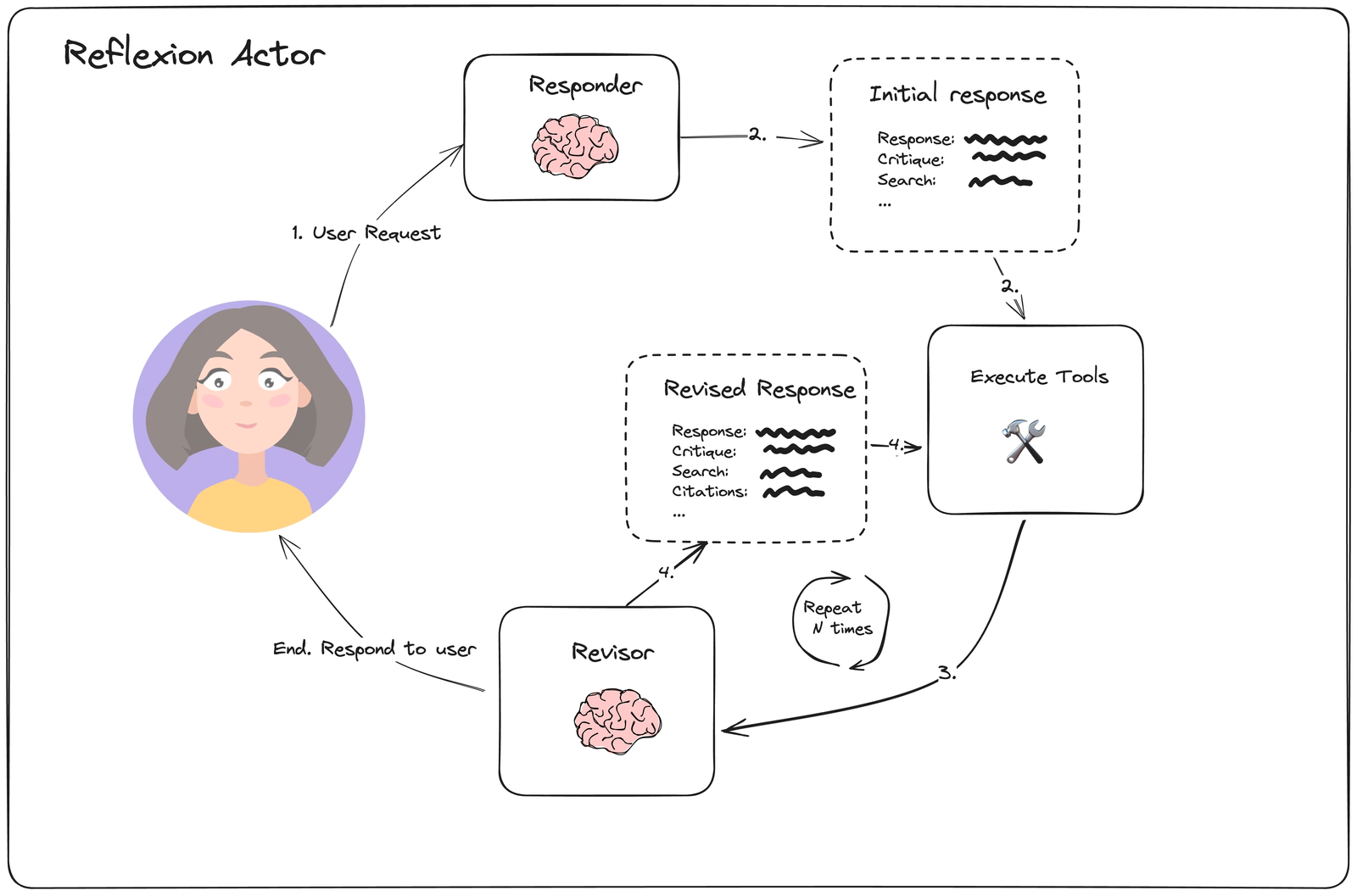
The main component of Reflexion Agent System is the “actor”.
The “actor” is the main agent that drives everything - it reflects on it’s responses and re-executes.
It can do this with or without tools to improve based on self-critique that is grounded in external data.
It’s main sub-components includes:
Tools/tool execution
Initial responder: generate an initial response & self-reflection
Revisor: re-respond & reflect based on previous reflections
Episodic memory:
In the context of Reflexion agents, episodic memory refers to an agent’s ability to recall specific past interactions, events, or experiences, rather than just generalised knowledge.
This is crucial for making agents feel more context-aware, personalized, and human-like over time.
Architecture
Response: The actual/main output.
Critique: A self-assessment of the response—pointing out limitations, potential gaps, or assumptions in the explanation.
Search: Keywords or queries used (or that would be used) to gather accurate information and form the response.
Citations: Verified sources or references (articles, docs, repos) that support the response or provide further reading.
LLM Response Parser System
The system converts unstructured LLM outputs into well-defined Python objects through a series of structured parsing steps, ensuring data validation and consistent formatting.
What are the key components?
Chat Prompt Template
Function Calling with Pydantic Schema
Pydantic Parser
Function Calling with Pydantic Schema
Function Calling
Similar to how we make tools available to the LLM, we can also send a schema to the LLM and force it to structure it’s JSON output according to the schema.
Pydantic: A python library that defines data structures using classes.
Pydantic Parser
Takes the JSON output from the LLM’s function call
Validates it against the defined Pydantic Schema (class definition)
Creates instances of Pydantic classes with the validated data
If the LLMs output does not match with the defined schema, it will throw an error.
Implementation
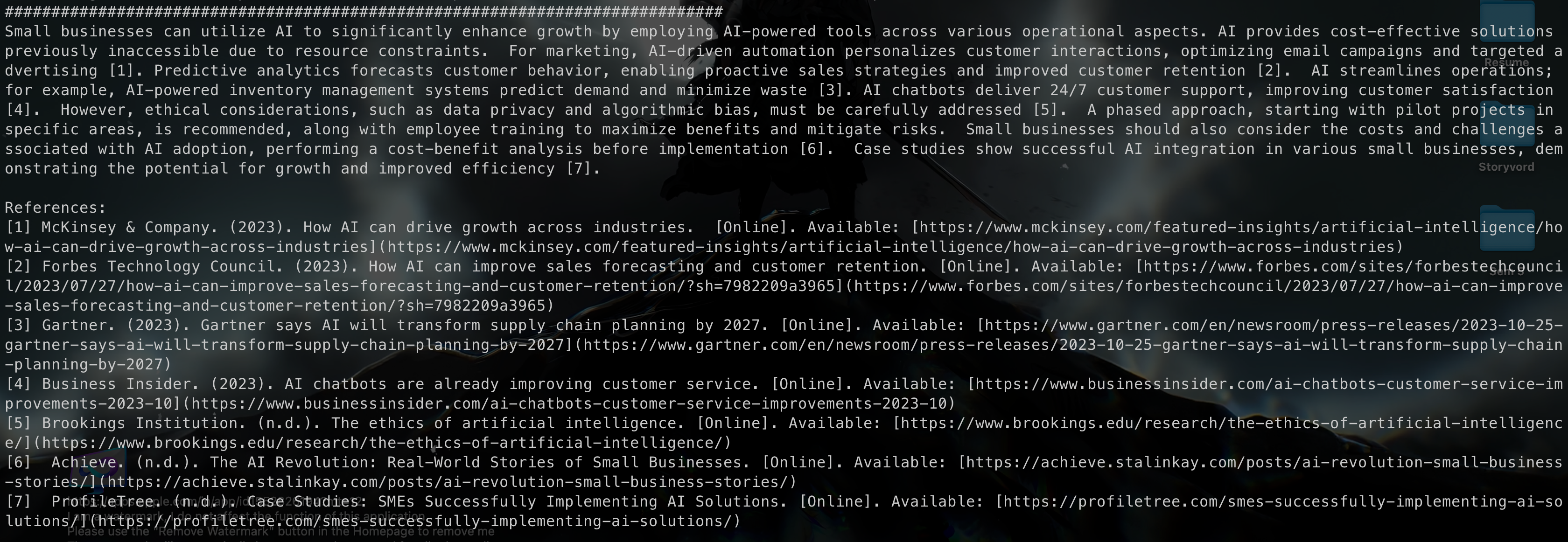
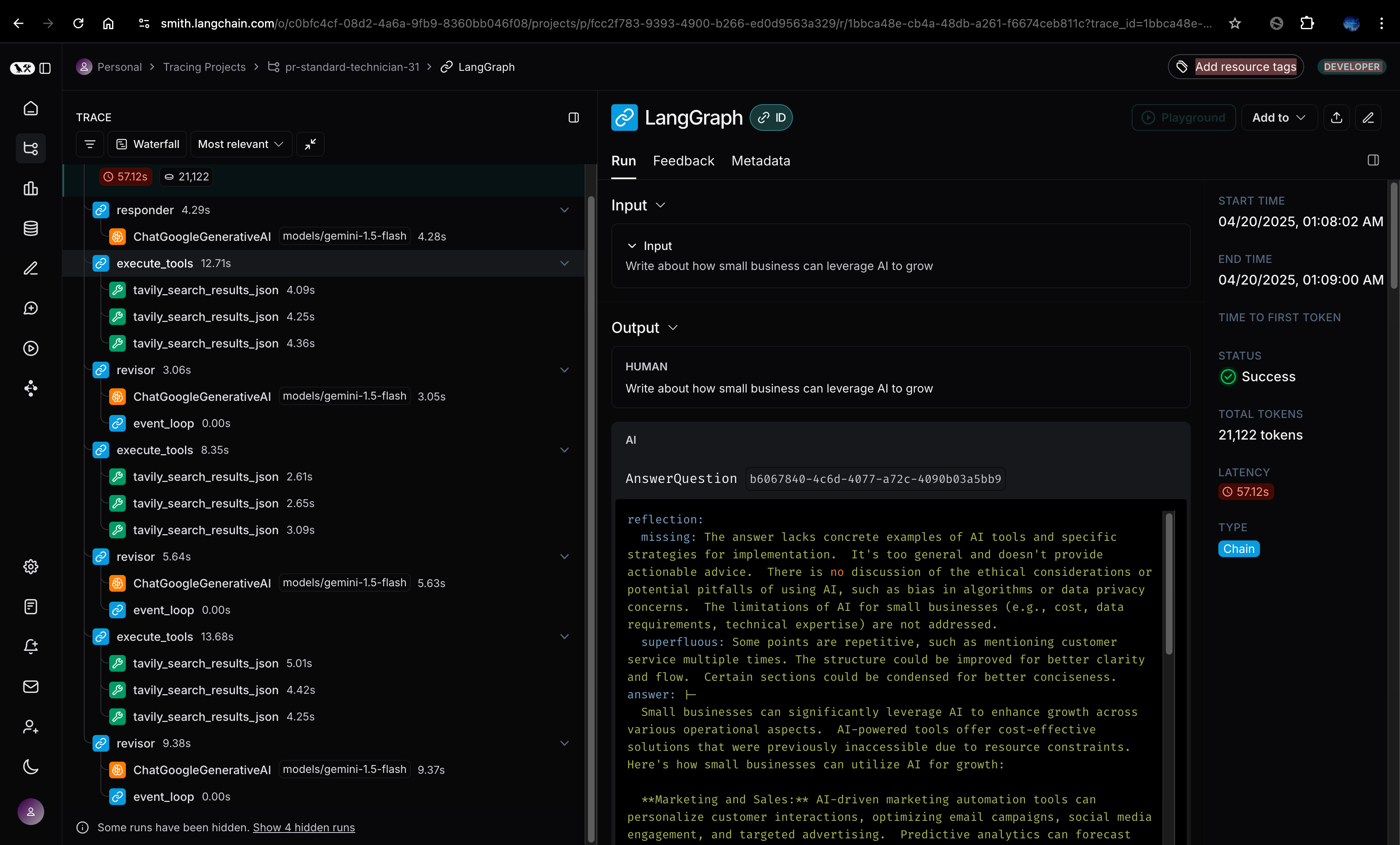
####################################################################### schema.py######################################################################from pydantic import BaseModel, Fieldfrom typing import Listclass Reflection(BaseModel): missing: str = Field(description="Critique of what is missing.") superfluous: str = Field(description="Critique of what is superfluous")class AnswerQuestion(BaseModel): """Answer the question.""" answer: str= Field( description="~250 word detailed answer to the question." ) search_queries: List[str] = Field( description="1-3 search queries for researching improvements to address to critique of your current answer." ) reflection: Reflection = Field( description="Your reflectionon the initial answer." )class ReviseAnswer(AnswerQuestion): """Revise your original answer to your question.""" # Citations references: List[str] = Field( description="Citations motivating your updated answer." )####################################################################### chain.py######################################################################from langchain.prompts import ChatPromptTemplate, MessagesPlaceholderimport datetimefrom langchain_google_genai import ChatGoogleGenerativeAIfrom schema import AnswerQuestion, ReviseAnswerfrom langchain_core.output_parsers.openai_tools import PydanticToolsParserfrom langchain_core.messages import HumanMessageimport osfrom dotenv import load_dotenvload_dotenv()pydantic_parser = PydanticToolsParser(tools=[AnswerQuestion])# Actor Agent Prompt actor_prompt_template = ChatPromptTemplate.from_messages( [ ( "system", """You re expert AI researcher. Current Time: {time} 1. {first_instruction} 2. Reflext and critique your answer. Be severe to maximize improvement. 3. After the reflection, **list 1-3 search queries seperately** for researching improvements. Do not include them inside the reflection.""", ), MessagesPlaceholder(variable_name="messages"), ("system", "Answer the user's question above using the required format."), ]).partial( # Pre populate the variable time=lambda: datetime.datetime.now().isoformat(),)llm = ChatGoogleGenerativeAI(model='gemini-1.5-flash')first_responder_prompt_templete = actor_prompt_template.partial( first_instruction="Provide a detailed ~250 word answer")# bind_tools help us provide tools to the llm# tools: Array of all the tools provided to LLM# tool_choice: force the llm to use a particular toolfirst_responder_chain = first_responder_prompt_templete | llm.bind_tools(tools=[AnswerQuestion], tool_choice="AnswerQuestion")validator = PydanticToolsParser(tools=[AnswerQuestion])revise_instruction = """Revise your previous answer using the new information. - You should use the previous critique to add important information to your answer. - You MUST include numerical citations in your revised answer to ensure it can be verified. - Add a 'References' section to the bottom of your answer (which does not count towards the word limit). In from of: - [1] https://example.com - [2] https://example.com - You should use the previous critique to remove superfluous information from your answer and make SURE it is not more than 250 words."""revisor_chain = actor_prompt_template.partial( first_instruction=revise_instruction) | llm.bind_tools(tools=[ReviseAnswer], tool_choice="ReviseAnswer")response = first_responder_chain.invoke({ "messages": [HumanMessage(content="Write me a blog post on how small business can leverage AI to grow")]})####################################################################### execute_tools.py######################################################################import jsonfrom typing import List, Dict, Any from langchain_core.messages import AIMessage, BaseMessage, ToolMessage, HumanMessagefrom langchain_community.tools import TavilySearchResults# Create the Tavily search tooltavily_tool = TavilySearchResults(max_results=5)# Function to execute search queries from AnswerQuestion tool callsdef execute_tools(state: List[BaseMessage]) -> List[BaseMessage]: last_ai_message: AIMessage = state[-1] # Extract tool calls from the AI message if not hasattr(last_ai_message, "tool_calls") or not last_ai_message.tool_calls: return [] # Process the AnswerQuestion or ReviseAnswer tool calls to extract search queries tool_messages = [] for tool_call in last_ai_message.tool_calls: if tool_call["name"] in ["AnswerQuestion", "ReviseAnswer"]: call_id = tool_call["id"] search_queries = tool_call["args"].get("search_queries", []) # Execute each search query using the tavily tool query_result = {} for query in search_queries: result = tavily_tool.invoke(query) query_result[query] = result # Create a tool message with the results tool_messages.append( ToolMessage( content=json.dumps(query_result), tool_call_id=call_id ) ) return tool_messages# Example usagetest_state = [ HumanMessage( content="Write about how small business can leverage AI to grow" ), AIMessage( content="", tool_calls=[ { "name": "AnswerQuestion", "args": { 'answer': '', 'search_queries': [ 'AI tools for small business', 'AI in small business marketing', 'AI automation for small business' ], 'reflection': { 'missing': '', 'superfluous': '' } }, "id": "call_KpYHichFFEmLitHFvFhKy1Ra", } ], )]# Execute the tools# results = execute_tools(test_state)# print("Raw results:", results)# if results:# parsed_content = json.loads(results[0].content)# print("Parsed content:", parsed_content)####################################################################### reflexion_graph.py######################################################################from typing import Listfrom langchain_core.messages import BaseMessage, ToolMessagefrom langgraph.graph import END, MessageGraphfrom chains import revisor_chain, first_responder_chainfrom execute_tools import execute_toolsgraph = MessageGraph()MAX_ITERATIONS = 2graph.add_node("responder", first_responder_chain)graph.add_node("execute_tools", execute_tools)graph.add_node("revisor", revisor_chain)graph.add_edge("responder", "execute_tools")graph.add_edge("execute_tools", "revisor")# Conditiondef event_loop(state: List[BaseMessage]) -> str: count_tool_visits = sum(isinstance(item, ToolMessage) for item in state) num_iterations = count_tool_visits if num_iterations > MAX_ITERATIONS: return END return "execute_tools"graph.add_conditional_edges("revisor", event_loop)graph.set_entry_point("responder")app = graph.compile()print(app.get_graph().draw_mermaid())response = app.invoke( "Write about how small business can leverage AI to grow")print(response)print("#############################################################################")print(response[-1].tool_calls[0]["args"]["answer"])
Output
Terminal
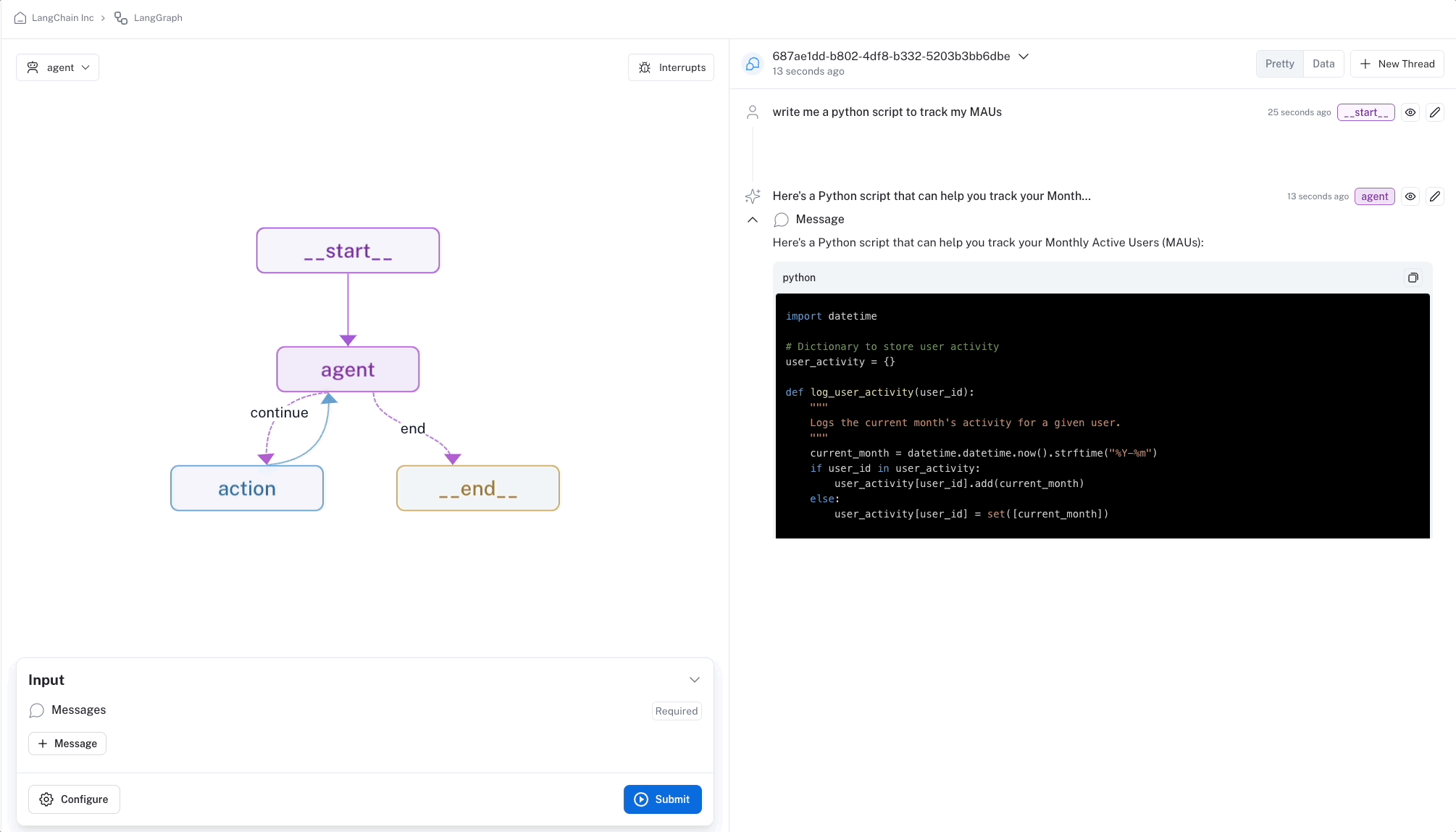
LangSmith
Reflection Agent vs Reflexion Agent in LangGraph
Feature
Reflection Agent
Reflexion Agent
Purpose
Helps the agent evaluate and improve its behavior after a task or chain is complete.
Focuses on real-time, self-correcting behavior after a failure or poor outcome.
Trigger Time
Typically after completing a task or full execution.
Immediately after an error or failed attempt.
Goal
Learn from the overall process, identify what worked or didn’t, and refine strategy.
Adapt actions in the moment to recover or redirect after a failure.
Learning Style
Retrospective learning (post-task reflection).
Iterative real-time correction.
Example Use Case
After generating a full script, the agent analyzes tone/flow and adjusts strategy.
When a character generation step fails, the agent corrects and retries instantly.
Inspiration
Rooted in academic reflective practices (e.g., journaling, evaluation).
Inspired by reinforcement learning and trial-error feedback loops.
LangGraph Context
Used in memory-heavy, goal-oriented workflows.
Used in tight, outcome-sensitive workflows needing immediate correction.
Pydantic is a Python library that helps define data structures.
Acts like a “blueprint” for data
Uses Python’s type hints (like str, int) to enforce correct data types
How it works in LangChain/ LangGraph?
Define a class with the fields you need (name, capital, language)
Add descriptions to explain what each field means
Use with _structured_output()_ (Magic Method) to tell the LLM to follow your format
Pydantic
from pydantic import BaseModel, Field# from langchain_openai import ChatOpenAIfrom langchain_google_genai import ChatGoogleGenerativeAIimport os# llm = ChatOpenAI(model="gpt-4o")llm = ChatGoogleGenerativeAI(model="gemini-1.5-flash", api_key=os.getenv("GOOGLE_API_KEY"))# This will be considered as tool for the LLMclass Country(BaseModel): """Information about a country""" name: str = Field(description="name of the country") language: str = Field(description="language of the country") capital: str = Field(description="Capital of the country")structured_llm = llm.with_structured_output(Country)structured_llmresponse = structured_llm.invoke("Tell me about France")print(response)
TypedDict
from typeing_extensions import Annotated, TypedDictfrom typing import Optional# TypedDictclass Joke(TypedDict): """Joke to tell user.""" # Annotated[type, default_value, description] setup: Annotated[str, ..., "The setup of the joke"] # Alternatively, we could have specified setup as # setup: str # no default, no description # setup: Annotated[str, ...] # no default, no description # setup: Annotated[str, "foo"] # default, no description punchline: Annotated[str, ..., "The punchline of the joke."] rating: Annotated[Optional[int], None, "How funny the joke is, from 1 to 10"]structured_llm = llm.with_structured_output(Joke)response = structured_llm.invoke("Tell me a joke about cats.")print(response)
json_schema
{ "title": "Joke", "description": "Joke to tell user.", "type": "object", "properties": { "setup": { "type": "string", "description": "The setup of the joke" }, "punchline": { "type": "string", "description": "The punchline of the joke." }, "rating": { "type": ["integer", "null"], "description": "How funny the joke is, from 1 to 10" } }, "required": ["setup", "punchline"]}
AgentExecutor (We will eliminate the need for this in LangGraph)
1. create_react_agent: (One that creates the agent)
- Takes each tool's name and description.
- Formats them into a standardized way the LLM can understand.
- Inserts them into specific placeholders in the ReAct prompt template.
- It makes the LLM call + takes the LLMs response + parses it.
```txt
Thought: I need to find out when SpaceX's last launch was and calculate days since.
Action: search
Action Input: "SpaceX most resent launch date"
```
- It parses the response of the LLM into one of these two classes: **AgentAction** and **AgentFinish**.
AgentAction
This is a LangChain class that represents an action the agent wants to take. It typically contains:
action = AgentAction( tool = "calculator", tool_input = "2+2", log = "I need to calculate the sum of 2 and 2")
AgentFinist
This represents the agent completing its task with a final answer. It typically contains:
finish = AgentFinish( return_values = {"output": "The answer is 4"}, log = "I've calculated 2+2 and determinined the answer is 4".)
2. AgentExecutor
Takes the agent from create_react_agent and manages the execution loop.
Receives the user’s question and feeds it to the agent.
Identifies which tool to run based on the agent’s output (AgentActon or No tool if AgentFinish).
Executes the tool and captures the result.
Feeds the result back to the agent for the next decision.
Continues this loop until the agent produces an AgentFinish.
Returns the final answer to the user.
Disadvantage of LangChain implementation of ReAct
If the proper tool is not provided to the AgentExecutor, it goes into infinite looping problem.
LangGraph
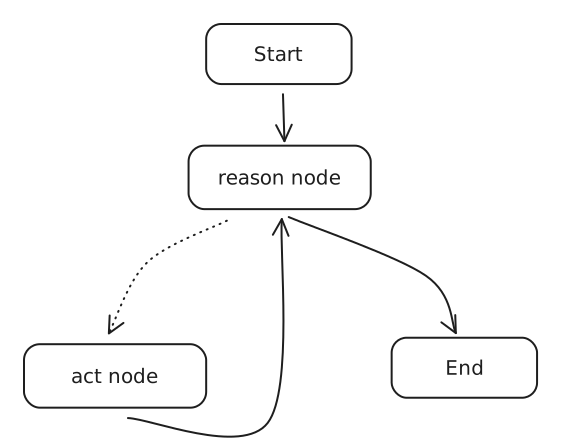
LangGraph turns the hidden “black box” loop into a visible, editable workflow.
You can add custom nodes, modify the flow, or insert additional logic.
The “reason” node does what create_react_agent did - it thinks and decides.
If the reason node output an AgentAction, then “act” node executes the tool.
Results from the tool flow back to “reason” node for the next decision.
When the agent has the final answer, it takes the right path to “end”.
This visualization makes the “black box” of AgentExecutor transparent and modifiable.
Implementation
############################################################################## agent_reason_runnable.py#############################################################################from langchain_google_genai import ChatGoogleGenerativeAIfrom langchain.agents import tool, create_react_agentimport datetimefrom langchain_community.tools import TavilySearchResultsfrom langchain import hubfrom dotenv import load_dotenvload_dotenv()import oskey = os.getenv("GOOGLE_API_KEY")# llm = ChatGoogleGenerativeAI(model='gemini-1.5-pro', api_key=api_key)llm = ChatGoogleGenerativeAI(model='gemini-2.0-flash', api_key = key)search_tool = TavilySearchResults(search_depth='basic')@tooldef get_system_time(format: str = "%Y-%m-%d %H:%M:%S"): """Returns the current system time formatted according to the provided format string.""" current_time = datetime.datetime.now() formatted_time = current_time.strftime(format) return formatted_timetools = [search_tool, get_system_time]react_prompt = hub.pull("hwchase17/react")react_agent_runnable = create_react_agent(tools=tools, llm=llm, prompt=react_prompt)############################################################################## react_state.py#############################################################################import operatorfrom typing import Annotated, TypedDict, Unionfrom langchain_core.agents import AgentAction, AgentFinishclass AgentState(TypedDict): input: str agent_outcome: Union[AgentAction, AgentFinish, None] intermediate_steps: Annotated[list[tuple[AgentAction, str]], operator.add]############################################################################## nodes.py#############################################################################from dotenv import load_dotenvfrom agent_reason_runnable import react_agent_runnable, toolsfrom react_state import AgentStateload_dotenv()def reason_node(state: AgentState): agent_outcome = react_agent_runnable.invoke(state) return {"agent_outcome": agent_outcome}def act_node(state: AgentState): agent_action = state["agent_outcome"] # Extract tool name and input from AgentAction tool_name = agent_action.tool tool_input = agent_action.tool_input # Find the matching tool function tool_function = None for tool in tools: if tool.name == tool_name: tool_function = tool break # Execute the tool with the input if tool_function: if isinstance(tool_input, dict): output = tool_function.invoke(**tool_input) else: output = tool_function.invoke(tool_input) else: output = f"Tool '{tool_name}' not found" return {"intermediate_steps": [(agent_action, str(output))]}############################################################################## react_graph.py#############################################################################from dotenv import load_dotenvload_dotenv()from langchain_core.agents import AgentFinish, AgentActionfrom langgraph.graph import END, StateGraphfrom nodes import reason_node, act_nodefrom react_state import AgentStateREASON_NODE = "reason_node"ACT_NODE = "act_node"def should_continue(state: AgentState) -> str: if isinstance(state["agent_outcome"], AgentFinish): return END else: return ACT_NODEgraph = StateGraph(AgentState)graph.add_node(REASON_NODE, reason_node)graph.set_entry_point(REASON_NODE)graph.add_node(ACT_NODE, act_node)graph.add_conditional_edges( REASON_NODE, should_continue)graph.add_edge(ACT_NODE, REASON_NODE)app = graph.compile()result = app.invoke( { "input": "How many days ago was the latest SpaceX launch?", })print(result)print("########################################################################")print(result["agent_outcome"].return_values["output"], "final result")
When you build a basic chatbot using LangGraph, you run into an immediate limitation: by default, your chatbot has amnesia.
Every time a user starts a conversation, the bot has no recollection of previous interactions.
This happens because without memory management, each invocation of your graph is completely independent.
This is where the concept of checkpointers in LangGraph come into the picture.
Checkpointer
A checkpointer in LangGraph is essentially a way to save the state of your agent or workflow at specific points during execution.
Think of it like saving your progress in a video game. When you reach a checkpoint:
The current state of everything is saved
If something goes wrong later, you can return to this saved point.
In the context of LangGraph nodes and workflows:
Nodes are the individual steps or components in your workflow
Checkpoints save the complete sate after a node finishes its work if an error occurs in a later node, you can resume from the last checkpoint rather than starting the entire workflow again.
This is particularly useful for complex workflows where:
Processing takes significant time or resources.
You want to implement retry mechanisms.
You need persistance across sessions or server restarts.
Thread ID
A thread ID is simply a unique identifier for each specific conversation or workflow execution. Think of it like:
A unique session ID for a user.
A conversation ID that groups related messages together
The thread ID is necessary because:
You might have multiple conversations/workflows running simultaneously.
Each needs its own separate saved state.
The thread ID helps the system know which saved state belongs to which conversation
Without thread IDs, all your conversations would share the same state, which would cause confusion and errors.
MemorySaver (InMemorySaver)
from typing import TypedDict, Annotatedfrom langgraph.graph import add_messages, StateGraph, ENDfrom langchain_groq import ChatGroqfrom langchain_core.messages import AIMessage, HumanMessagefrom dotenv import load_dotenvfrom langgraph.checkpoint.memory import MemorySaverload_dotenv()memory = MemorySaver()llm = ChatGroq(model="llama-3.1-8b-instant")class BasicChatState(TypedDict): messages: Annotated[list, add_messages]def chatbot(state: BasicChatState): return { "messages": [llm.invoke(state["messages"])], }graph = StateGraph(BasicChatState)graph.add_node("chatbot", chatbot)graph.set_entry_point("chatbot")graph.add_edge("chatbot", END)app = graph.compile(checkpointer=memory)# The config is used to set the thread_id for the in-memory checkpointing# To store and use the in-memory checkpoint, you need to set the thread_id same for all the conversationsconfig = {"configurable": { "thread_id": 1, }}while True: user_input = input("User: ") if(user_input == "exit"): break result = app.invoke({ "messages": [HumanMessage(content=user_input)] }, config=config) print("AI: ", result["messages"][-1].content)# The in-memory checkpointing will store the state of the conversations# You can retrieve the state of the conversations using the get_state methosprint(app.get_state(config=config))
SqliteSaver
from typing import TypedDict, Annotatedfrom langgraph.graph import add_messages, StateGraph, ENDfrom langchain_groq import ChatGroqfrom langchain_core.messages import AIMessage, HumanMessagefrom dotenv import load_dotenv# from langgraph.checkpoint.memory import MemorySaverfrom langgraph.checkpoint.sqlite import SqliteSaverimport sqlite3load_dotenv()# LangGraph works with multiple threads# Sqlite only supports one thread at a time# So we need to create a connection to the sqlite database explicitly stating to not check for the same threadsqlite_conn = sqlite3.connect("checkpoint.sqlite", check_same_thread=False)memory = SqliteSaver(sqlite_conn)llm = ChatGroq(model="llama-3.1-8b-instant")class BasicChatState(TypedDict): messages: Annotated[list, add_messages]def chatbot(state: BasicChatState): return { "messages": [llm.invoke(state["messages"])], }graph = StateGraph(BasicChatState)graph.add_node("chatbot", chatbot)graph.set_entry_point("chatbot")graph.add_edge("chatbot", END)app = graph.compile(checkpointer=memory)# The config is used to set the thread_id for the in-memory checkpointing# To store and use the in-memory checkpoint, you need to set the thread_id same for all the conversationsconfig = {"configurable": { "thread_id": 1, }}while True: user_input = input("User: ") if(user_input == "exit"): break result = app.invoke({ "messages": [HumanMessage(content=user_input)] }, config=config) print("AI: ", result["messages"][-1].content)# The in-memory checkpointing will store the state of the conversations# You can retrieve the state of the conversations using the get_state methosprint(app.get_state(config=config))
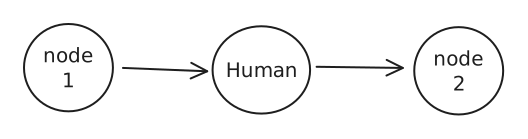
A human-in-loop workflow integrates human input into automated processes, allowing for decisions, validation, or corrections at key stages.
This is especially usefull in LLM-based applications, where the underlying model may generate occational inaccuracies.
Use Cases:
Reviewing tool calls: Humans can review, edit, or approve tool calls requested by the LLM before tool execution.
Validating LLM outputs: Humans can review, edit, or approve content generated by the LLM.
Providing context: Enable the LLM to explicitly request human input for clarification or additional details or to support multi-turn conversations.
Design Patterns
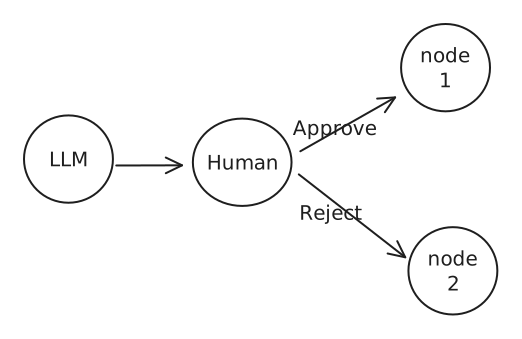
1. Approve or Reject
Pause the graph before a critical step, such as an API call, to review and approve the action.
If the action is rejected, you can prevent the graph from executing the step, and potentially take an alternative action. This pattern often involve routing the graph based on the human’s input.
2. Review & Edit State:
A human can review and edit the state of the graph. This is useful for correcting mistakes or updating the state with additional information.
3. Review Tool Calls:
A human can review and edit the output from the LLM before proceeding.
This is particularly critical in applications where the tool calls requested by the LLM may be sensitive or require human oversight.
LangGraph provides two primary approaches for managing conversation state: InMemorySaver and SqliteSaver. These checkpointers serve different purposes and offer distinct advantages depending on your use case.
Core Concepts
Checkpoints - Snapshots of graph state saved at specific points during execution
Contain configuration, metadata, values, and tasks
Enable features like time travel and fault tolerance
Thread IDs - Unique identifiers for each conversation or workflow
Required for managing multiple simultaneous conversations
Prevent state mixing between different conversations
flowchart LR
    subgraph "Conversation Flow"
        direction TB
        M1[Message 1] --> M2[Message 2] --> M3[Message 3]
    end

    subgraph "In-Memory Storage"
        direction TB
        IM["InMemorySaver
        • RAM-based
        • Process-lifetime only
        • Fast access"]
    end

    subgraph "SQLite Storage"
        direction TB
        DB[(Database File)]
        Cache["In-Memory Cache
        • Faster access
        • Temporary storage"]
    end

    subgraph "Thread Management"
        direction TB
        TID["Thread ID
        • Conversation identifier
        • Groups related states"]
    end

    M1 & M2 & M3 --> TID
    TID --> IM
    TID --> DB
    DB <--> Cache

    style IM fill:#f9f,stroke:#333,color:#000
    style DB fill:#9cf,stroke:#333,color:#000
    style Cache fill:#fcf,stroke:#333,color:#000
The diagram above illustrates several key concepts:
Messages flow into thread IDs, which group related conversations together
SQLite storage uses a dual-layer approach with both disk storage and an in-memory cache for better performance
The bidirectional arrows between the database and cache represent read/write operations, showing how data flows between persistent storage and temporary memory
InMemorySaver is included with LangGraph core and requires minimal setup. It’s ideal for development and testing scenarios where persistence across sessions isn’t required.
SqliteSaver Implementation
SqliteSaver provides persistent storage and is ideal for production environments . The check_same_thread=False parameter is required for multi-threaded applications.
Advanced Features
Time Travel - Both savers support replaying previous states
Enable debugging and state inspection
Allow exploring alternative conversation paths
Fault Tolerance - Save pending writes from completed nodes
Resume execution from last checkpoint on failure
Prevent redundant computations
State Management
# Get latest stateconfig = {"configurable": {"thread_id": "1"}}graph.get_state(config)# Get state historyhistory = graph.get_state_history(config)
Best Practices
Development Workflow - Start with InMemorySaver for rapid prototyping
Test thread management thoroughly
Verify checkpoint behavior early
Production Deployment - Migrate to SqliteSaver for persistence
Implement proper error handling
Monitor memory usage
Consider upgrading to Postgres for large-scale deployments
Performance Optimization - Use appropriate thread IDs for concurrent conversations
Implement cleanup strategies for old checkpoints
Monitor storage growth in production environments
Choose InMemorySaver for development and testing, while SqliteSaver is better suited for production environments requiring persistent state across sessions. Both options support advanced features like time travel and fault tolerance, making them powerful tools for building robust conversational applications.
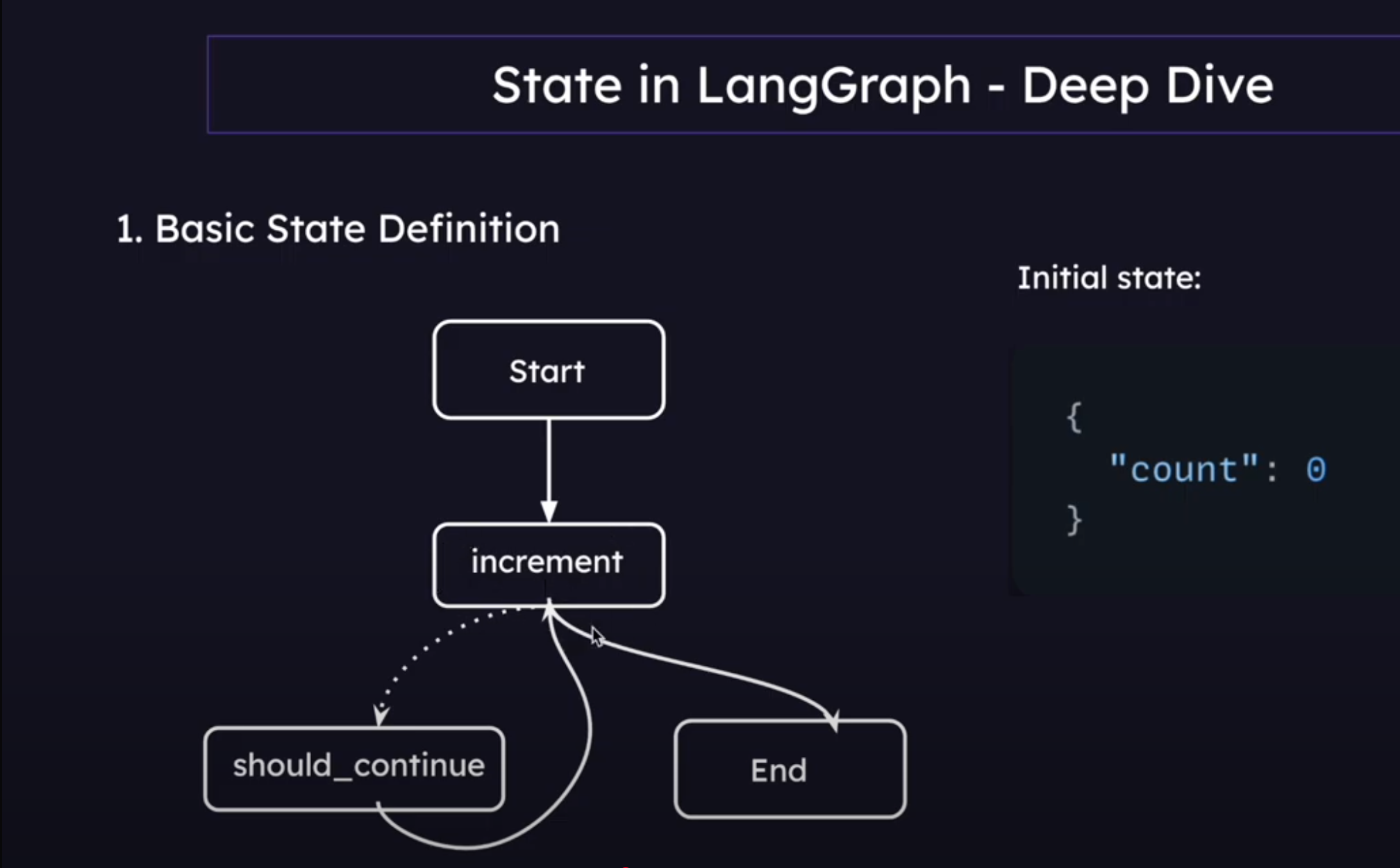
The Command class in LangGraph allows us to create edgeless workflows
def agent(state: MessageState) -> Command[Literal[..., END]]:
	...
	return Command(
		goto = ...      # The next node(s) to transition to
		update = {"messages": [response]} # Update to the State
	)
Large Language Models (LLMs) have demonstrated remarkable capabilities in understanding and generating human-like text. However, they inherently possess certain limitations:
Knowledge Cutoff: LLMs are trained on vast datasets, but this knowledge is static and reflects the information available up to the point of their last training. They are unaware of events or information that have emerged since.
Hallucinations: LLMs can sometimes generate plausible-sounding but incorrect or nonsensical information, often referred to as “hallucinations.” This is particularly prevalent when queried about topics outside their training data or when forced to make inferences beyond their capabilities.
Lack of Domain-Specific, Real-Time Information: For many practical applications, access to specific, up-to-date, or proprietary information is crucial. Traditional LLMs cannot readily access or incorporate this external knowledge.
Difficulty in Source Attribution: When an LLM provides information, it’s often difficult to trace back the source of that information, making it hard to verify accuracy or credibility.
Retrieval Augmented Generation (RAG) emerged as a powerful paradigm to address these limitations.
What is the Actual Purpose of RAG?
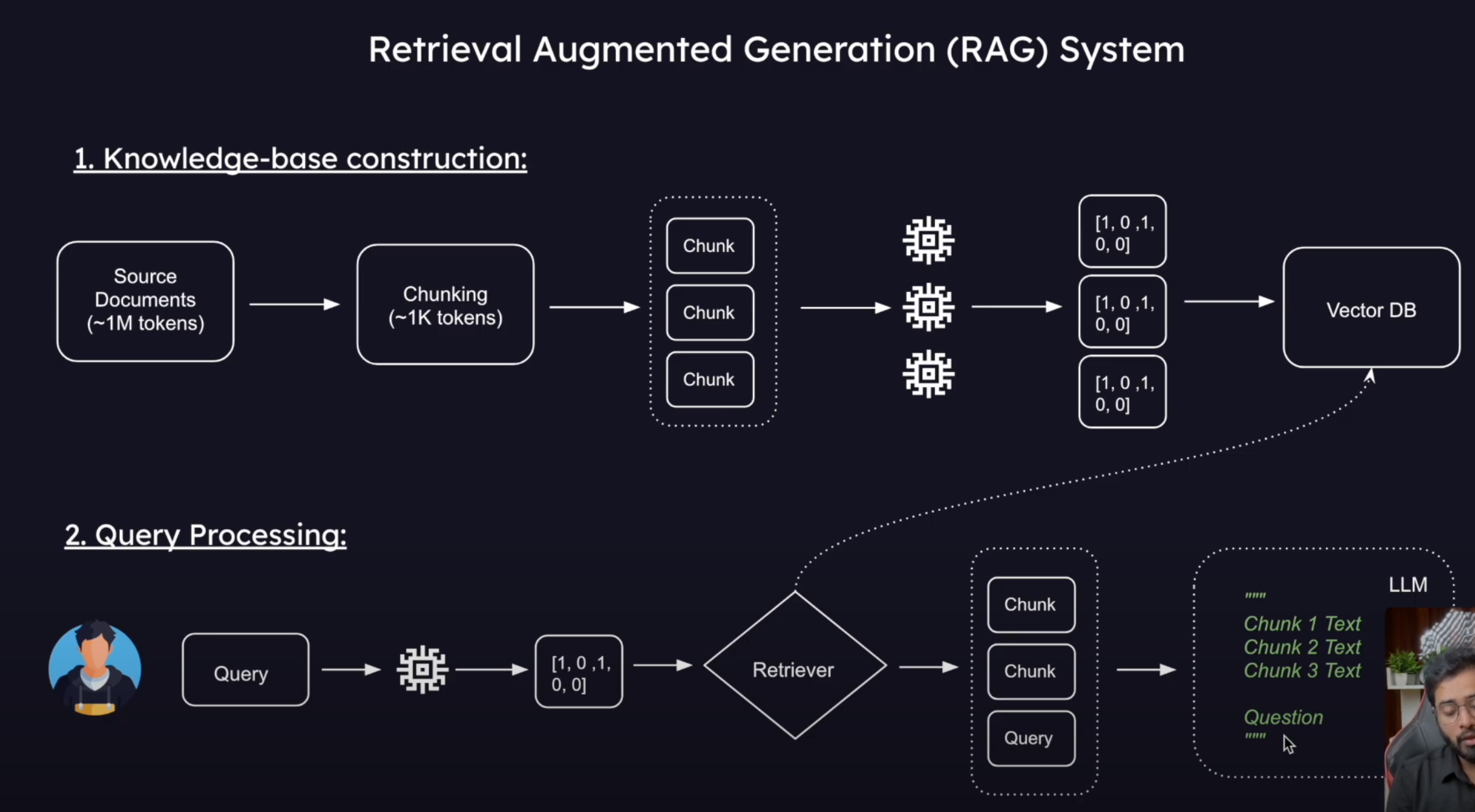
The core purpose of RAG is to ground LLMs in external, verifiable knowledge sources. It achieves this by combining the generative strengths of LLMs with a retrieval mechanism that fetches relevant information from a knowledge base before the LLM generates a response.
In essence, RAG models:
Retrieve: When a query is posed, the RAG system first searches a specified knowledge corpus (e.g., a collection of documents, a database, web pages) for information relevant to the query.
Augment: The retrieved information (context) is then provided to the LLM along with the original query.
Generate: The LLM uses this augmented prompt (original query + retrieved context) to generate a more informed, accurate, and contextually relevant response.
This approach allows LLMs to:
Access and utilize up-to-date information.
Reduce hallucinations by basing responses on factual, retrieved data.
Provide more specific and nuanced answers by leveraging domain-specific knowledge.
Potentially offer source attribution by indicating the documents or data used for generation.
Where Can RAG Be Used?
RAG’s ability to integrate external knowledge makes it suitable for a wide array of applications:
Question Answering Systems:
Answering questions over internal company documents (e.g., HR policies, technical manuals).
Customer support chatbots that can pull information from product documentation or FAQs.
Educational platforms that answer student queries based on textbooks or research papers.
Enhanced Chatbots and Virtual Assistants:
Creating more knowledgeable and helpful conversational AI that can discuss recent events or specific domains.
Personalized assistants that can access a user’s private documents or emails (with permission) to provide relevant information.
Content Generation with Factual Grounding:
Generating summaries of large documents or sets of articles.
Assisting in writing reports or articles by providing relevant factual snippets.
Creating product descriptions based on technical specifications.
Fact Verification and Claim Checking:
Systems that can check the veracity of a claim by retrieving and presenting supporting or contradictory evidence.
Personalized Recommendation Systems:
Recommending products, articles, or services based on a deeper understanding of their features and user preferences, drawn from extensive knowledge bases.
Code Generation and Explanation:
Generating code snippets based on documentation or existing codebases.
Explaining code by retrieving relevant information from API docs or tutorials.
By bridging the gap between the generative power of LLMs and the vastness of external information, RAG significantly expands the capabilities and reliability of AI systems.
Python Example: Basic RAG Implementation
Below is a Python example demonstrating a simple RAG pipeline using LangChain:
from langchain_core.documents import Document # Changed from langchain.schema to langchain_core.documents for newer LangChain versionsfrom langchain_openai import OpenAIEmbeddingsfrom langchain_community.vectorstores import Chroma# Initialize the embedding function using OpenAI. This will be used to convert text into numerical vectors.embedding_function = OpenAIEmbeddings() # Ensure your OPENAI_API_KEY is set in your environment# Define a list of documents that will form our knowledge base.# Each document has page_content (the text) and metadata (additional information, like the source).docs = [ Document( page_content="Peak Performance Gym was founded in 2015 by former Olympic athlete Marcus Chen. With over 15 years of experience in professional athletics, Marcus established the gym to provide personalized fitness solutions for people of all levels. The gym spans 10,000 square feet and features state-of-the-art equipment.", metadata={"source": "about.txt"} ), Document( page_content="Peak Performance Gym is open Monday through Friday from 5:00 AM to 11:00 PM. On weekends, our hours are 7:00 AM to 9:00 PM. We remain closed on major national holidays. Members with Premium access can enter using their key cards 24/7, including holidays.", metadata={"source": "hours.txt"} ), Document( page_content="Our membership plans include: Basic (₹1,500/month) with access to gym floor and basic equipment; Standard (₹2,500/month) adds group classes and locker facilities; Premium (₹4,000/month) includes 24/7 access, personal training sessions, and spa facilities. We offer student and senior citizen discounts of 15% on all plans. Corporate partnerships are available for companies with 10+ employees joining.", metadata={"source": "membership.txt"} ), Document( page_content="Group fitness classes at Peak Performance Gym include Yoga (beginner, intermediate, advanced), HIIT, Zumba, Spin Cycling, CrossFit, and Pilates. Beginner classes are held every Monday and Wednesday at 6:00 PM. Intermediate and advanced classes are scheduled throughout the week. The full schedule is available on our mobile app or at the reception desk.", metadata={"source": "classes.txt"} ), Document( page_content="Personal trainers at Peak Performance Gym are all certified professionals with minimum 5 years of experience. Each new member receives a complimentary fitness assessment and one free session with a trainer. Our head trainer, Neha Kapoor, specializes in rehabilitation fitness and sports-specific training. Personal training sessions can be booked individually (₹800/session) or in packages of 10 (₹7,000) or 20 (₹13,000).", metadata={"source": "trainers.txt"} ), Document( page_content="Peak Performance Gym's facilities include a cardio zone with 30+ machines, strength training area, functional fitness space, dedicated yoga studio, spin class room, swimming pool (25m), sauna and steam rooms, juice bar, and locker rooms with shower facilities. Our equipment is replaced or upgraded every 3 years to ensure members have access to the latest fitness technology.", metadata={"source": "facilities.txt"} )]# Create a Chroma vector store from the documents and the embedding function.# The Chroma vector store will index the documents by converting them into embeddings (vectors)# and allow for efficient retrieval based on semantic similarity to a query.# This process can take time depending on the number of documents and the complexity of the embedding model.db = Chroma.from_documents(docs, embedding_function)# Create a retriever from the vector store.# This method helps to retrieve diverse and relevant documents based on the query.# search_type="mmr" (Maximum Marginal Relevance) aims to find documents that are relevant to the query# but also diverse among themselves, avoiding redundant information.# k=3 specifies that we want to retrieve the top 3 most relevant and diverse documents.retriever = db.as_retriever(search_type="mmr", search_kwargs={"k": 3})# Test the retriever by invoking it with a sample question.# This will fetch the 3 documents from our 'db' that are most relevant to the question.retrieved_docs = retriever.invoke("Who founded the gym and what are the timings?")# print(f"Retrieved docs for the first question: {retrieved_docs}") # Optional: print to see the retrieved docsfrom langchain_core.prompts import ChatPromptTemplate# Define a prompt template for the language model.# This template structures how the retrieved context and the user's question will be presented to the LLM.# It instructs the LLM to answer the question based *only* on the provided context.template = """Answer the question based only on the following context:{context}Question: {question}"""prompt = ChatPromptTemplate.from_template(template)from langchain_core.output_parsers import StrOutputParserfrom langchain_openai import ChatOpenAI# Initialize the language model (LLM), in this case, OpenAI's gpt-4o.# This model will generate the answer.llm = ChatOpenAI(model="gpt-4o") # Ensure your OPENAI_API_KEY is set# Define a helper function to format the retrieved documents into a single string.# This string will be passed as the 'context' to the prompt.def format_docs(docs_list): return "\\n\\n".join(doc.page_content for doc in docs_list)# Create the Question-Answering (QA) chain.# This chain defines the sequence of operations:# 1. The input is a question (string).# 2. A dictionary is created:# - "context": The retriever is invoked with the input question (x),# and the retrieved documents are formatted by format_docs.# - "question": The original input question (x) is passed through.# 3. This dictionary is then passed to the 'prompt' template.# 4. The formatted prompt is passed to the 'llm' for answer generation.# 5. The 'StrOutputParser' parses the LLM's output into a simple string.qa_chain = ( { "context": lambda x: format_docs(retriever.invoke(x)), "question": lambda x: x } | prompt | llm | StrOutputParser())# Invoke the QA chain with a user question.# The chain will perform retrieval, augment the prompt, and generate an answer.answer = qa_chain.invoke("Who is the owner and what are the timings?")print(f"Question: Who is the owner and what are the timings?\\nAnswer: {answer}")# Example output might be:# Question: Who is the owner and what are the timings?# Answer: Peak Performance Gym was founded by Marcus Chen. It is open Monday through Friday from 5:00 AM to 11:00 PM and on weekends from 7:00 AM to 9:00 PM.
This example illustrates the fundamental components of a RAG system:
Document Loading: Preparing the knowledge base.
Embedding and Indexing: Converting documents into vectors and storing them in a vector database for efficient search.
Retrieval: Fetching relevant documents based on a user query.
Prompt Augmentation: Combining the retrieved documents with the user query into a prompt for the LLM.
Generation: Using the LLM to generate an answer based on the augmented prompt.
This is a simplified example. Real-world RAG systems can be much more complex, involving more sophisticated retrieval strategies, multiple knowledge sources, and advanced prompt engineering techniques.
Python Example: Classification-Driven RAG with LangGraph
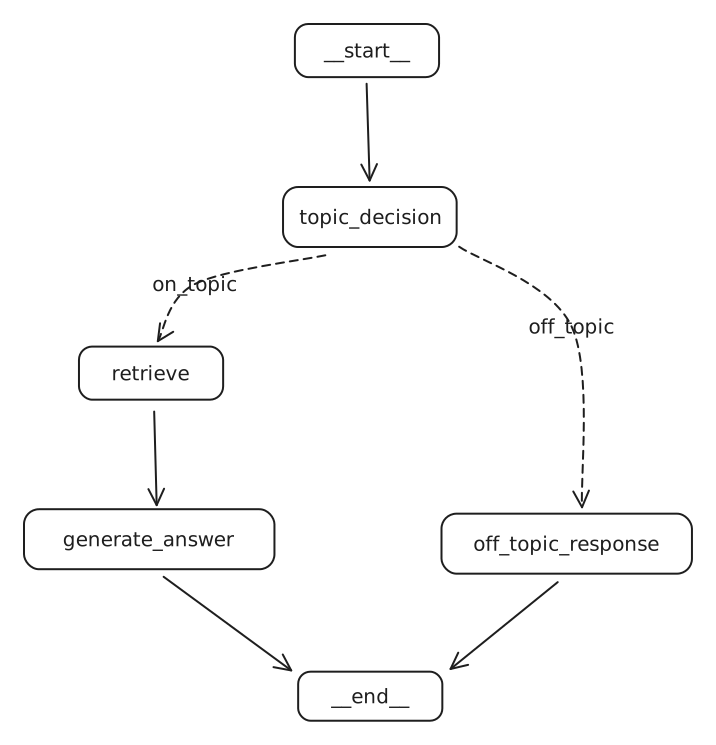
This example demonstrates a RAG system that first classifies a user’s question to determine if it’s on-topic before attempting to answer.
from langchain_core.documents import Document # Ensure this is the correct importfrom langchain_openai import OpenAIEmbeddingsfrom langchain_community.vectorstores import Chromafrom langchain_core.prompts import ChatPromptTemplatefrom langchain_core.output_parsers import StrOutputParserfrom langchain_openai import ChatOpenAIfrom typing import List, TypedDict # Corrected from 'list' to 'List' for type hintingfrom langchain_core.messages import BaseMessage, HumanMessage, AIMessagefrom pydantic import BaseModel, Fieldfrom langgraph.graph import StateGraph, END# from IPython.display import Image, display # Only needed if running in a Jupyter environment# from langchain_core.runnables.graph import MermaidDrawMethod # Only for displaying graph# --- 1. Setup Knowledge Base and Retriever ---# Initialize embeddings (ensure OPENAI_API_KEY is set in your environment)embedding_function = OpenAIEmbeddings()# Sample documents for the knowledge basedocs = [ Document( page_content="Peak Performance Gym was founded in 2015 by former Olympic athlete Marcus Chen. With over 15 years of experience in professional athletics, Marcus established the gym to provide personalized fitness solutions for people of all levels. The gym spans 10,000 square feet and features state-of-the-art equipment.", metadata={"source": "about.txt"} ), Document( page_content="Peak Performance Gym is open Monday through Friday from 5:00 AM to 11:00 PM. On weekends, our hours are 7:00 AM to 9:00 PM. We remain closed on major national holidays. Members with Premium access can enter using their key cards 24/7, including holidays.", metadata={"source": "hours.txt"} ), Document( page_content="Our membership plans include: Basic (₹1,500/month) with access to gym floor and basic equipment; Standard (₹2,500/month) adds group classes and locker facilities; Premium (₹4,000/month) includes 24/7 access, personal training sessions, and spa facilities. We offer student and senior citizen discounts of 15% on all plans. Corporate partnerships are available for companies with 10+ employees joining.", metadata={"source": "membership.txt"} ), Document( page_content="Group fitness classes at Peak Performance Gym include Yoga (beginner, intermediate, advanced), HIIT, Zumba, Spin Cycling, CrossFit, and Pilates. Beginner classes are held every Monday and Wednesday at 6:00 PM. Intermediate and advanced classes are scheduled throughout the week. The full schedule is available on our mobile app or at the reception desk.", metadata={"source": "classes.txt"} ), Document( page_content="Personal trainers at Peak Performance Gym are all certified professionals with minimum 5 years of experience. Each new member receives a complimentary fitness assessment and one free session with a trainer. Our head trainer, Neha Kapoor, specializes in rehabilitation fitness and sports-specific training. Personal training sessions can be booked individually (₹800/session) or in packages of 10 (₹7,000) or 20 (₹13,000).", metadata={"source": "trainers.txt"} ), Document( page_content="Peak Performance Gym\'s facilities include a cardio zone with 30+ machines, strength training area, functional fitness space, dedicated yoga studio, spin class room, swimming pool (25m), sauna and steam rooms, juice bar, and locker rooms with shower facilities. Our equipment is replaced or upgraded every 3 years to ensure members have access to the latest fitness technology.", metadata={"source": "facilities.txt"} )]# Create a Chroma vector storedb = Chroma.from_documents(docs, embedding_function)# Create a retriever# search_type="mmr" (Maximum Marginal Relevance) for diverse results# k=3 to retrieve top 3 documentsretriever = db.as_retriever(search_type="mmr", search_kwargs={"k": 3})# --- 2. Define RAG Chain Components ---# LLM for generationllm = ChatOpenAI(model="gpt-4o")# Prompt template for RAGrag_template_str = """Answer the question based only on the following context: {context}Question: {question}"""rag_prompt = ChatPromptTemplate.from_template(rag_template_str)# Basic RAG chain (Context + Question -> Prompt -> LLM -> Parsed Answer)rag_chain = rag_prompt | llm | StrOutputParser()# Helper function to format documentsdef format_docs(docs_list: List[Document]): # Added type hint for docs_list return "\n\n".join(doc.page_content for doc in docs_list)# --- 3. Define Agent State ---class AgentState(TypedDict): messages: List[BaseMessage] # Stores conversation history documents: List[Document] # Stores retrieved documents on_topic: str # Stores classification result ('Yes' or 'No')# --- 4. Define Pydantic Model for Classifier's Structured Output ---class GradeQuestion(BaseModel): """Boolean value to check whether a question is related to the Peak Performance Gym.""" score: str = Field( description="Question is about gym? If yes -> 'Yes' if not -> 'No'" )# --- 5. Define Graph Nodes ---# Node: Classify the questiondef question_classifier_node(state: AgentState): print("---CLASSIFYING QUESTION---") question = state["messages"][-1].content system_prompt_classifier = """You are a classifier that determines whether a user's question is about one of the following topics related to Peak Performance Gym: 1. Gym History & Founder 2. Operating Hours 3. Membership Plans 4. Fitness Classes 5. Personal Trainers 6. Facilities & Equipment If the question IS about any of these topics, respond with 'Yes'. Otherwise, respond with 'No'. """ grade_prompt = ChatPromptTemplate.from_messages( [ ("system", system_prompt_classifier), ("human", "User question: {question}") ] ) classifier_llm = ChatOpenAI(model="gpt-4o") # Using a fresh LLM instance for classification structured_llm_grader = classifier_llm.with_structured_output(GradeQuestion) grader_chain = grade_prompt | structured_llm_grader result = grader_chain.invoke({"question": question}) print(f"Classifier result: {result.score}") state["on_topic"] = result.score return state# Node: Retrieve documents if on-topicdef retrieve_documents_node(state: AgentState): print("---RETRIEVING DOCUMENTS---") question = state["messages"][-1].content documents = retriever.invoke(question) # retriever is defined in global scope print(f"Retrieved {len(documents)} documents.") state["documents"] = documents return state# Node: Generate answer if on-topicdef generate_answer_node(state: AgentState): print("---GENERATING ANSWER---") question = state["messages"][-1].content documents = state["documents"] context_str = format_docs(documents) # rag_chain is defined in global scope generated_answer_str = rag_chain.invoke({"context": context_str, "question": question}) state["messages"].append(AIMessage(content=generated_answer_str)) print("Answer generated.") return state# Node: Respond if off-topicdef off_topic_response_node(state: AgentState): print("---GENERATING OFF-TOPIC RESPONSE---") state["messages"].append(AIMessage(content="I\'m sorry! I cannot answer this question as it does not seem to be related to Peak Performance Gym.")) return state# --- 6. Define Router for Conditional Edges ---def on_topic_router_edge(state: AgentState): print(f"---ROUTING BASED ON CLASSIFICATION: {state['on_topic']}---") if state["on_topic"].lower() == "yes": return "on_topic" # This label will map to the retrieve_documents_node return "off_topic" # This label will map to the off_topic_response_node# --- 7. Construct and Compile the Graph ---workflow = StateGraph(AgentState)# Add nodesworkflow.add_node("topic_classifier", question_classifier_node) # Entry pointworkflow.add_node("retrieve_docs", retrieve_documents_node)workflow.add_node("generate_answer", generate_answer_node)workflow.add_node("off_topic_responder", off_topic_response_node)# Set the entry pointworkflow.set_entry_point("topic_classifier")# Add conditional edges from the classifierworkflow.add_conditional_edges( "topic_classifier", on_topic_router_edge, { "on_topic": "retrieve_docs", "off_topic": "off_topic_responder" })# Add regular edges for the on-topic pathworkflow.add_edge("retrieve_docs", "generate_answer")workflow.add_edge("generate_answer", END) # End of on-topic path# Add edge for the off-topic pathworkflow.add_edge("off_topic_responder", END) # End of off-topic path# Compile the graphgraph = workflow.compile()# --- 8. Example Invocations (commented out for non-Jupyter environments) ---# To run these examples, you would typically be in a Jupyter notebook or similar environment# that supports `display(Image(...))` for graph visualization.# from IPython.display import Image, display# from langchain_core.runnables.graph import MermaidDrawMethod# try:# display(# Image(# graph.get_graph().draw_mermaid_png(# draw_method=MermaidDrawMethod.API # Or MermaidDrawMethod.CLI# )# )# )# except Exception as e:# print(f"Graph display failed (requires libraries like graphviz or mermaid API access): {e}")# print("\n---INVOKING GRAPH (ON-TOPIC EXAMPLE)---")# on_topic_input = {"messages": [HumanMessage(content="Who is the owner and what are the timings?")]}# # Note: The 'Number of requested results...' message comes from ChromaDB/retriever internals# on_topic_output = graph.invoke(input=on_topic_input) # print("\nFinal Output (On-Topic):")# for msg in on_topic_output['messages']:# print(f"{msg.type.upper()}: {msg.content}")# # print(f"Documents retrieved: {len(on_topic_output.get('documents', []))}") # If you want to inspect documents# # print(f"Classification: {on_topic_output.get('on_topic')}")# # Expected-like console output for on-topic:# # ---CLASSIFYING QUESTION---# # Classifier result: Yes# # ---ROUTING BASED ON CLASSIFICATION: Yes---# # ---RETRIEVING DOCUMENTS---# # (ChromaDB message: Number of requested results 20 is greater than number of elements in index 6, updating n_results = 6)# # Retrieved 3 documents.# # ---GENERATING ANSWER---# # Answer generated.# ## # Final Output (On-Topic):# # HUMAN: Who is the owner and what are the timings?# # AI: Peak Performance Gym was founded by Marcus Chen. The gym is open Monday through Friday from 5:00 AM to 11:00 PM and on weekends from 7:00 AM to 9:00 PM.# print("\n---INVOKING GRAPH (OFF-TOPIC EXAMPLE)---")# off_topic_input = {"messages": [HumanMessage(content="What does the company Apple do?")]}# off_topic_output = graph.invoke(input=off_topic_input)# print("\nFinal Output (Off-Topic):")# for msg in off_topic_output['messages']:# print(f"{msg.type.upper()}: {msg.content}")# # print(f"Classification: {off_topic_output.get('on_topic')}")# # Expected-like console output for off-topic:# # ---CLASSIFYING QUESTION---# # Classifier result: No# # ---ROUTING BASED ON CLASSIFICATION: No---# # ---GENERATING OFF-TOPIC RESPONSE---# ## # Final Output (Off-Topic):# # HUMAN: What does the company Apple do?# # AI: I'm sorry! I cannot answer this question as it does not seem to be related to Peak Performance Gym.
Notes on this Topic
This LangGraph implementation showcases a more robust RAG (Retrieval Augmented Generation) system by introducing a preliminary classification step. Here’s a breakdown of its functionality and key components:
Knowledge Base & Retrieval Setup:
A collection of Document objects serves as the knowledge base, each containing text content and metadata (e.g., source file).
OpenAIEmbeddings are used to convert text into numerical vector representations.
Chroma is employed as a vector store to index these documents, enabling efficient semantic search.
A retriever is configured using Maximum Marginal Relevance (mmr) to fetch documents that are both relevant to the query and diverse.
Agent State (AgentState):
This TypedDict defines the structure for data that flows through the graph. It includes:
messages: A List[BaseMessage] objects (e.g., HumanMessage, AIMessage) to maintain conversation history.
documents: A List[Document] to store documents retrieved from the vector store.
on_topic: A string (‘Yes’ or ‘No’) indicating the result of the question classification.
This is the entry point of the graph (renamed to topic_classifier in graph definition).
It takes the latest user question from the messages in the state.
It uses a separate LLM call (ChatOpenAI with with_structured_output) to classify whether the question pertains to predefined topics related to “Peak Performance Gym.”
The classification prompt guides the LLM to output ‘Yes’ or ‘No’ using the GradeQuestion Pydantic model.
The result is stored in state["on_topic"].
Conditional Routing (on_topic_router_edge):
Based on the on_topic value in the state, this function directs the workflow:
If ‘Yes’, the graph transitions to the retrieve_docs node.
If ‘No’, the graph transitions to the off_topic_responder node.
Document Retrieval (retrieve_documents_node):
If the question is on-topic (renamed to retrieve_docs in graph definition).
This node uses the pre-configured retriever to fetch relevant documents based on the user’s question.
The retrieved documents are stored in state["documents"].
Answer Generation (generate_answer_node):
This node is executed after relevant documents are retrieved.
It formats the retrieved documents into a single context string using format_docs.
It uses a rag_chain (composed of a prompt template, the main LLM, and an StrOutputParser) to generate an answer. The prompt explicitly instructs the LLM to answer based only on the provided context.
The generated answer (as an AIMessage) is appended to state["messages"].
Off-Topic Response (off_topic_response_node):
If the question is classified as off-topic (renamed to off_topic_responder in graph definition).
This node appends a predefined AIMessage to state["messages"], indicating that the question cannot be answered.
Graph Construction (StateGraph):
The StateGraph from LangGraph is used to define the nodes and edges of this workflow.
Node names in add_node calls are strings that label the functions.
set_entry_point defines where the execution begins (e.g., "topic_classifier").
add_conditional_edges implements the routing logic from a source node based on the output of a router function, mapping string keys (like “on_topic”) to destination node names.
add_edge defines direct transitions between nodes using their string names.
The graph is compile()d into an executable object.
Invocation and Output:
The compiled graph is invoked with an initial state, typically containing the user’s first question as a HumanMessage.
The output of the graph includes the final state, containing all messages, any retrieved documents, and the classification decision.
The example invocations (commented out in the script) show how the system routes on-topic and off-topic questions appropriately.
This classification-driven approach enhances the RAG system by:
Focusing resources: Prevents unnecessary (and potentially costly) retrieval and generation steps for irrelevant queries.
Improving user experience: Provides clear feedback when a question is outside the system’s domain.
Increasing relevance: Ensures that answers are generated only when the system has relevant information to draw upon.
RAG (Retrieval Augmented Generation) Powered Tool Calling is an advanced approach where Large Language Models (LLMs) leverage external knowledge retrieved through RAG to make more informed and effective decisions about invoking tools (e.g., APIs, functions). Instead of relying solely on its pre-trained knowledge or a fixed set of tool descriptions, the LLM first consults a dynamic knowledge base to understand the context, available tools, or specific parameters required, leading to more accurate and contextually appropriate tool usage.
Why Combine RAG with Tool Calling?
Combining RAG with tool calling offers several significant advantages:
Enhanced Contextual Understanding: RAG provides the LLM with relevant, up-to-date information from external knowledge sources. This allows the LLM to better understand the user’s query in the context of available data, leading to more appropriate tool selection.
Dynamic Tool Discovery & Parameterization: Instead of hardcoding tool descriptions or relying on the LLM’s potentially outdated training data, RAG can retrieve information about available tools, their functionalities, and required parameters. This is especially useful in environments where tools change frequently or are numerous.
Reduced Hallucination in Tool Usage: LLMs can sometimes hallucinate tool names or parameters. By grounding the LLM with factual information retrieved by RAG, the likelihood of such errors is reduced.
Improved Accuracy for Complex Queries: For queries that require specific data to be passed to a tool (e.g., an ID, a specific format), RAG can fetch this data, ensuring the tool is called correctly.
Handling Ambiguity: If a user’s request is ambiguous regarding which tool to use or what parameters are needed, RAG can retrieve clarifying information or options, helping the LLM (or even the user through the LLM) to disambiguate.
Access to Proprietary or Real-time Information for Tools: Tools often need to operate on data that is not part of the LLM’s training. RAG can fetch this proprietary or real-time data, which can then be used to inform the tool call or provide necessary inputs.
When to Use RAG Powered Tool Calling?
This approach is particularly beneficial in scenarios such as:
Complex Enterprise Systems: Where an LLM needs to interact with numerous internal APIs, databases, or services, and the specifics of these tools are documented in a knowledge base.
Dynamic Environments: When the set of available tools or their specifications (e.g., API endpoints, parameters) changes over time.
Knowledge-Intensive Tooling: For tools that require specific, factual data as input that the LLM might not inherently know (e.g., looking up a product ID before calling an inventory check tool).
Automated Customer Support: Where agents need to use tools to perform actions (e.g., check order status, process refunds) based on information retrieved from FAQs, order databases, or policy documents.
Data Analysis and Reporting: When an LLM needs to select and use data analysis tools based on the structure or type of data retrieved from a database or document store.
Personalized Assistants: Where tools need to be called based on user-specific data or preferences retrieved via RAG.
How Does it Work? (Conceptual Architecture)
A typical workflow for RAG powered tool calling might look like this:
User Query: The user submits a request.
Initial Processing & RAG Trigger: The LLM (or a preceding logic layer) analyzes the query. If it determines that external knowledge might be needed to select or use a tool, it triggers the RAG process.
Retrieval: The RAG system searches its configured knowledge base (e.g., API documentation, FAQs, database schemas) for information relevant to the user’s query and potential tool usage.
Context Augmentation: The retrieved information (context) is provided to the LLM along with the original query.
Informed Tool Decision: The LLM, now equipped with the augmented context, decides:
Whether a tool needs to be called.
Which specific tool to call (if multiple are candidates).
What parameters to use for the tool, potentially extracting or inferring them from the query and the RAG context.
Tool Execution: The selected tool is executed with the determined parameters.
Response Generation: The LLM receives the output from the tool. It then synthesizes this output, the original query, and potentially the RAG context to generate a final, coherent response for the user.
This can be an iterative process, where multiple RAG lookups or tool calls might be needed for complex queries.
Python Code Example: RAG for API Call Decision
Let’s imagine a scenario where an LLM needs to call an internal company API. The company has many APIs, and their details (endpoint, purpose) are documented. RAG will help the LLM find the correct API and its endpoint based on the user’s natural language request.
import osfrom typing import List, TypedDict, Annotated, Sequencefrom langchain_core.documents import Documentfrom langchain_openai import OpenAIEmbeddings, ChatOpenAIfrom langchain_community.vectorstores import Chromafrom langchain_core.prompts import ChatPromptTemplatefrom langchain_core.output_parsers import StrOutputParser, JsonOutputParserfrom langchain_core.tools import toolfrom langchain_core.messages import BaseMessage, HumanMessage, AIMessage, ToolMessagefrom langgraph.graph import StateGraph, ENDfrom pydantic import BaseModel, Field# --- 0. Environment Setup (Ensure OPENAI_API_KEY is set) ---# os.environ["OPENAI_API_KEY"] = "your_openai_api_key"# --- 1. Knowledge Base for RAG: API Documentation ---api_docs_content = [ Document( page_content="User Info API: Use this API to get details about a user. Endpoint: /api/users/{user_id}. Requires user_id.", metadata={"api_name": "UserInfoAPI", "source": "api_docs.txt"} ), Document( page_content="Order Status API: Use this API to check the status of an order. Endpoint: /api/orders/{order_id}. Requires order_id.", metadata={"api_name": "OrderStatusAPI", "source": "api_docs.txt"} ), Document( page_content="Product Search API: Use this API to search for products. Endpoint: /api/products/search?query={search_term}. Requires search_term.", metadata={"api_name": "ProductSearchAPI", "source": "api_docs.txt"} ), Document( page_content="General Help API: Use this API for general help topics or FAQs. Endpoint: /api/help?topic={topic_name}. Use for non-specific queries.", metadata={"api_name": "GeneralHelpAPI", "source": "api_docs.txt"} )]# --- 2. RAG Setup: Embeddings and Vector Store ---embedding_function = OpenAIEmbeddings()db = Chroma.from_documents(api_docs_content, embedding_function)retriever = db.as_retriever(search_kwargs={"k": 2}) # Retrieve top 2 relevant docs# --- 3. Define a Mock Tool: Simulate API Call ---@tooldef call_internal_api(api_name: str, endpoint: str, method: str = "GET", params: dict = None) -> dict: """Simulates calling an internal API. Args: api_name: The name of the API being called (e.g., UserInfoAPI). endpoint: The specific endpoint to hit (e.g., /api/users/123). method: HTTP method (default: GET). params: Dictionary of parameters for the API call. Returns: A dictionary with the mock API response. """ print(f"\n[Tool Call] Calling API: {api_name}, Endpoint: {endpoint}, Method: {method}, Params: {params}") if api_name == "OrderStatusAPI" and "/api/orders/" in endpoint: order_id = endpoint.split("/")[-1] return {"status": "success", "order_id": order_id, "details": f"Order {order_id} is shipped."} elif api_name == "UserInfoAPI" and "/api/users/" in endpoint: user_id = endpoint.split("/")[-1] return {"status": "success", "user_id": user_id, "name": f"User {user_id} Name", "email": f"user{user_id}@example.com"} elif api_name == "ProductSearchAPI" and params and "query" in params: return {"status": "success", "query": params["query"], "results": [f"Product A for {params['query']}", f"Product B for {params['query']}"]} return {"status": "error", "message": "Mock API endpoint not recognized or missing params."}tools = [call_internal_api]# --- 4. LLM and Agent State Definition ---llm = ChatOpenAI(model="gpt-4o")llm_with_tools = llm.bind_tools(tools)class AgentState(TypedDict): messages: Sequence[BaseMessage] retrieved_docs: List[Document] # To store documents from RAG# --- 5. Graph Nodes ---# Node 1: Retrieve relevant API documentation using RAGdef retrieve_api_docs_node(state: AgentState): print("---NODE: RETRIEVE API DOCS---") last_message = state["messages"][-1] query = last_message.content docs = retriever.invoke(query) print(f"Retrieved {len(docs)} documents for query: '{query}'") # for doc in docs: print(f" - {doc.page_content}") # Optional: print retrieved docs return {"retrieved_docs": docs, "messages": state["messages"]}# Node 2: Decide whether to call a tool, and which one, using RAG contextdef decide_tool_or_respond_node(state: AgentState): print("---NODE: DECIDE TOOL OR RESPOND---") messages = list(state["messages"]) retrieved_docs = state["retrieved_docs"] # Augment the prompt with RAG context context_str = "\n\n".join([doc.page_content for doc in retrieved_docs]) augmented_prompt = ( f"Based on the user query and the following API documentation, decide if a tool should be called. " f"If so, prepare the exact tool call. If not, or if more information is needed, respond directly.\n\n" f"API Documentation Context:\n{context_str}\n\n" f"User Query: {messages[-1].content}" ) print(f"Augmented prompt for tool decision: {augmented_prompt[:300]}...") # Print snippet # Add this augmented information as a system message for the LLM's tool decision process # We create a new list of messages for this specific LLM call to avoid polluting the main chat history yet decision_messages = [ HumanMessage(content=augmented_prompt) ] ai_response = llm_with_tools.invoke(decision_messages) if not ai_response.tool_calls: print("LLM decided to respond directly or needs clarification.") # If no tool call, we might want to add the AI's reasoning or direct response to messages # For simplicity, we'll just pass the original messages and let a later node handle final response if no tool. # Or, we can add its direct response here. # For this example, if no tool call, we assume it's a direct answer based on RAG context. final_response_prompt = ( f"Based on the user query and the following API documentation, provide a helpful answer.\n\n" f"API Documentation Context:\n{context_str}\n\n" f"User Query: {messages[-1].content}" ) direct_answer = llm.invoke([HumanMessage(content=final_response_prompt)]) messages.append(direct_answer) # Add direct answer to messages else: print(f"LLM decided to call tool(s): {ai_response.tool_calls}") messages.append(ai_response) # Add AI message with tool_calls to history return {"messages": messages, "retrieved_docs": retrieved_docs} # Node 3: Execute the tooldef execute_tool_node(state: AgentState): print("---NODE: EXECUTE TOOL---") last_message = state["messages"][-1] if not isinstance(last_message, AIMessage) or not last_message.tool_calls: # Should not happen if logic is correct, but good to have a fallback. print("No tool call found in the last AI message.") return state tool_call = last_message.tool_calls[0] # Assuming one tool call for simplicity tool_name = tool_call["name"] tool_args = tool_call["args"] # Find the actual tool function from the `tools` list selected_tool_func = next((t for t in tools if t.name == tool_name), None) if not selected_tool_func: error_message = f"Tool '{tool_name}' not found." print(error_message) tool_response_message = ToolMessage(content=error_message, tool_call_id=tool_call["id"]) else: try: tool_output = selected_tool_func.invoke(tool_args) tool_response_message = ToolMessage(content=str(tool_output), tool_call_id=tool_call["id"]) except Exception as e: print(f"Error executing tool {tool_name}: {e}") tool_response_message = ToolMessage(content=f"Error: {e}", tool_call_id=tool_call["id"]) updated_messages = list(state["messages"]) + [tool_response_message] return {"messages": updated_messages, "retrieved_docs": state["retrieved_docs"]}# Node 4: Generate final response after tool call (or if no tool was called initially)def generate_final_response_node(state: AgentState): print("---NODE: GENERATE FINAL RESPONSE---") # The context for the final response includes the original query, RAG docs, and any tool interactions. # For simplicity, we'll just use the current message history which includes tool calls and responses. response = llm.invoke(state["messages"]) updated_messages = list(state["messages"]) + [response] return {"messages": updated_messages, "retrieved_docs": state["retrieved_docs"]}# --- 6. Define Graph Edges and Conditional Logic ---def should_call_tool_edge(state: AgentState) -> str: print("---EDGE: SHOULD CALL TOOL?---") last_message = state["messages"][-1] if isinstance(last_message, AIMessage) and last_message.tool_calls: print("Decision: Call tool.") return "call_tool" print("Decision: No tool call / Respond directly.") return "respond_directly"# --- 7. Construct the Graph ---workflow = StateGraph(AgentState)workflow.add_node("retrieve_docs", retrieve_api_docs_node)workflow.add_node("decide_tool_or_respond", decide_tool_or_respond_node)workflow.add_node("execute_tool", execute_tool_node)workflow.add_node("generate_final_response", generate_final_response_node)workflow.set_entry_point("retrieve_docs")workflow.add_edge("retrieve_docs", "decide_tool_or_respond")workflow.add_conditional_edges( "decide_tool_or_respond", should_call_tool_edge, { "call_tool": "execute_tool", "respond_directly": "generate_final_response" # If no tool, generate response based on RAG context })workflow.add_edge("execute_tool", "generate_final_response") # After tool execution, generate final responseworkflow.add_edge("generate_final_response", END)app = workflow.compile()# --- 8. Run the Agent ---if __name__ == "__main__": print("\n--- Running RAG Powered Tool Calling Agent ---") queries = [ "What is the status of my order 7890?", "Can you tell me about user 456?", "I need help with billing.", # Should use GeneralHelpAPI or respond directly "Search for blue running shoes." ] for query_text in queries: print(f"\n\n--- USER QUERY: {query_text} ---") inputs = {"messages": [HumanMessage(content=query_text)]} final_state = app.invoke(inputs) print("\n--- FINAL RESPONSE ---") # The final AI response is usually the last message in the list final_ai_message = final_state["messages"][-1] if isinstance(final_ai_message, AIMessage): print(f"AI: {final_ai_message.content}") else: print(f"Final state: {final_state['messages'][-1]}") # Print last if not AIMessage print("------------------------")
Explanation of the Code
Knowledge Base (API Docs): We define a list of Document objects, each describing an API, its endpoint, and purpose. This serves as our external knowledge for RAG.
RAG Setup: OpenAIEmbeddings and Chroma vector store are used to create a retriever for these API documents.
Mock Tool (call_internal_api): A simple Python function decorated with @tool simulates making an API call. It returns mock data based on the api_name and endpoint.
Agent State (AgentState): A TypedDict that holds the conversation messages and retrieved_docs (from RAG) as the graph progresses.
Graph Nodes:
retrieve_api_docs_node: Takes the user query, retrieves relevant API documents using the RAG retriever, and adds them to the state.
decide_tool_or_respond_node: This is the core RAG-powered decision node. It constructs an augmented prompt containing the original user query AND the retrieved API documentation. It then asks the LLM (bound with tools) to decide if a tool call is necessary based on this augmented context. If the LLM decides to call a tool, its AIMessage with tool_calls is added to the history. If not, it attempts to generate a direct response based on the RAG context.
execute_tool_node: If the previous node decided on a tool call, this node extracts the tool name and arguments, executes the mock tool, and adds the ToolMessage (with the tool’s output) to the message history.
generate_final_response_node: After any tool interaction (or if no tool was called), this node generates the final response to the user, considering the entire conversation history (which includes RAG insights via the augmented prompt and tool results).
Conditional Edge (should_call_tool_edge): This function checks the last message in the state. If it’s an AIMessage containing tool_calls, it directs the graph to execute_tool_node. Otherwise, it directs to generate_final_response_node (implying a direct answer is needed).
Graph Construction: The nodes and edges are assembled into a StateGraph.
Running the Agent: The if __name__ == "__main__": block shows how to invoke the compiled graph with different user queries. The agent will first retrieve API docs, then use that context to decide on and execute tool calls, and finally generate a response.
Benefits of this Approach
Accuracy: The LLM makes tool-related decisions based on specific, retrieved documentation rather than just its general knowledge, leading to more accurate tool selection and parameterization.
Flexibility: Easily update or expand the available tools by simply updating the API documentation (the RAG knowledge base) without retraining the LLM or extensively modifying the agent’s core logic.
Clarity: The process is more transparent as the retrieved context used for decision-making can be inspected.
Reduced Errors: Less chance of the LLM attempting to call non-existent tools or using incorrect parameters if the documentation is accurate.
Considerations
Quality of RAG Source: The effectiveness heavily depends on the quality, accuracy, and comprehensiveness of the documentation provided to the RAG system.
Retrieval Relevance: The retriever must be effective in finding the most relevant documents for the LLM’s decision-making process.
Prompt Engineering: Crafting the augmented prompt for the decide_tool_or_respond_node is crucial. It needs to clearly instruct the LLM on how to use the RAG context for tool decisions.
Complexity: This architecture is more complex than simple tool calling, involving an additional retrieval step.
Latency: The RAG step adds latency to the response time.
Cost: More LLM calls might be involved (e.g., one for RAG-augmented decision, another for final response generation).
By carefully designing the RAG source, retrieval strategy, and agent logic, RAG powered tool calling can significantly enhance the capabilities and reliability of LLM-based agents.
The Advanced Multi-Step RAG System is a sophisticated information retrieval and generation pipeline that incorporates multiple decision-making nodes to improve the quality and relevance of responses. This system goes beyond simple RAG by adding intelligent routing, query processing, and response evaluation.
Architecture Components
1. Start Node
Purpose: Entry point for the system
Function: Initiates the workflow and passes the initial user query
2. Question Rewriter Node
Purpose: Enhances query quality and context
Function: Reformulates user queries for better retrieval performance
Significance:
Initial query: “What are Peak Performance Gym’s hours?”
Follow-up query: “What about weekends?”
Without rephrasing, the follow-up query lacks context on its own and would likely return irrelevant results if sent directly to a retrieval system.
The rephrasing node transforms “What about weekends?” into “What are the Peak Performance Gym’s weekend hours?”
Benefits:
Maintains conversation context
Improves retrieval accuracy
Handles ambiguous or incomplete queries
Standardizes query format
3. Question Classifier Node
Purpose: Determines the appropriate retrieval strategy
Function: Analyzes the query type and routes to optimal processing path
Out-of-scope queries: Redirect or decline appropriately
4. Retrieve Node
Purpose: Core information retrieval component
Function: Searches the knowledge base using enhanced queries
Features:
Vector similarity search
Semantic matching
Relevance scoring
Multiple retrieval strategies
5. Retrieval Grader Node
Purpose: Quality control for retrieved documents
Function: Evaluates relevance and usefulness of retrieved information
Evaluation Criteria:
Relevance: How well does the content match the query?
Completeness: Does it provide sufficient information?
Accuracy: Is the information correct and up-to-date?
Context: Does it fit the conversation context?
Decision Paths:
High Quality: Proceed to answer generation
Medium Quality: Refine query and retrieve again
Low Quality: Generate fallback response or request clarification
6. Processing Nodes
Generate Answer Node
Purpose: Creates comprehensive responses from retrieved documents
Function: Synthesizes information into coherent, contextual answers
Features:
Citation integration
Response formatting
Fact verification
Tone adaptation
Refine Question Node
Purpose: Improves query specificity when initial retrieval is insufficient
Function: Iteratively enhances queries based on retrieval feedback
Process:
Analyzes retrieval gaps
Adds missing context
Adjusts query scope
Incorporates domain-specific terms
Cannot Answer Node
Purpose: Handles queries that cannot be adequately answered
Function: Provides appropriate fallback responses
Scenarios:
Insufficient information in knowledge base
Out-of-scope queries
Ambiguous requests requiring clarification
Privacy or safety concerns
Off-topic Response Node
Purpose: Manages queries outside the system’s domain
Function: Politely redirects or declines inappropriate requests
Features:
Domain boundary detection
Helpful redirection suggestions
Maintains conversation flow
7. End Node
Purpose: Final output and workflow completion
Function: Delivers the processed response to the user
Workflow Examples
Example 1: Gym Hours Inquiry
User: "What are Peak Performance Gym's hours?"

1. Start → question_rewriter
   Input: "What are Peak Performance Gym's hours?"
   Output: "What are the operating hours for Peak Performance Gym?"

2. question_rewriter → question_classifier
   Classification: "Factual query - Business hours"
   Route: Direct retrieval

3. question_classifier → retrieve
   Search Query: Enhanced with context and synonyms
   Retrieved: Gym schedule document, hours policy

4. retrieve → retrieval_grader
   Grade: High relevance (95% confidence)
   Decision: Proceed to generate_answer

5. retrieval_grader → generate_answer
   Response: "Peak Performance Gym is open Monday-Friday 5:00 AM to 11:00 PM,
             Saturday-Sunday 6:00 AM to 10:00 PM."

6. generate_answer → __end__
Example 2: Follow-up Question
User: "What about weekends?"

1. Start → question_rewriter
   Input: "What about weekends?"
   Context: Previous query about gym hours
   Output: "What are Peak Performance Gym's weekend hours?"

2. question_rewriter → question_classifier
   Classification: "Contextual follow-up - Business hours"
   Route: Targeted retrieval

3. question_classifier → retrieve
   Search: Weekend-specific schedule information
   Retrieved: Weekend hours policy

4. retrieve → retrieval_grader
   Grade: High relevance (92% confidence)
   Decision: Proceed to generate_answer

5. retrieval_grader → generate_answer
   Response: "On weekends, Peak Performance Gym is open Saturday-Sunday
             from 6:00 AM to 10:00 PM."

6. generate_answer → __end__
Example 3: Complex Query with Refinement
User: "I need help with my workout routine"

1. Start → question_rewriter
   Input: "I need help with my workout routine"
   Output: "What assistance do you need with workout routine planning?"

2. question_rewriter → question_classifier
   Classification: "Vague request - Requires clarification"
   Route: Refinement needed

3. question_classifier → retrieve
   Search: General workout information
   Retrieved: Multiple fitness documents

4. retrieve → retrieval_grader
   Grade: Medium relevance (60% confidence)
   Reason: Query too broad
   Decision: Refine query

5. retrieval_grader → refine_question
   Refinement: "Could you specify your fitness goals, experience level,
               and preferred workout types?"
   Route: Back to retrieve or generate clarifying response

6. refine_question → generate_answer
   Response: "I'd be happy to help with your workout routine! Could you tell me:
             - Your fitness goals (weight loss, muscle gain, endurance)
             - Your experience level (beginner, intermediate, advanced)
             - Preferred workout types (cardio, strength training, yoga)"

7. generate_answer → __end__
Example 4: Out-of-Scope Query
User: "What's the weather like today?"

1. Start → question_rewriter
   Input: "What's the weather like today?"
   Output: "What is today's weather forecast?"

2. question_rewriter → question_classifier
   Classification: "Off-topic - Weather inquiry"
   Route: Off-topic handler

3. question_classifier → Off_topic_response
   Decision: Outside gym/fitness domain

4. Off_topic_response → __end__
   Response: "I'm designed to help with gym and fitness-related questions.
             For weather information, I'd recommend checking a weather app
             or website like Weather.com. Is there anything about Peak
             Performance Gym I can help you with?"
Graceful Degradation: Fallback to simpler RAG when nodes fail
Retry Mechanisms: Handle temporary failures
Circuit Breakers: Prevent cascade failures
Logging: Comprehensive error tracking
import osfrom dotenv import load_dotenvfrom langchain.schema import Documentimport google.generativeai as genaiimport chromadbfrom chromadb import Documents, EmbeddingFunction, Embeddingsfrom typing import List# Load .env variablesload_dotenv()# --------------------- Sample Documents -------------------------docs = [ Document( page_content="Peak Performance Gym was founded in 2015 by former Olympic athlete Marcus Chen. With over 15 years of experience in professional athletics, Marcus established the gym to provide personalized fitness solutions for people of all levels. The gym spans 10,000 square feet and features state-of-the-art equipment.", metadata={"source": "about.txt"} ), Document( page_content="Peak Performance Gym is open Monday through Friday from 5:00 AM to 11:00 PM. On weekends, our hours are 7:00 AM to 9:00 PM. We remain closed on major national holidays. Members with Premium access can enter using their key cards 24/7, including holidays.", metadata={"source": "hours.txt"} ), Document( page_content="Our membership plans include: Basic (₹1,500/month) with access to gym floor and basic equipment; Standard (₹2,500/month) adds group classes and locker facilities; Premium (₹4,000/month) includes 24/7 access, personal training sessions, and spa facilities. We offer student and senior citizen discounts of 15% on all plans. Corporate partnerships are available for companies with 10+ employees joining.", metadata={"source": "membership.txt"} ), Document( page_content="Group fitness classes at Peak Performance Gym include Yoga (beginner, intermediate, advanced), HIIT, Zumba, Spin Cycling, CrossFit, and Pilates. Beginner classes are held every Monday and Wednesday at 6:00 PM. Intermediate and advanced classes are scheduled throughout the week. The full schedule is available on our mobile app or at the reception desk.", metadata={"source": "classes.txt"} ), Document( page_content="Personal trainers at Peak Performance Gym are all certified professionals with minimum 5 years of experience. Each new member receives a complimentary fitness assessment and one free session with a trainer. Our head trainer, Neha Kapoor, specializes in rehabilitation fitness and sports-specific training. Personal training sessions can be booked individually (₹800/session) or in packages of 10 (₹7,000) or 20 (₹13,000).", metadata={"source": "trainers.txt"} ), Document( page_content="Peak Performance Gym's facilities include a cardio zone with 30+ machines, strength training area, functional fitness space, dedicated yoga studio, spin class room, swimming pool (25m), sauna and steam rooms, juice bar, and locker rooms with shower facilities. Our equipment is replaced or upgraded every 3 years to ensure members have access to the latest fitness technology.", metadata={"source": "facilities.txt"} )]# ---------------------- Embedding Function ----------------------class GeminiEmbeddingFunction(EmbeddingFunction): def __init__(self): pass def __call__(self, input: Documents) -> Embeddings: gemini_api_key = os.getenv("GEMINI_API_KEY") if not gemini_api_key: raise ValueError("Gemini API Key not provided. Please provide GEMINI_API_KEY as an environment variable") genai.configure(api_key=gemini_api_key) # Convert input to string (if input is a list of strings or a single string) if isinstance(input, list): input_text = " ".join(input) else: input_text = input # Get the embedding from Gemini response = genai.embed_content( model="models/embedding-001", content=input_text, task_type="retrieval_document", title="Custom query" ) embedding = response["embedding"] # If it's a NumPy array, convert it to a plain Python list if hasattr(embedding, "tolist"): embedding = embedding.tolist() # Return a **single-level list of lists**, as expected by ChromaDB return [embedding]# ------------------------ Create ChromaDB -----------------------# def create_chroma_db(documents: List[Document], path: str, name: str): # chroma_client = chromadb.PersistentClient(path=path) # db = chroma_client.get_or_create_collection( # name=name, # embedding_function=GeminiEmbeddingFunction() # ) # for i, d in enumerate(documents): # db.add( # ids=[str(i)], # documents=[d.page_content], # metadatas=[d.metadata] # ) # return db# Create DB# db = create_chroma_db(documents=docs, path="./chroma_db", name="rag_experiment")# retriever = db.as_retriever(search_type="mmr", search_kwargs = {"k": 4})from langchain_community.vectorstores import Chromafrom langchain_google_genai import GoogleGenerativeAIEmbeddings# Initialize Embeddingsembedding_model = GoogleGenerativeAIEmbeddings(model="models/embedding-001")# Create Chroma vectorstoredb = Chroma.from_documents( documents=docs, embedding=embedding_model, persist_directory="./chroma_db")# Now you can use as_retriever()retriever = db.as_retriever(search_type="mmr", search_kwargs={"k": 4})# -------------------------- RAG Chain --------------------------from langchain_core.prompts import ChatPromptTemplatefrom langchain_google_genai import ChatGoogleGenerativeAIllm = ChatGoogleGenerativeAI(model='gemini-2.0-flash')template = """Answer the question based on the following context and the ChatHistory. Especially take the latest messages into account.ChatHistory: {history}Context: {context}Question: {question}"""prompt = ChatPromptTemplate.from_template(template)rag_chain = prompt | llm# -------------------- Graph Nodes --------------------from typing import TypedDict, Listfrom langchain_core.messages import BaseMessage, HumanMessage, AIMessage, SystemMessagefrom langchain.schema import Documentfrom pydantic import BaseModel, Fieldfrom langgraph.graph import StateGraph, END# Agent State that holds the conversation history, documents, and other relevant informationclass AgentState(TypedDict): messages: List[BaseMessage] documents: List[Document] on_topic: str rephrased_question: str proceed_to_generate: bool rephrase_count: int # max 3 rephrases question: HumanMessage# GradeQuestion model is to classify whether the question is about the specified topicsclass GradeQuestion(BaseModel): score: str = Field( description="Question is about the specified topics? IF yes -> 'Yes', if not -> 'No'" )# Function to rewrite the question based on the context and chat historydef question_rewriter(state: AgentState) -> AgentState: print("Rewriting question...") # Reset state variables except for the 'question' and 'messages' state["documents"] = [] state["on_topic"] = "" state["rephrased_question"] = "" state["proceed_to_generate"] = False state["rephrase_count"] = 0 if "messages" not in state or state["messages"] is None: state["messages"] = [] if state["question"] not in state["messages"]: state["messages"].append(state["question"]) if len(state["messages"]) > 1: conversation = state["messages"][:-1] # Exclude the last question message current_question = state["question"].content messages = [ SystemMessage( content="You are an expert at rewriting questions based on context and chat history." ) ] messages.extend(conversation) messages.append(HumanMessage(content=current_question)) rephrase_prompt = ChatPromptTemplate.from_messages(messages) rephrased_response = llm.invoke(rephrase_prompt.format_messages()) better_question = rephrased_response.content.strip() print(f"Rephrased question: {better_question}") state["rephrased_question"] = better_question else: print("No previous messages to rephrase the question.") state["rephrased_question"] = state["question"].content return state# Function to classify the questiondef question_classifier(state: AgentState) -> AgentState: print("Classifying question...") system_message = SystemMessage( content=""" You are a classifier that determines whether a user's question is about one of the following topics: 1. Gym History & Founder 2. Operating Hours 3. Membership Plans 4. Fitness Classes 5. Personal Trainers 6. Facilities & Equipment 7. Anything else about any of these topics, response with 'Yes'. Otherwise, respond with 'No'. """ ) human_message = HumanMessage( content=f"User question: {state["rephrased_question"]}" ) # Create the prompt for classification # The prompt is structured to include the system message and the user's question grade_prompt = ChatPromptTemplate.from_messages([system_message, human_message]) # Create a structured LLM that will return the classification result structured_llm = llm.with_structured_output(GradeQuestion) # Invoke the LLM to classify the question grader_llm = grade_prompt | structured_llm # Invoke the LLM with the current state result = grader_llm.invoke({}) state["on_topic"] = result.score.strip() print(f"Classifier result: {state['on_topic']}") return state# Function to route based on on_topic_routerdef on_topic_router(state: AgentState): print("Routing based on topic...") on_topic = state["on_topic"].lower() if on_topic == "yes": print("Routing to RAG generation...") return "retrieve" else: print("Routing to off_topic response...") return "off_topic_response"# Retrieve relevant documents based on the rephrased questiondef retrieve(state: AgentState) -> AgentState: print("Retrieving relevent documents...") documents = retriever.invoke( state["rephrased_question"] ) print(f"retrieve: Retrieved {len(documents)} documents") state["documents"] = documents return state# GradeDocument model is to classify whether the document is relevant to the questionclass GradeDocument(BaseModel): score: str = Field( description="Document is relevant to the question? If yes -> 'Yes', if not -> 'No'" )# Function to grade the retrieved documents based on their relevance to the questiondef retrieval_grader(state: AgentState) -> AgentState: print("Grading retrieved documents...") system_message = SystemMessage( content=""" You are a assessing the relevance of a retrieved document to a user question. Only answer with 'Yes' if the document is relevant to the question, otherwise answer with 'No'. """ ) structured_llm = llm.with_structured_output(GradeDocument) relevant_docs = [] for doc in state["documents"]: human_message = HumanMessage( content=f"user question: {state['rephrased_question']}\n\nRetrieved document: \n{doc.page_content}" ) grade_prompt = ChatPromptTemplate.from_messages([system_message, human_message]) grader_llm = grade_prompt | structured_llm result = grader_llm.invoke({}) if result.score.strip().lower() == "yes": relevant_docs.append(doc) print(f"Document '{doc.metadata['source']}' is relevant to the question.") state["documents"] = relevant_docs state["proceed_to_generate"] = len(relevant_docs) > 0 print(f"relevant_docs: {len(relevant_docs)} documents are relevant to the question.") return state# proceed_router function to determine the next step based on document relevancedef proceed_router(state: AgentState): print("Routing based on document relevance...") if state["proceed_to_generate"]: print("Proceeding to answer generation...") return "generate_answer" elif state["rephrase_count"] >= 2: print("Maximum rephrase attempts reached, routing to off_topic_response...") return "cannot_answer" else: print("Routing to refine_qestion...") return "refine_question"# refine_question function to refine the rephrased questiondef refine_question(state: AgentState) -> AgentState: print("Refining question...") rephrase_count = state.get("rephrase_count", 0) if rephrase_count >= 2: print("Maximum rephrase attempts reached, cannot refine further.") return state question_to_refine = state["rephrased_question"] system_message = SystemMessage( content="You are a helpful assessant that helps refine user questions to make them more specific and answerable." ) human_message = HumanMessage( content=f"Original question: {question_to_refine}\n\nProvide a slightly refined version of this question that is more specific and answerable." ) refine_prompt = ChatPromptTemplate.from_messages([system_message, human_message]) response = llm.invoke(refine_prompt.format_messages()) refined_question = response.content.strip() print(f"Refined question: {refined_question}") state["rephrased_question"] = refined_question state["rephrase_count"] = rephrase_count + 1 return state# generate_answer function to generate the final answer based on the rephrased question and retrieved documentsdef generate_answer(state: AgentState) -> AgentState: print("Generating answer...") if "messages" not in state or state["messages"] is None: raise ValueError("State must contain 'messages' key with a list of messages.") history = state["messages"] documents = state["documents"] rephrased_question = state["rephrased_question"] response = rag_chain.invoke( { "history": history, "context": "\n\n".join([doc.page_content for doc in documents]), "question": rephrased_question } ) generation = response.content.strip() state["messages"].append(AIMessage(content=generation)) print(f"Generated answer: {generation}") return statedef cannot_answer(state: AgentState) -> AgentState: print("Cannot answer the question, providing a default response.") if not "messages" in state or state["messages"] is None: state["messages"] = [] state["messages"].append(AIMessage(content="I'm sorry, I cannot answer that question.")) return statedef off_topic_response(state: AgentState) -> AgentState: print("Off-topic response.") if not "messages" in state or state["messages"] is None: state["messages"] = [] state["messages"].append(AIMessage(content="I'm sorry! I cannot answer this question as it does not seem to be related to Peak Performance Gym.")) return state# -------------------- Build & Compile the Graph --------------------from langgraph.checkpoint.memory import MemorySavercheckpointer = MemorySaver()workflow = StateGraph(AgentState)workflow.add_node("question_rewriter", question_rewriter)workflow.add_node("question_classifier", question_classifier)workflow.add_node("off_topic_response", off_topic_response)workflow.add_node("retrieve", retrieve)workflow.add_node("retrieval_grader", retrieval_grader)workflow.add_node("generate_answer", generate_answer)workflow.add_node("cannot_answer", cannot_answer)workflow.add_node("refine_question", refine_question)workflow.add_edge("question_rewriter", "question_classifier")workflow.add_conditional_edges( "question_classifier", on_topic_router, { "retrieve": "retrieve", "off_topic_response": "off_topic_response" })workflow.add_edge("retrieve", "retrieval_grader")workflow.add_conditional_edges( "retrieval_grader", proceed_router, { "generate_answer": "generate_answer", "refine_question": "refine_question", "cannot_answer": "cannot_answer" })workflow.add_edge("refine_question", "retrieve")workflow.add_edge("generate_answer", END)workflow.add_edge("cannot_answer", END)workflow.add_edge("off_topic_response", END)workflow.set_entry_point("question_rewriter")graph = workflow.compile(checkpointer=checkpointer)# graph = workflow.compile()config = {"config": { "thread_id": 1, }}# Print the graph structureprint("Graph structure:")print(graph.get_graph().draw_mermaid())graph.get_graph().print_ascii()# -------------------- Example Run --------------------# input_data = {"question": HumanMessage(content="What dos the company Apple do?")}# print(graph.invoke(input_data, config={"thread_id": 1}))# # input_data = {# "question": HumanMessage(# content="What is the cancelation policy for Peak Performance Gym membership?"# )# }# print(graph.invoke(input_data, config={"thread_id": 1}))# # # input_data = {# "question": HumanMessage(# content="Who founded Peak Performance Gym and when?"# )# }# print(graph.invoke(input_data, config={"thread_id": 1}))input_data = { "question": HumanMessage( content="What are the timings of the gym?" )}print(graph.invoke(input_data, config={"thread_id": 1}))input_data = { "question": HumanMessage( content="What about the weekends?" )}print(graph.invoke(input_data, config={"thread_id": 1}))
An agent is a system that uses an LLM to decide the control flow of an application. As these systems grow more complex over time, they become harder to manage and scale effectively.
Common Problems with Single-Agent Systems
As agent applications evolve, you might encounter the following challenges:
1. Tool Overload
Agent has too many tools at its disposal
Makes poor decisions about which tool to call next
Tool selection becomes inefficient and unreliable
2. Context Complexity
Context grows too complex for a single agent to keep track of
Information overload leads to degraded performance
Difficult to maintain conversation coherence
3. Specialization Requirements
Need for multiple specialization areas in the system
Examples: planner, researcher, math expert, code analyst
Single agent cannot excel in all domains
Solution: Multi-Agent Architecture
To tackle these challenges, break your application into multiple smaller, independent agents and compose them into a multi-agent system.
Agent Complexity Spectrum
Simple: Basic prompt + LLM call
Complex: Full ReAct agent with tools and reasoning
Primary Benefits of Multi-Agent Systems
1. Modularity
Separate agents make it easier to develop, test, and maintain agentic systems
Independent development and deployment
Easier debugging and troubleshooting
Component reusability across projects
2. Specialization
Create expert agents focused on specific domains
Improves overall system performance through focused expertise
Domain-specific optimization and fine-tuning
Better accuracy in specialized tasks
3. Control
Explicitly control how agents communicate
Not relying solely on function calling mechanisms
Deterministic interaction patterns
Better system predictability
Types of Multi-Agent Architectures
Architecture Patterns
1. Hierarchical Architecture
Master-Slave pattern: Central coordinator manages sub-agents
Tree structure: Parent nodes delegate to child agents
Clear command chain: Top-down control flow
2. Collaborative Architecture
Peer-to-peer: Agents work as equals
Shared workspace: Common state and knowledge base
Consensus mechanisms: Democratic decision making
3. Pipeline Architecture
Sequential processing: Output of one agent feeds into next
Assembly line: Each agent adds value to the workflow
Specialization stages: Different processing phases
4. Market Architecture
Bidding system: Agents compete for tasks
Resource allocation: Dynamic task distribution
Economic models: Cost-benefit optimization
Subgraphs in LangGraph
Overview
Subgraphs allow you to build complex systems with multiple components that are themselves graphs. This is the primary mechanism for building multi-agent systems in LangGraph.
Key Concept: State Communication
The main question when adding subgraphs is: How do the parent graph and subgraph communicate?
Specifically, how they pass state between each other during graph execution.
Two Communication Scenarios
Scenario 1: Shared Schema Keys
Parent graph and subgraph share schema keys
Implementation: Add a node with the compiled subgraph directly
Use case: When both graphs work with similar data structures
Advantage: Seamless state passing, minimal transformation
Scenario 2: Different Schemas
Parent graph and subgraph have different schemas
Implementation: Add a node function that invokes the subgraph
Use case: When graphs have different state structures
Requirement: Transform state before and after calling the subgraph
from typing import TypedDict, Annotatedfrom langgraph.graph import add_messages, StateGraph, END, STARTfrom langchain_groq import ChatGroqfrom langchain_core.messages import AIMessage, HumanMessagefrom dotenv import load_dotenvfrom langchain_community.tools.tavily_search import TavilySearchResultsfrom langgraph.prebuilt import ToolNodeload_dotenv()# ChildState is used to define the state of the child nodeclass ChildState(TypedDict): messages: Annotated[list, add_messages]search_tool = TavilySearchResults(max_results=3)tools = [search_tool]llm = ChatGroq(model="llama-3.1-8b-instant")llm_with_tools = llm.bind_tools(tools)def agent(state: ChildState): return { "messages": [llm_with_tools.invoke(state["messages"])] }def tools_router(state: ChildState): last_message = state["messages"][-1] if (hasattr(last_message, "tool_calls") and len(last_message.tool_calls) > 0): # If the last message has tool calls, we will invoke the tool node return "tool_node" else: # If the last message does not have tool calls, we will invoke the agent node return ENDtool_node = ToolNode(tools=tools)subgraph = StateGraph(ChildState)subgraph.add_node("agent", agent)subgraph.add_node("tool_node", tool_node)subgraph.set_entry_point("agent")subgraph.add_conditional_edges("agent", tools_router)subgraph.add_edge("tool_node", "agent")search_app = subgraph.compile()search_app.get_graph().print_ascii()# response = search_app.invoke({ # "messages": [HumanMessage(content="What is LangGraph?")]# })# print(response["messages"][-1].content)# ----------------------------------- Case 1 : Shared Schema -----------------------------------class ParentState(TypedDict): messages: Annotated[list, add_messages]parent_graph = StateGraph(ParentState)# Add the subgraph to the parent graph as a nodeparent_graph.add_node("search_agent", search_app)parent_graph.add_edge(START, "search_agent")parent_graph.add_edge("search_agent", END)parent_app = parent_graph.compile()parent_app.get_graph().print_ascii()response = parent_app.invoke({ "messages": [HumanMessage(content="What is LangGraph?")]})print(response["messages"][-1].content)# ----------------------------------- Case 2 : Different Schema -----------------------------------class ParentState2(TypedDict): query: str response: strdef search_agent(state: ParentState2): # Transform from parent schema to subgraph schema subgraph_input = { "messages": [HumanMessage(content=state["query"])] } # Invoke the subgraph subgraph_result = search_app.invoke(subgraph_input) # Transform response back to parent schema assistant_message = subgraph_result["messages"][-1] return {"response": assistant_message.content}parent_graph = StateGraph(ParentState2)parent_graph.add_node("search_agent", search_agent)parent_graph.add_edge(START, "search_agent")parent_graph.add_edge("search_agent", END)parent_app = parent_graph.compile()parent_app.get_graph().print_ascii()response = parent_app.invoke({ "query": "What is LangGraph?"})print(response["response"])
The Supervisor Multi-Agent Architecture is a hierarchical pattern where a central supervisor agent (LLM) orchestrates and coordinates multiple specialist agents. In this architecture:
Agents are defined as nodes in the graph
Supervisor node makes intelligent routing decisions
Command objects route execution to appropriate agent nodes
Structured workflow ensures quality and completeness
# Initialize the LLM for supervisor and validationllm = ChatGroq(model="llama-3.1-8b-instant")# Configure tools for specialist agentstavily_search = TavilySearchResults(max_results=3)python_repl_tool = PythonREPLTool()# Test tool functionalityprint(python_repl_tool.invoke("x = 5; print(x)"))
Agent Definitions
1. Supervisor Agent
The supervisor acts as the workflow orchestrator, making intelligent routing decisions based on task requirements and current context.
Supervisor Schema
class Supervisor(BaseModel):
    next: Literal["enhancer", "researcher", "coder"] = Field(
        description="Determines which specialist to activate next in the workflow sequence: "
        "'enhancer' for content enhancement, 'researcher' for information gathering, or 'coder' for code generation."
    )
    reason: str = Field(
        description="Detailed justification for the routing decision, explaining the rationale behind selecting the particular specialist and how this advances the task towards completion."
    )
Supervisor Implementation
def supervisor_node(state: MessagesState) -> Command[Literal["enhancer", "researcher", "coder"]]:
    system_prompt = ("""
    You are a workflow supervisor managing a team of heree specialists: an Enhancer, a Researcher, and a Coder. Your role is to orchestrate the workflow by selecting the most appropriate next agent based on the current task requirements and the progress made so far. Provide a clear, concise rationale for your choice, ensuring that the selected specialist is best suited to advance the task towards completion.

    **Team Members:**
    1. **Prompt Enhancer**: Focuses on refining and improving the quality of the prompt or task description.
    2. **Researcher**: Gathers relevant information, data, or insights to support the task at hand.
    3. **Coder**: Develops code or technical solutions based on the requirements provided.

    **Your Responsibilities:**
    4. Analyze each user request and agent response to completeness, accuracy, and relevance.
    5. Route the task to the most suitable specialist based on the current context and needs.
    6. Provide a clear explanation of your routing decision, detailing why the chosen specialist is the best fit for the next step in the workflow.
    7. Ensure that the workflow progresses efficiently towards task completion, minimizing unnecessary delays or detours.

    Your objective is to create an efficient workflow that leverages each agent's strengths while minimizing unnecessary steps, ultimately delivering complete and accurate solutions to the user's requests.
    """)

    messages = [
        {"role": "system", "content": system_prompt},
    ] + state["messages"]

    response = llm.with_structured_output(Supervisor).invoke(messages)

    goto = response.next
    reason = response.reason

    print(f"Supervisor routing decision: {goto} - Reason: {reason}")

    return Command(
        update={
            "messages": [
                HumanMessage(
                    content=reason, name="supervisor"
                )
            ]
        },
        goto=goto,
    )
2. Enhancer Agent
The enhancer agent improves and clarifies user queries, transforming them into more precise and actionable requests.
Enhancer Schema
def enhancer_node(state: MessagesState) -> Command[Literal["supervisor"]]:
    """
    Enhancer agent node that improves and clarifies user queries. Takes the original user input and transforms it into a more precise, actionalble request before passsing it back to the supervisor.
    """

    system_prompt = """
    You are a Query Refinement Specialist with expertise in transforming vague requests into clear, actionable queries. Your task is to enhance the user's original input by making it more specific, detailed, and focused, ensuring that it can be effectively addressed by the subsequent agents in the workflow.\n\n
    1. Analyze the user's original request to identify ambiguities, missing details, or areas for improvement.
    2. Resolving any ambiguities without requesting additional user.
    3. Expanding underdeveloped aspects of the request to provide a more comprehensive and actionable query.
    4. Restructuring the query to ensure clarity and precision, making it easier for the next agent to understand and act upon.
    5. Ensure that the enhanced query is clear, concise, and ready for the next stage in the workflow.

    Important: Never ask questions back to the user. Instead, make informed assumptions to fill in any gaps in the original request. Your goal is to provide a refined query that can be directly used by the next agent in the workflow.
    """

    messages = [
        {"role": "system", "content": system_prompt},
    ] + state["messages"]

    enhanced_query = llm.invoke(messages)

    print(f"Enhanced query: {enhanced_query}")

    return Command(
        update={
            "messages": [
                HumanMessage(
                    content=enhanced_query.content, name="enhancer"
                )
            ]
        },
        goto="supervisor",
    )
3. Researcher Agent
The researcher agent gathers information using Tavily Search, performing relevant research, and returning the findings for validation.
Researcher Schema
def researcher_node(state: MessagesState) -> Command[Literal["validator"]]:
    """
    Researcher agent node that gathers information using Tavily Search, Takes the current task state, performs relevant researches, and returns teh findings for validation.
    """

    research_agent = create_react_agent(
        llm,
        tools=[tavily_search],
        state_modifier="""
        You are an Information Specialist with expertise in comprehansive research. Your responsibility includes:

        1. Identifying key information needed based on the query context
        2. Gathering relevant, accurate, and up-to-date information from reliable sources.
        3. Organizing findings in a structured, easily digestible format.
        4. Citing sources when possible to establish credibility and allow for further exploration.
        5. Focusing exclusively on information gathering - avoid analysis or implementation.

        Provide thorough, factual responses without speculation or assumptions. Your goal is to deliver well-researched, actionable insights that can be used by the next agent in the workflow.
        """
    )

    result = research_agent.invoke(state)

    print(f"Research findings: {result['messages'][-1].content}")

    return Command(
        update={
            "messages": [
                HumanMessage(
                    content=result["messages"][-1].content, name="researcher"
                )
            ]
        },
        goto="validator",
    )
4. Coder Agent
The coder agent generates code based on the current task state, performing relevant coding, and returning the code for review.
Coder Schema
def code_node(state: MessagesState) -> Command[Literal["validator"]]:
    """
    Coder agent node that generates code based on the current task state. Takes the current task state, performs relevant coding, and returns the code for review.
    """
    code_agent = create_react_agent(
        llm,
        tools=[python_repl_tool],
        state_modifier="""
        You are a Code Generation Specialist with expertise in developing efficient, functional code based on provided requirements. Your responsibilities include:
        1. Analyzing the task requirements to understand the coding needs.
        2. Writing clean, efficient code that meets the specified requirements.
        3. Ensuring the code is well-structured, documented, and easy to understand.
        4. Testing the code to ensure it functions correctly and meets the expected outcomes.
        5. Providing clear explanations of the code's functionality and how it addresses the task requirements.
        Your goal is to deliver high-quality code that can be directly used or further refined by the next agent in the workflow.
        """
    )

    result = code_agent.invoke(state)

    print(f"Generated code: {result['messages'][-1].content}")

    return Command(
        update={
            "messages": [
                HumanMessage(
                    content=result["messages"][-1].content, name="coder"
                )
            ]
        },
        goto="validator",
    )
5. Validator Agent
The validator agent reviews the final answer and determines if it meets the requirements, deciding whether to conclude the workflow or route back to the supervisor for further review.
Validator Schema
class Validator(BaseModel): next: Literal["supervisor", "FINISH"] = Field( description="Determines the next step in the workflow: 'supervisor' to escalate to the supervisor for further review, or 'FINISH' to conclude the workflow if the answer is satisfactory." ) reason: str = Field( description="Detailed explanation of the validation decision, including whether the answer meets the requirements and why it is considered acceptable or not." )def validator_node(state: MessagesState) -> Command[Literal["supervisor", "__end__"]]: """ Validator agent node that reviews the final answer and determines if it meets the requirements. If the answer is acceptable, it concludes the workflow; otherwise, it routes back to the supervisor for further review. """ system_prompt = """ Your task is to ensure reasonalble quality. Specifically, you must: - Review the user's question (the first message in the workflow). - Review the answer (the last message in the workflow). - If the answer addresses the core intent of the question, even if not perfectly, signal to end the workflow with 'FINISH' as the next step. - Only route back to the supervisor if the answer is completely off-topic, harmful, or fundamentally misunderstands the question. - Accept answers that are "good enough" rather than perfect - Prioritize workflow completing over perfect responses - Give benefit of doubt to borderline answers. Routing Guidelines: 1. 'supervisor' Agent: ONLY for responses that are completely incorrect or off-topic. 2. Respond with 'FINISH' in all other cases to end the workflow gracefully. """ user_question = state["messages"][0].content agent_answer = state["messages"][-1].content messages = [ {"role": "system", "content": system_prompt}, {"role": "user", "content": f"User question: {user_question}"}, {"role": "assistant", "content": f"Agent answer: {agent_answer}"} ] response = llm.with_structured_output(Validator).invoke(messages) goto = response.next reason = response.reason if goto == "FINISH" or goto == "__end__" or goto == END: print(f"Validation complete: {goto} - Reason: {reason}") goto = END else: print(f"Validation escalated to supervisor: {goto} - Reason: {reason}") return Command( update={ "messages": [ HumanMessage( content=reason, name="validator" ) ] }, goto=goto, )
The workflow is defined as a state graph, with each agent represented as a node and transitions between nodes representing the flow of control and data.
----------------------- Running the Workflow -----------------------
The workflow is executed in a loop, continuously accepting user input and processing it through the defined agent workflow until the user decides to exit.
while True:
    user_input = input("User: ")
    if user_input.lower() == "exit":
        break

    result = app.invoke({
        "messages": [HumanMessage(content=user_input)]
    })

    # Print the final response from the workflow
    final_message = result["messages"][-1]
    print(f"AI: {final_message.content}")
from langgraph.graph import StateGraph, ENDfrom langchain_openai import ChatOpenAIfrom langchain_core.messages import HumanMessage, AIMessagefrom typing import TypedDict, Listimport asyncioclass State(TypedDict): messages: List[HumanMessage | AIMessage]def chat_node(state: State): llm = ChatOpenAI(model="gpt-4o", streaming=True) response = llm.invoke(state["messages"]) return {"messages": [response]}# Build graphworkflow = StateGraph(State)workflow.add_node("chat", chat_node)workflow.set_entry_point("chat")workflow.add_edge("chat", END)graph = workflow.compile()# Stream tokens as they're generatedasync def stream_tokens(): async for event in graph.astream_events( {"messages": [HumanMessage(content="Tell me a joke")]}, version="v1" ): if event["event"] == "on_chat_model_stream": token = event["data"]["chunk"].content if token: print(token, end="", flush=True)# Run the streaming exampleasyncio.run(stream_tokens())
Streaming State Updates
# Stream complete state after each nodefor chunk in graph.stream( {"messages": [HumanMessage(content="Hello")]}, stream_mode="values"): print(f"State after node: {chunk}")# Stream only updates from each nodefor chunk in graph.stream( {"messages": [HumanMessage(content="Hello")]}, stream_mode="updates"): print(f"Updates from node: {chunk}")
Custom Progress Updates
from langgraph.graph import StateGraph, ENDfrom typing import TypedDictimport timeclass ProcessingState(TypedDict): data: List[str] processed_count: int total_count: intdef processing_node(state: ProcessingState): # Simulate processing with custom updates total = state["total_count"] processed = 0 for item in state["data"]: # Process item time.sleep(0.1) # Simulate work processed += 1 # Emit custom progress event yield { "processed_count": processed, "progress_message": f"Processed {processed}/{total} items" } return {"processed_count": processed}# Use with streaming to get real-time progressfor update in graph.stream(initial_state, stream_mode="updates"): if "progress_message" in update: print(update["progress_message"])
Best Practices for Streaming
1. Choose the Right Stream Mode
Use "values" for complete state tracking
Use "updates" for efficient delta updates
Use "debug" during development
2. Handle Token Streaming Efficiently
Buffer tokens for better UX (avoid character-by-character display)
Implement proper error handling for streaming failures
Use async/await for non-blocking operations
3. Implement Progress Indicators
Show progress bars for long-running operations
Provide meaningful status messages
Allow users to cancel long operations
4. Error Handling in Streams
async def safe_streaming():
    try:
        async for event in graph.astream_events(input_data, version="v1"):
            # Process event
            handle_event(event)
    except Exception as e:
        print(f"Streaming error: {e}")
        # Implement fallback behavior
Performance Considerations
Buffering Strategies
Character-level: Real-time but can be overwhelming
Word-level: Good balance of responsiveness and readability
Sentence-level: Smoother reading experience
Chunk-based: Efficient for large outputs
Network Considerations
Implement connection retry logic
Handle network interruptions gracefully
Consider compression for large state objects
Use WebSockets for real-time web applications
Memory Management
Clean up completed streams
Implement backpressure for slow consumers
Monitor memory usage with large state objects
Integration with Web Applications
FastAPI Example
from fastapi import FastAPIfrom fastapi.responses import StreamingResponseimport jsonapp = FastAPI()@app.post("/chat/stream")async def stream_chat(message: str): async def generate(): async for event in graph.astream_events( {"messages": [HumanMessage(content=message)]}, version="v1" ): if event["event"] == "on_chat_model_stream": token = event["data"]["chunk"].content if token: yield f"data: {json.dumps({'token': token})}\n\n" return StreamingResponse(generate(), media_type="text/plain")
WebSocket Example
from fastapi import WebSocketimport asyncio@app.websocket("/ws/chat")async def websocket_chat(websocket: WebSocket): await websocket.accept() while True: message = await websocket.receive_text() async for event in graph.astream_events( {"messages": [HumanMessage(content=message)]}, version="v1" ): if event["event"] == "on_chat_model_stream": token = event["data"]["chunk"].content if token: await websocket.send_text(json.dumps({ "type": "token", "content": token }))
Debugging Streaming Issues
Common Problems
Missing tokens: Check if streaming is enabled on the LLM
Memory leaks: Ensure proper cleanup of stream objects
Performance issues: Monitor event processing time
Connection drops: Implement reconnection logic
Debugging Tools
# Enable detailed loggingimport logginglogging.basicConfig(level=logging.DEBUG)# Monitor streaming performanceimport timeasync def debug_streaming(): start_time = time.time() token_count = 0 async for event in graph.astream_events(input_data, version="v1"): if event["event"] == "on_chat_model_stream": token_count += 1 elapsed = time.time() - start_time print(f"Token {token_count} at {elapsed:.2f}s")
Advanced Streaming Patterns
Conditional Streaming
async def conditional_streaming():
    async for event in graph.astream_events(input_data, version="v1"):
        # Only stream certain types of events
        if event["event"] in ["on_chat_model_stream", "on_tool_end"]:
            process_event(event)
Multi-Stream Coordination
import asyncioasync def coordinate_multiple_streams(): # Run multiple streaming operations concurrently tasks = [ graph1.astream_events(input1, version="v1"), graph2.astream_events(input2, version="v1") ] async for completed_task in asyncio.as_completed(tasks): async for event in completed_task: handle_multi_stream_event(event)
Stream Filtering and Transformation
class StreamProcessor: def __init__(self, graph): self.graph = graph self.filters = [] self.transformers = [] def add_filter(self, filter_func): self.filters.append(filter_func) def add_transformer(self, transform_func): self.transformers.append(transform_func) async def process_stream(self, input_data): async for event in self.graph.astream_events(input_data, version="v1"): # Apply filters if all(f(event) for f in self.filters): # Apply transformations for transformer in self.transformers: event = transformer(event) yield event# Usageprocessor = StreamProcessor(graph)processor.add_filter(lambda e: e["event"] == "on_chat_model_stream")processor.add_transformer(lambda e: {**e, "timestamp": time.time()})async for processed_event in processor.process_stream(input_data): print(processed_event)
D.A.V.I.D. (Data Analysis and Visualization Intelligence Dashboard) is JPMorgan Chase’s sophisticated AI-powered system built using LangGraph for automated financial data analysis and visualization. This system demonstrates how large financial institutions leverage multi-agent architectures to process complex financial queries and generate actionable insights.
System Architecture
Core Components
Multi-Agent Framework: Built on LangGraph’s StateGraph architecture
Specialized Agents: Domain-specific agents for different financial analysis tasks
Tool Integration: Multiple financial data tools and APIs
Visualization Engine: Automated chart and report generation
Quality Assurance: Built-in validation and review mechanisms
Agent Architecture (Based on LangGraph Diagram)
1. Query Processing Agent
Purpose: Initial query interpretation and routing
Responsibilities:
Parse natural language financial queries
Identify query type (market analysis, risk assessment, portfolio review, etc.)
The system uses sophisticated routing logic to direct queries to the most appropriate analysis pipeline:
def routing_logic(state: DavidState) -> str:
    query_type = state["query_type"]

    if query_type in ["portfolio_analysis", "performance_review"]:
        return "portfolio_agent"
    elif query_type in ["risk_assessment", "stress_test"]:
        return "risk_agent"
    elif query_type in ["market_analysis", "trend_analysis"]:
        return "market_agent"
    elif query_type in ["compliance", "regulatory"]:
        return "compliance_agent"
    else:
        return "general_analysis_agent"
2. Error Handling and Fallbacks
Robust error handling ensures system reliability:
def error_handler_node(state: DavidState):
    if state.get("error_flags"):
        # Implement fallback strategies
        return fallback_analysis(state)
    return state
3. Human-in-the-Loop Integration
Critical decisions and high-stakes analyses include human review:
def human_review_required(state: DavidState) -> str:
    if (state["confidence_score"] < 0.8 or
        "high_risk" in state["analysis_results"] or
        state["query_type"] == "regulatory_filing"):
        return "human_review"
    return "auto_approve"
Tools and Integrations
1. Market Data Tools
Bloomberg API: Real-time market data
Reuters Eikon: News and analytics
Internal Market Data: Proprietary feeds
2. Risk Analysis Tools
Monte Carlo Simulation: Scenario analysis
VaR Calculators: Value at Risk assessment
Stress Testing: Regulatory stress tests
3. Visualization Tools
Plotly/Dash: Interactive charts
D3.js: Custom visualizations
PowerBI: Executive dashboards
4. Data Processing Tools
Pandas/NumPy: Data manipulation
Apache Spark: Large-scale processing
SQL Databases: Data storage and retrieval
Security and Compliance Considerations
1. Data Security
End-to-end encryption for all data transfers
Role-based access control (RBAC)
Audit logging for all system interactions
Secure API endpoints with authentication
2. Regulatory Compliance
SOX compliance for financial reporting
GDPR compliance for data privacy
Basel III compliance for risk reporting
SEC compliance for market analysis
3. Data Governance
Data lineage tracking
Quality metrics monitoring
Retention policy enforcement
Classification and tagging
Performance Optimizations
1. Caching Strategies
Redis cache for frequently accessed market data
Database query optimization
Pre-computed analysis results for common queries
2. Parallel Processing
Concurrent data retrieval from multiple sources
Parallel analysis pipelines for different metrics
Asynchronous visualization generation
3. Resource Management
Dynamic scaling based on query volume
Load balancing across analysis nodes
Memory optimization for large datasets
Benefits Achieved
1. Operational Efficiency
90% reduction in manual analysis time
24/7 availability for critical analysis requests
Consistent quality across all reports
2. Risk Management Enhancement
Real-time risk monitoring capabilities
Automated stress testing execution
Early warning systems for market anomalies
3. Regulatory Compliance
Automated compliance checking for all analyses
Standardized reporting formats
Audit trail maintenance for all decisions
4. Business Intelligence
Faster decision making with instant analysis
Comprehensive insights from multi-source data
Predictive analytics for market trends
Lessons Learned and Best Practices
1. Agent Design Principles
Single Responsibility: Each agent has a clear, focused purpose
Loose Coupling: Agents communicate through well-defined state
Error Resilience: Comprehensive error handling and recovery
2. Data Management
Data Quality First: Implement robust validation before analysis
Source Diversity: Use multiple data sources for cross-validation
Real-time Updates: Ensure data freshness for critical decisions
3. Human Integration
Strategic Oversight: Keep humans in the loop for critical decisions
Explainable AI: Provide clear reasoning for all recommendations
Continuous Learning: Incorporate human feedback for system improvement
Future Enhancements
1. Advanced AI Capabilities
Integration of large language models for natural language reporting
Machine learning models for predictive analysis
Computer vision for document analysis
2. Enhanced Visualization
AR/VR dashboards for immersive data exploration
Real-time collaborative analysis environments
Mobile-optimized interfaces
3. Expanded Coverage
Integration with alternative data sources
Cross-asset class analysis capabilities
Global regulatory compliance modules
This implementation demonstrates how LangGraph can be leveraged to build sophisticated, enterprise-grade financial analysis systems that combine the power of AI with the reliability and compliance requirements of the financial services industry.
Embeddings are dense vector representations of data (text, images, etc.) that capture semantic meaning in a continuous vector space. They transform discrete tokens into numerical vectors that can be processed by machine learning models.
12-Factor Agents- Patterns of reliable LLM applications
Overview
The 12-Factor Agents methodology provides principles for building LLM-powered software that is production-ready and reliable enough for customer-facing applications. Inspired by the 12-Factor App methodology, these patterns focus on engineering rigor rather than framework dependence.
Key Philosophy
Agents are mostly software with LLM steps sprinkled at the right points
Small, focused agents work better than monolithic ones
Own your abstractions rather than relying heavily on frameworks
Context engineering is the core skill for LLM applications
The 12 Factors
Factor 1: Natural Language to Tool Calls
Concept
Convert natural language into structured tool calls - the fundamental pattern of agent building.
Key Points
Structured Output: Transform user requests into JSON objects that describe API calls
Atomic Operations: Focus on single, well-defined transformations
Deterministic Execution: LLM decides what to do, your code controls how it’s done
Example
Input: “Create a payment link for $750 to Jeff for sponsoring the February AI meetup”
# LLM converts natural language to structured outputnextStep = await llm.determineNextStep( "create a payment link for $750 to Jeff for sponsoring the february AI tinkerers meetup")# Deterministic code handles the structured outputif nextStep.function == 'create_payment_link': stripe.paymentlinks.create(nextStep.parameters)elif nextStep.function == 'something_else': # Handle other cases passelse: # Handle unknown tools pass
Benefits
Clear separation between LLM reasoning and execution
Testable deterministic code for all actual operations
Flexible tool expansion without changing core logic
Reliable error handling for structured operations
Factor 2: Own Your Prompts
Concept
Maintain direct control over your prompts rather than relying on framework abstractions.
Iteration Speed: Quickly modify based on real-world performance
Transparency: Know exactly what instructions your agent receives
Role Hacking: Take advantage of non-standard API usage patterns
Implementation Strategies
# Store prompts as first-class code assetsSYSTEM_PROMPT = """You are a deployment assistant for a production system.Your role is to:1. Analyze deployment requests for safety2. Validate prerequisites 3. Execute approved deployments4. Provide clear status updatesAvailable tools:- check_system_health- validate_deployment- execute_deployment- notify_team"""# Template with variable substitutiondef build_prompt(context, tools_available): return f""" {SYSTEM_PROMPT} Current system context: {context} Available tools: {', '.join(tools_available)} What's the next step? """
Best Practices
Modular prompts: Break complex instructions into reusable components
Context-aware templating: Adapt prompts based on current state
<system>You are a deployment assistant.</system><user_request>Deploy backend to production</user_request><git_tags>v1.2.3 (abc123) - 2024-03-15v1.2.2 (def456) - 2024-03-14 v1.2.1 (ghi789) - 2024-03-13</git_tags><next_step>Which version should I deploy?</next_step>
Context Engineering Strategies
Information density: Pack more meaning into fewer tokens
Structured markup: Use XML/HTML-like tags for clear section boundaries
Prioritized information: Place most important context first
Filtered relevance: Only include context that affects the current decision
Implementation Example
def thread_to_prompt(thread_events):
    """Convert thread events to optimized context format"""
    context_parts = []

    # System instructions
    context_parts.append("<system>You are a deployment assistant.</system>")

    # User request
    user_input = find_latest_user_input(thread_events)
    context_parts.append(f"<request>{user_input}</request>")

    # Relevant tool results (filtered and formatted)
    tool_results = extract_relevant_tool_results(thread_events)
    for result in tool_results:
        context_parts.append(f"<{result.type}>{result.formatted_data}</{result.type}>")

    # Next step prompt
    context_parts.append("<instruction>What's the next step?</instruction>")

    return "\n\n".join(context_parts)
Factor 4: Tools Are Just Structured Outputs
Concept
Tools don’t need to be complex - they’re just structured JSON output from your LLM that triggers deterministic code.
Key Points
Simple abstraction: Tools are JSON objects with intent and parameters
Flexible execution: Same tool call can trigger different actions based on context
Clean separation: LLM decides what to do, your code controls how it’s done
Extensible design: Easy to add new tools without changing core logic
Implementation Pattern
# Define tool schemasclass CreateIssue: intent: "create_issue" title: str description: str team_id: str assignee_id: strclass SearchIssues: intent: "search_issues" query: str filters: dict# Simple execution patterndef handle_tool_call(tool_call): if tool_call.intent == 'create_issue': # Could call different APIs based on context if current_environment == 'github': github_api.create_issue(tool_call) elif current_environment == 'jira': jira_api.create_ticket(tool_call) elif tool_call.intent == 'search_issues': return search_service.find_issues(tool_call.query, tool_call.filters) else: raise UnknownToolError(tool_call.intent)
Advanced Pattern - Context-Aware Execution
def handle_tool_call(tool_call, context):
    """Handle tool calls with context-aware execution"""

    if tool_call.intent == 'deploy_backend':
        # Different behavior based on urgency
        if context.get('urgency') == 'emergency':
            return emergency_deploy(tool_call.version)
        else:
            return standard_deploy_with_approval(tool_call.version)

    elif tool_call.intent == 'request_human_input':
        # Route to different humans based on context
        if context.get('domain') == 'security':
            return notify_security_team(tool_call.question)
        else:
            return notify_default_approver(tool_call.question)
Benefits
Flexibility: Same tool definition can have different implementations
Testability: Easy to mock and test tool execution logic
Observability: Clear log of what tools were called with what parameters
Maintainability: Changes to tool implementation don’t affect LLM interface
Factor 5: Unify Execution State and Business State
Concept
Simplify your architecture by unifying execution state (current step, retry counts) with business state (what’s happened so far).
Key Points
Reduce complexity: Avoid separate systems for execution vs business state
Single source of truth: One unified event log captures everything
Simplified debugging: All state changes in one place
Easy serialization: Trivial to save/restore agent state
Multiple access points: Support for various communication channels
Audit trail: Complete record of human decisions and rationale
Scalable: Easy to route requests to appropriate humans based on expertise/availability
Factor 8: Own Your Control Flow
Concept
Maintain direct control over your agent’s execution loop rather than delegating to framework abstractions.
Key Points
Explicit control: You decide when to call the LLM, when to execute tools, when to loop
Custom logic: Insert your own logic between LLM calls and tool execution
Pause points: Ability to pause execution at any point for human input or external processes
Error handling: Custom error recovery and retry logic
Observability: Full visibility into execution flow
Basic Agent Loop
async def run_agent(thread):
    """Core agent execution loop with full control"""

    while True:
        # Convert thread to prompt format
        prompt = thread_to_prompt(thread["events"])

        # Ask LLM for next step
        next_step = await llm.determine_next_step(prompt)

        # Add tool call to thread
        thread["events"].append({
            "type": "tool_call",
            "data": next_step.__dict__
        })

        # Check if we're done
        if next_step.intent == "done":
            return next_step.final_answer

        # Execute the tool call
        try:
            result = await execute_tool_call(next_step, thread)

            # Add result to thread
            thread["events"].append({
                "type": "tool_result",
                "data": result
            })

        except Exception as e:
            # Add error to context for self-healing
            thread["events"].append({
                "type": "error",
                "data": format_error(e)
            })

        # Custom pause points
        if should_pause(next_step, thread):
            return await pause_and_wait(thread)

        # Rate limiting, cost controls, etc.
        await apply_rate_limits(thread)
Advanced Control Flow
async def advanced_agent_loop(thread):
    """Agent loop with sophisticated control logic"""

    max_iterations = 20
    iteration_count = 0

    while iteration_count < max_iterations:
        iteration_count += 1

        # Pre-processing hooks
        await pre_step_hooks(thread)

        # Dynamic prompt adjustment
        prompt = build_context_aware_prompt(thread, iteration_count)

        # LLM call with retries
        next_step = await llm_call_with_retries(prompt, max_retries=3)

        # Validation layer
        if not validate_tool_call(next_step):
            await handle_invalid_tool_call(next_step, thread)
            continue

        # Record decision
        thread["events"].append({
            "type": "tool_call",
            "data": next_step.__dict__,
            "iteration": iteration_count,
            "confidence": next_step.confidence if hasattr(next_step, 'confidence') else None
        })

        # Terminal conditions
        if next_step.intent in ["done", "error", "requires_human"]:
            return await handle_terminal_state(next_step, thread)

        # Tool execution with monitoring
        result = await monitored_tool_execution(next_step, thread)

        # Post-processing
        await post_step_hooks(thread, next_step, result)

        # Dynamic loop control
        if should_escalate_to_human(thread):
            return await escalate_to_human(thread)

        if should_switch_strategy(thread):
            return await switch_agent_strategy(thread)

    # Max iterations reached
    return await handle_max_iterations_exceeded(thread)
Control Flow Patterns
Conditional Execution:
if next_step.intent == "deploy" and not is_business_hours():
    # Pause until business hours
    await schedule_for_business_hours(thread)
    return
Human Checkpoints:
if next_step.intent in HIGH_STAKES_OPERATIONS:
    # Always require human approval for high-stakes operations
    approval_step = RequestApproval(
        question=f"Approve {next_step.intent}?",
        context=format_operation_details(next_step),
        urgency="high"
    )
    return await request_human_approval(approval_step, thread)
Error Recovery:
if isinstance(result, Exception):
    if attempt_count < max_retries:
        await exponential_backoff(attempt_count)
        continue
    else:
        return await escalate_error_to_human(result, thread)
Benefits
Full control: Complete visibility and control over execution flow
Custom logic: Insert business rules, security checks, rate limits
Debugging: Step through execution with full context
Testing: Easy to mock and test individual components
Monitoring: Instrument every step of the execution
Factor 9: Compact Errors into Context Window
Concept
When tools fail, add the error information to the context window to enable LLM self-healing.
Key Points
Self-healing: LLMs can often recover from errors by reading error messages
Context preservation: Errors become part of the conversation history
Learning from failures: Subsequent tool calls can be informed by previous errors
Graceful degradation: Try alternative approaches when initial attempts fail
Implementation Pattern
async def execute_with_error_handling(thread, next_step): """Execute tool calls with error recovery""" try: result = await handle_tool_call(thread, next_step) # Add successful result to context thread["events"].append({ "type": "tool_result", "data": result, "status": "success" }) return result except Exception as e: # Format error for LLM understanding error_info = { "error_type": type(e).__name__, "error_message": str(e), "attempted_action": next_step.intent, "parameters": next_step.__dict__, "suggestions": get_error_suggestions(e, next_step) } # Add error to context window thread["events"].append({ "type": "error", "data": error_info, "status": "failed" }) return error_infodef get_error_suggestions(error, attempted_action): """Generate helpful suggestions based on error type""" if isinstance(error, AuthenticationError): return [ "Check if API credentials are valid", "Verify required permissions are granted", "Try refreshing authentication tokens" ] elif isinstance(error, RateLimitError): return [ "Wait before retrying the request", "Use a different API endpoint if available", "Batch multiple operations together" ] elif isinstance(error, ValidationError): return [ "Check the format of input parameters", "Verify all required fields are provided", "Review parameter constraints and limits" ] else: return [ "Review the error message for specific details", "Try an alternative approach to achieve the same goal", "Consider if this operation can be broken into smaller steps" ]
Error Context Example
<user_request>Deploy the latest version to production</user_request><tool_call>intent: "get_latest_version"repository: "backend-service"</tool_call><error>error_type: "AuthenticationError"error_message: "Invalid GitHub token - token has expired"attempted_action: "get_latest_version"suggestions: [ "Check if API credentials are valid", "Verify required permissions are granted", "Try refreshing authentication tokens"]</error><tool_call>intent: "refresh_github_token"</tool_call><tool_result>status: "success"new_token: "ghp_xxxxxxxxxxxx"expires_at: "2024-04-15T10:00:00Z"</tool_result><tool_call>intent: "get_latest_version"repository: "backend-service"</tool_call><tool_result>status: "success"latest_version: "v2.1.4"commit_hash: "abc123def456"</tool_result>
# Large, unwieldy contextcontext = f"""You are a comprehensive business automation agent. You can:- Handle customer support inquiries- Deploy applications to production- Analyze business metrics- Manage user accounts- Process billing issues- Monitor system health- Generate reports- Send notifications- ...and 20 more capabilitiesCurrent conversation history: {50_previous_interactions}Available tools: {30_different_tools}Business context: {complex_business_rules}What should I do next?"""
After (Focused Agent - 5-8 steps):
# Clean, focused contextcontext = f"""You are a deployment specialist. Your only job is to safely deploy applications.Available tools:- check_system_health- validate_deployment_package - execute_deployment- verify_deployment_successCurrent deployment request: {current_request}System status: {health_check_results}What's the next deployment step?"""
Benefits of Small Agents
Performance: Better LLM performance with focused, smaller context
Reliability: Fewer failure modes and edge cases
Maintainability: Easier to update and modify individual agents
Testing: Comprehensive testing of smaller, well-defined functionality
Scaling: Independent scaling of different capabilities
Specialization: Deep expertise in specific domains
Future-Proofing
As LLMs improve and can handle longer contexts, small focused agents can gradually expand their scope:
Gradual Expansion Strategy:
Start with 3-5 step workflows
Validate high reliability (>95% success rate)
Gradually add 1-2 more steps
Monitor performance degradation
Find the optimal scope for your use case
Factor 11: Trigger from Anywhere, Meet Users Where They Are
Concept
Enable agents to be triggered from multiple sources and interaction points, not just traditional chat interfaces.
class UserContextManager:
    """Manage user state across different channels"""

    async def get_user_context(self, user_id):
        """Get unified user context from all channels"""

        context = {
            "user_id": user_id,
            "preferences": await self.get_user_preferences(user_id),
            "recent_interactions": await self.get_recent_interactions(user_id),
            "active_threads": await self.get_active_threads(user_id),
            "preferred_channels": await self.get_preferred_channels(user_id)
        }

        return context

    async def update_user_context(self, user_id, interaction_data):
        """Update user context based on new interaction"""

        await self.store_interaction(user_id, interaction_data)
        await self.update_preferences(user_id, interaction_data)
        await self.sync_across_channels(user_id)
Outer Loop Agent Patterns
Proactive Monitoring Agent:
async def system_monitoring_agent():
    """Proactive agent that monitors systems and takes action"""

    while True:
        # Check system health
        health_status = await system_health_checker.get_status()

        if health_status.has_issues():
            # Launch intervention agent
            thread_id = f"health_intervention_{int(time.time())}"

            intervention_result = await agent_controller.launch(
                thread_id=thread_id,
                initial_input=f"System health issues detected: {health_status.issues}",
                context={
                    "trigger_source": "monitoring",
                    "urgency": "high",
                    "auto_resolve": True
                }
            )

            # If agent can't resolve automatically, alert humans
            if intervention_result["status"] == "requires_human":
                await alert_on_call_engineer(intervention_result)

        await asyncio.sleep(300)  # Check every 5 minutes
Workflow Orchestration Agent:
async def deployment_orchestrator():
    """Agent that orchestrates complex deployment workflows"""

    # Triggered by CI/CD pipeline
    deployment_request = await get_pending_deployments()

    for deployment in deployment_request:
        thread_id = f"deploy_{deployment.version}_{deployment.environment}"

        result = await agent_controller.launch(
            thread_id=thread_id,
            initial_input=f"Orchestrate deployment of {deployment.version} to {deployment.environment}",
            context={
                "trigger_source": "cicd_pipeline",
                "deployment_id": deployment.id,
                "requester": deployment.requester,
                "approval_required": deployment.environment == "production"
            }
        )

        # Update deployment status in external systems
        await update_deployment_status(deployment.id, result["status"])
Benefits
User Convenience: Meet users in their preferred communication channels
Automation: Enable fully automated workflows triggered by events
Scalability: Handle requests from multiple sources simultaneously
Integration: Easy integration with existing tools and workflows
Flexibility: Support both human-initiated and system-initiated interactions
Implementation Tips
Channel Adapters: Create consistent interfaces for different communication channels
Context Preservation: Maintain user and conversation context across channels
Response Routing: Ensure responses go back through the appropriate channel
Rate Limiting: Respect rate limits and usage policies for each channel
Factor 12: Make Your Agent a Stateless Reducer
Concept
Design your agent as a pure function that takes a thread (state) and returns an updated thread, enabling predictable behavior and easy testing.
Key Points
Pure functions: Agent execution is deterministic given the same input
Immutable state: Never modify the input thread, always return a new version
Testability: Easy to test with known inputs and expected outputs
Reproducibility: Same thread state always produces the same result
Concurrency: Safe to run multiple agent instances simultaneously
Stateless Agent Pattern
Pure Function Design:
async def agent_reducer(thread: Thread, max_steps: int = 10) -> Thread: """ Pure function that takes a thread and returns an updated thread. No side effects, no external state modifications. """ # Create a copy to avoid mutating input updated_thread = copy.deepcopy(thread) step_count = 0 while step_count < max_steps: # Check if we're in a terminal state if is_terminal_state(updated_thread): break # Determine next step (pure function) next_step = await determine_next_step(updated_thread) # Add the decision to thread updated_thread["events"].append({ "type": "tool_call", "data": next_step.__dict__, "step": step_count }) # Execute the step (the only place with side effects) result = await execute_step(next_step, updated_thread) # Add the result to thread updated_thread["events"].append({ "type": "tool_result", "data": result, "step": step_count }) step_count += 1 # Return the updated thread (never modify the original) return updated_threaddef is_terminal_state(thread: Thread) -> bool: """Pure function to check if thread is in terminal state""" if not thread["events"]: return False last_event = thread["events"][-1] return ( last_event["type"] == "tool_call" and last_event["data"]["intent"] in ["done", "error", "requires_human"] )
Separation of Concerns
Pure Agent Logic (no side effects):
class AgentLogic:
    """Pure functions for agent decision making"""

    @staticmethod
    async def determine_next_step(thread: Thread) -> ToolCall:
        """Pure function - same thread always returns same result"""

        prompt = thread_to_prompt(thread["events"])

        # This is the only external call, but it's deterministic
        # for the same prompt (assuming deterministic LLM settings)
        return await llm.predict_next_step(prompt)

    @staticmethod
    def should_continue(thread: Thread, step_count: int) -> bool:
        """Pure function to determine if agent should continue"""

        max_steps = thread.get("config", {}).get("max_steps", 10)

        if step_count >= max_steps:
            return False

        return not is_terminal_state(thread)

    @staticmethod
    def calculate_confidence(thread: Thread) -> float:
        """Pure function to calculate confidence in current state"""

        successful_steps = sum(
            1 for event in thread["events"]
            if event["type"] == "tool_result" and event["data"].get("status") == "success"
        )

        total_steps = len([
            event for event in thread["events"]
            if event["type"] == "tool_call"
        ])

        return successful_steps / total_steps if total_steps > 0 else 1.0
Side Effect Management (isolated):
class ToolExecutor:
    """Handles all side effects in isolation"""

    async def execute_step(self, tool_call: ToolCall, context: Thread) -> dict:
        """Execute tool call with proper side effect management"""

        try:
            if tool_call.intent == "send_email":
                return await self.send_email(tool_call, context)
            elif tool_call.intent == "deploy_service":
                return await self.deploy_service(tool_call, context)
            elif tool_call.intent == "query_database":
                return await self.query_database(tool_call, context)
            else:
                return {"status": "error", "message": f"Unknown tool: {tool_call.intent}"}

        except Exception as e:
            return {
                "status": "error",
                "error_type": type(e).__name__,
                "error_message": str(e)
            }

    async def send_email(self, tool_call: ToolCall, context: Thread) -> dict:
        """Send email - side effect properly isolated"""

        # Extract parameters
        recipient = tool_call.recipient
        subject = tool_call.subject
        body = tool_call.body

        # Perform side effect
        result = await email_service.send(
            to=recipient,
            subject=subject,
            body=body
        )

        return {
            "status": "success",
            "message_id": result.message_id,
            "sent_at": result.timestamp
        }
Testing Patterns
Pure Function Testing:
import pytestclass TestAgentLogic: """Test pure agent logic functions""" def test_determine_next_step_consistency(self): """Same thread should always produce same result""" thread = { "events": [ {"type": "user_input", "data": "Deploy version 1.2.3"} ] } # Should produce same result multiple times result1 = AgentLogic.determine_next_step(thread) result2 = AgentLogic.determine_next_step(thread) assert result1 == result2 def test_should_continue_logic(self): """Test continuation logic""" # Thread at max steps should not continue thread_at_limit = { "config": {"max_steps": 5}, "events": [ {"type": "tool_call", "data": {"intent": "action"}}, {"type": "tool_result", "data": {"status": "success"}}, # ... 5 steps total ] } assert not AgentLogic.should_continue(thread_at_limit, 5) # Thread with terminal state should not continue thread_terminal = { "events": [ {"type": "tool_call", "data": {"intent": "done"}} ] } assert not AgentLogic.should_continue(thread_terminal, 2) def test_confidence_calculation(self): """Test confidence calculation""" thread = { "events": [ {"type": "tool_call", "data": {"intent": "action1"}}, {"type": "tool_result", "data": {"status": "success"}}, {"type": "tool_call", "data": {"intent": "action2"}}, {"type": "tool_result", "data": {"status": "error"}}, ] } confidence = AgentLogic.calculate_confidence(thread) assert confidence == 0.5 # 1 success out of 2 attempts
Integration Testing with Mocks:
class TestAgentReducer:
    """Test the full agent reducer with mocked side effects"""

    @pytest.mark.asyncio
    async def test_agent_reducer_flow(self):
        """Test complete agent flow with mocked tools"""

        initial_thread = {
            "events": [
                {"type": "user_input", "data": "Send welcome email to john@example.com"}
            ]
        }

        # Mock the tool executor
        mock_executor = Mock()
        mock_executor.execute_step.return_value = {
            "status": "success",
            "message_id": "msg_123"
        }

        # Run the agent
        result_thread = await agent_reducer(
            initial_thread,
            tool_executor=mock_executor
        )

        # Verify the flow
        assert len(result_thread["events"]) == 3  # input + tool_call + tool_result
        assert result_thread["events"][1]["type"] == "tool_call"
        assert result_thread["events"][2]["type"] == "tool_result"
        assert result_thread["events"][2]["data"]["status"] == "success"
Benefits
Predictability: Same input always produces same output
Testability: Easy to test with known inputs and expected outputs
Debugging: Reproducible behavior makes debugging easier
Concurrency: Safe to run multiple instances simultaneously
Rollback: Easy to revert to previous states
Audit Trail: Complete state evolution is captured
Implementation Guidelines
Immutability: Never modify input parameters
Pure Functions: Separate pure logic from side effects
Deterministic: Same thread state should always produce same decisions
Error Isolation: Handle errors without corrupting state
State Validation: Validate thread state before and after operations
AI agent memory is the persistent cognitive architecture that allows agents to accumulate knowledge, maintain contextual awareness, and adapt their behavior based on historical interactions and learned experiences.
Memory makes Agents: Reliable, Believable and Capable
What is Memory Management?
Memory management in agentic syustems refers to the systematic organization, persistence, and retrieval of different types of information that AI agents need to function effictively across interactions and sessions.
Core Components of Agent Memory Management
1. Generation
2. Storage
3. Retrieval
4. Integration
5. Updating
6. Deletion/Forgetting
Different Forms of Memory
Persona
Description: Stores agent identity information, including personality traits, roles, expertise domains, and communication styles.
Contents: Name, role, goals, background, and vector embeddings for semantic retrieval.
Usage: Provides consistent identity for agents across interactions and sessions.
Schema: Includes Persona_id, name, role, goals, background fields with embedding vectors
ToolBox
Description: Stores tool definitions, metadata, parameter schemas, and embeddings for function capabilities.
Contents: Tool names, descriptions, parameter specifications, and vector embeddings
Usage: Enables semantic discovery and execution of external functions by agents
Schema: Includes tool_id, name, function metadata, parameters, and embedding vectors.
Conversation Memory
Description: Stores historical exchanges between users and agents
Contents: Sequential turns with roles, content, timestamps, and conversation identifiers.
Usage: Provides context for ongoing conversations and enables coherent multi-turn interactions
Schema: Includes memory_id, conversation_id, role, content, timestamp fields
Workflow Memory
Description: Stores multi-step process information and state tracking
Contents: Workflow definitions, current state, transition history, and execution context
Usage: Supports complex, multi-stage operations that span multiple agent interactions
Schema: Includes workflow_id, stages, current_stage, history, and context information
Agent Memory
Description: Stores agent-specific state, decision patterns, and learned behaviors
Contents: Agent preferences, behavioral patterns, decision history, and adaptation parameters
Usage: Enables agents to maintain consistent behavior patterns and learn from past decisions
Schema: Includes agent_id, behavior_patterns, decision_history, preferences, adaptation_metrics
Episodic Memory
Description: Stores specific events and experiences as discrete episodes with temporal context
Contents: Event sequences, context information, outcomes, and temporal relationships
Usage: Enables agents to recall specific past events and learn from similar situations
Schema: Includes episode_id, timestamp, context, actions, outcomes, emotional_state
Long-term Memory
Description: Stores persistent knowledge, patterns, and insights that transcend individual sessions
Contents: Accumulated knowledge, learned patterns, strategic insights, and domain expertise
Usage: Provides foundational knowledge base that persists across agent lifecycles
Schema: Includes memory_id, knowledge_type, content, confidence_score, last_updated
Entity Memory
Description: Stores information about specific entities (people, objects, concepts) encountered by the agent
Contents: Entity attributes, relationships, interaction history, and contextual associations
Usage: Enables agents to maintain detailed knowledge about recurring entities and their properties
Schema: Includes entity_id, entity_type, attributes, relationships, interaction_history
Memory Implementation in LangGraph
1. Checkpointing for Conversation Memory
LangGraph provides built-in checkpointing mechanisms for maintaining conversation state:
from langgraph.checkpoint.sqlite import SqliteSaverfrom langgraph.graph import StateGraph, ENDfrom typing import TypedDictclass ConversationState(TypedDict): messages: list user_id: str conversation_id: str context: dict# Initialize memory with SQLite checkpointermemory = SqliteSaver.from_conn_string(":memory:")def conversation_node(state: ConversationState): # Process conversation with memory context return {"messages": updated_messages}# Build graph with memoryworkflow = StateGraph(ConversationState)workflow.add_node("conversation", conversation_node)workflow.set_entry_point("conversation")workflow.add_edge("conversation", END)# Compile with memory checkpointingapp = workflow.compile(checkpointer=memory)# Use with thread_id for conversation continuityconfig = {"configurable": {"thread_id": "user_123_conversation"}}result = app.invoke(input_data, config=config)
def consolidate_memories(memory_manager: AgentMemoryManager):
    """Consolidate short-term memories into long-term storage"""

    # Retrieve recent episodic memories
    recent_episodes = memory_manager.get_recent_episodes(days=7)

    # Identify patterns and important events
    patterns = identify_patterns(recent_episodes)
    important_events = classify_importance(recent_episodes)

    # Store consolidated knowledge
    for pattern in patterns:
        memory_manager.store_long_term_knowledge(pattern)

    # Promote important episodes to long-term storage
    for event in important_events:
        memory_manager.promote_to_long_term(event)
2. Memory Cleanup and Forgetting
def cleanup_memories(memory_manager: AgentMemoryManager):
    """Remove outdated or irrelevant memories"""

    # Remove old conversation history (keep only recent)
    memory_manager.cleanup_conversations(keep_days=30)

    # Remove low-confidence episodic memories
    memory_manager.remove_low_confidence_episodes(threshold=0.3)

    # Compress similar entities
    memory_manager.merge_similar_entities(similarity_threshold=0.9)
Best Practices for Memory Management
1. Memory Hierarchy Design
Immediate Memory: Current conversation context
Short-term Memory: Recent interactions and temporary context
Long-term Memory: Persistent knowledge and patterns
Meta-Memory: Memory about memory (what the agent remembers)
2. Retrieval Strategies
Recency: Prioritize recent memories
Relevance: Use semantic similarity for retrieval
Importance: Weight memories by significance
Frequency: Consider how often memories are accessed
class AssociativeMemory:
    def __init__(self):
        self.memory_graph = nx.Graph()

    def add_memory(self, memory_id, content, associations):
        self.memory_graph.add_node(memory_id, content=content)
        for assoc_id, weight in associations:
            self.memory_graph.add_edge(memory_id, assoc_id, weight=weight)

    def retrieve_associated(self, memory_id, depth=2):
        return nx.ego_graph(self.memory_graph, memory_id, radius=depth)
This comprehensive memory management system enables agents to maintain context, learn from experiences, and provide more intelligent, personalized interactions across sessions.