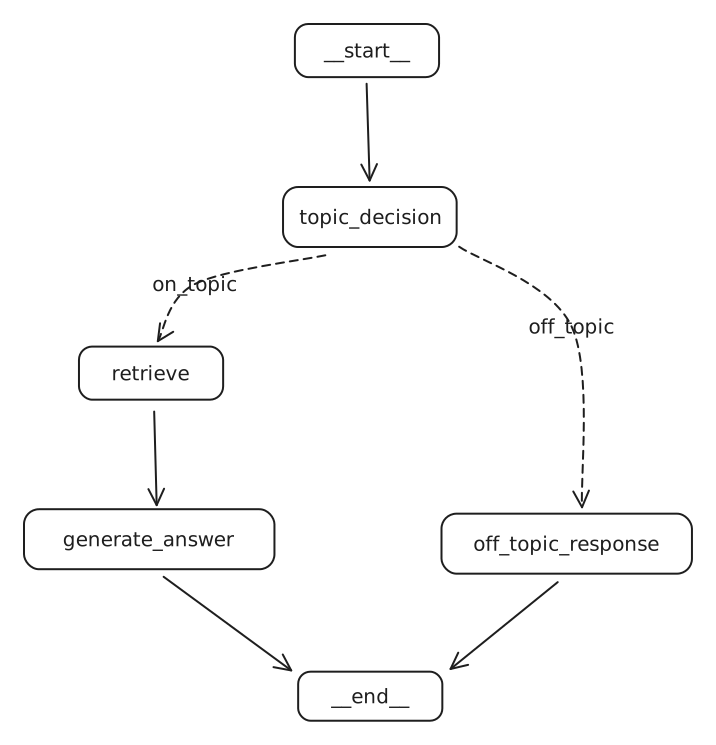
Python Example: Classification-Driven RAG with LangGraph
This example demonstrates a RAG system that first classifies a user’s question to determine if it’s on-topic before attempting to answer.
from langchain_core.documents import Document # Ensure this is the correct import
from langchain_openai import OpenAIEmbeddings
from langchain_community.vectorstores import Chroma
from langchain_core.prompts import ChatPromptTemplate
from langchain_core.output_parsers import StrOutputParser
from langchain_openai import ChatOpenAI
from typing import List, TypedDict # Corrected from 'list' to 'List' for type hinting
from langchain_core.messages import BaseMessage, HumanMessage, AIMessage
from pydantic import BaseModel, Field
from langgraph.graph import StateGraph, END
# from IPython.display import Image, display # Only needed if running in a Jupyter environment
# from langchain_core.runnables.graph import MermaidDrawMethod # Only for displaying graph

# --- 1. Setup Knowledge Base and Retriever ---
# Initialize embeddings (ensure OPENAI_API_KEY is set in your environment)
embedding_function = OpenAIEmbeddings()

# Sample documents for the knowledge base
docs = [
    Document(
        page_content="Peak Performance Gym was founded in 2015 by former Olympic athlete Marcus Chen. With over 15 years of experience in professional athletics, Marcus established the gym to provide personalized fitness solutions for people of all levels. The gym spans 10,000 square feet and features state-of-the-art equipment.",
        metadata={"source": "about.txt"}
    ),
    Document(
        page_content="Peak Performance Gym is open Monday through Friday from 5:00 AM to 11:00 PM. On weekends, our hours are 7:00 AM to 9:00 PM. We remain closed on major national holidays. Members with Premium access can enter using their key cards 24/7, including holidays.",
        metadata={"source": "hours.txt"}
    ),
    Document(
        page_content="Our membership plans include: Basic (₹1,500/month) with access to gym floor and basic equipment; Standard (₹2,500/month) adds group classes and locker facilities; Premium (₹4,000/month) includes 24/7 access, personal training sessions, and spa facilities. We offer student and senior citizen discounts of 15% on all plans. Corporate partnerships are available for companies with 10+ employees joining.",
        metadata={"source": "membership.txt"}
    ),
    Document(
        page_content="Group fitness classes at Peak Performance Gym include Yoga (beginner, intermediate, advanced), HIIT, Zumba, Spin Cycling, CrossFit, and Pilates. Beginner classes are held every Monday and Wednesday at 6:00 PM. Intermediate and advanced classes are scheduled throughout the week. The full schedule is available on our mobile app or at the reception desk.",
        metadata={"source": "classes.txt"}
    ),
    Document(
        page_content="Personal trainers at Peak Performance Gym are all certified professionals with minimum 5 years of experience. Each new member receives a complimentary fitness assessment and one free session with a trainer. Our head trainer, Neha Kapoor, specializes in rehabilitation fitness and sports-specific training. Personal training sessions can be booked individually (₹800/session) or in packages of 10 (₹7,000) or 20 (₹13,000).",
        metadata={"source": "trainers.txt"}
    ),
    Document(
        page_content="Peak Performance Gym\'s facilities include a cardio zone with 30+ machines, strength training area, functional fitness space, dedicated yoga studio, spin class room, swimming pool (25m), sauna and steam rooms, juice bar, and locker rooms with shower facilities. Our equipment is replaced or upgraded every 3 years to ensure members have access to the latest fitness technology.",
        metadata={"source": "facilities.txt"}
    )
]

# Create a Chroma vector store
db = Chroma.from_documents(docs, embedding_function)

# Create a retriever
# search_type="mmr" (Maximum Marginal Relevance) for diverse results
# k=3 to retrieve top 3 documents
retriever = db.as_retriever(search_type="mmr", search_kwargs={"k": 3})

# --- 2. Define RAG Chain Components ---
# LLM for generation
llm = ChatOpenAI(model="gpt-4o")

# Prompt template for RAG
rag_template_str = """
Answer the question based only on the following context:
	{context}

Question: {question}
"""
rag_prompt = ChatPromptTemplate.from_template(rag_template_str)

# Basic RAG chain (Context + Question -> Prompt -> LLM -> Parsed Answer)
rag_chain = rag_prompt | llm | StrOutputParser()

# Helper function to format documents
def format_docs(docs_list: List[Document]): # Added type hint for docs_list
    return "\n\n".join(doc.page_content for doc in docs_list)

# --- 3. Define Agent State ---
class AgentState(TypedDict):
    messages: List[BaseMessage] # Stores conversation history
    documents: List[Document]   # Stores retrieved documents
    on_topic: str             # Stores classification result ('Yes' or 'No')

# --- 4. Define Pydantic Model for Classifier's Structured Output ---
class GradeQuestion(BaseModel):
    """Boolean value to check whether a question is related to the Peak Performance Gym."""
    score: str = Field(
        description="Question is about gym? If yes -> 'Yes' if not -> 'No'"
    )

# --- 5. Define Graph Nodes ---

# Node: Classify the question
def question_classifier_node(state: AgentState):
    print("---CLASSIFYING QUESTION---")
    question = state["messages"][-1].content

    system_prompt_classifier = """You are a classifier that determines whether a user's question is about one of the following topics related to Peak Performance Gym:

    1. Gym History & Founder
    2. Operating Hours
    3. Membership Plans
    4. Fitness Classes
    5. Personal Trainers
    6. Facilities & Equipment

    If the question IS about any of these topics, respond with 'Yes'. Otherwise, respond with 'No'.
    """

    grade_prompt = ChatPromptTemplate.from_messages(
        [
            ("system", system_prompt_classifier),
            ("human", "User question: {question}")
        ]
    )

    classifier_llm = ChatOpenAI(model="gpt-4o") # Using a fresh LLM instance for classification
    structured_llm_grader = classifier_llm.with_structured_output(GradeQuestion)
    grader_chain = grade_prompt | structured_llm_grader

    result = grader_chain.invoke({"question": question})
    print(f"Classifier result: {result.score}")
    state["on_topic"] = result.score
    return state

# Node: Retrieve documents if on-topic
def retrieve_documents_node(state: AgentState):
    print("---RETRIEVING DOCUMENTS---")
    question = state["messages"][-1].content
    documents = retriever.invoke(question) # retriever is defined in global scope
    print(f"Retrieved {len(documents)} documents.")
    state["documents"] = documents
    return state

# Node: Generate answer if on-topic
def generate_answer_node(state: AgentState):
    print("---GENERATING ANSWER---")
    question = state["messages"][-1].content
    documents = state["documents"]

    context_str = format_docs(documents)

    # rag_chain is defined in global scope
    generated_answer_str = rag_chain.invoke({"context": context_str, "question": question})

    state["messages"].append(AIMessage(content=generated_answer_str))
    print("Answer generated.")
    return state

# Node: Respond if off-topic
def off_topic_response_node(state: AgentState):
    print("---GENERATING OFF-TOPIC RESPONSE---")
    state["messages"].append(AIMessage(content="I\'m sorry! I cannot answer this question as it does not seem to be related to Peak Performance Gym."))
    return state

# --- 6. Define Router for Conditional Edges ---
def on_topic_router_edge(state: AgentState):
    print(f"---ROUTING BASED ON CLASSIFICATION: {state['on_topic']}---")
    if state["on_topic"].lower() == "yes":
        return "on_topic"  # This label will map to the retrieve_documents_node
    return "off_topic" # This label will map to the off_topic_response_node

# --- 7. Construct and Compile the Graph ---
workflow = StateGraph(AgentState)

# Add nodes
workflow.add_node("topic_classifier", question_classifier_node) # Entry point
workflow.add_node("retrieve_docs", retrieve_documents_node)
workflow.add_node("generate_answer", generate_answer_node)
workflow.add_node("off_topic_responder", off_topic_response_node)

# Set the entry point
workflow.set_entry_point("topic_classifier")

# Add conditional edges from the classifier
workflow.add_conditional_edges(
    "topic_classifier",
    on_topic_router_edge,
    {
        "on_topic": "retrieve_docs",
        "off_topic": "off_topic_responder"
    }
)

# Add regular edges for the on-topic path
workflow.add_edge("retrieve_docs", "generate_answer")
workflow.add_edge("generate_answer", END) # End of on-topic path

# Add edge for the off-topic path
workflow.add_edge("off_topic_responder", END) # End of off-topic path

# Compile the graph
graph = workflow.compile()


# --- 8. Example Invocations (commented out for non-Jupyter environments) ---

# To run these examples, you would typically be in a Jupyter notebook or similar environment
# that supports `display(Image(...))` for graph visualization.

# from IPython.display import Image, display
# from langchain_core.runnables.graph import MermaidDrawMethod
# try:
#     display(
#         Image(
#             graph.get_graph().draw_mermaid_png(
#                 draw_method=MermaidDrawMethod.API # Or MermaidDrawMethod.CLI
#             )
#         )
#     )
# except Exception as e:
#     print(f"Graph display failed (requires libraries like graphviz or mermaid API access): {e}")

# print("\n---INVOKING GRAPH (ON-TOPIC EXAMPLE)---")
# on_topic_input = {"messages": [HumanMessage(content="Who is the owner and what are the timings?")]}
# # Note: The 'Number of requested results...' message comes from ChromaDB/retriever internals
# on_topic_output = graph.invoke(input=on_topic_input)
# print("\nFinal Output (On-Topic):")
# for msg in on_topic_output['messages']:
#     print(f"{msg.type.upper()}: {msg.content}")
# # print(f"Documents retrieved: {len(on_topic_output.get('documents', []))}") # If you want to inspect documents
# # print(f"Classification: {on_topic_output.get('on_topic')}")

# # Expected-like console output for on-topic:
# # ---CLASSIFYING QUESTION---
# # Classifier result: Yes
# # ---ROUTING BASED ON CLASSIFICATION: Yes---
# # ---RETRIEVING DOCUMENTS---
# # (ChromaDB message: Number of requested results 20 is greater than number of elements in index 6, updating n_results = 6)
# # Retrieved 3 documents.
# # ---GENERATING ANSWER---
# # Answer generated.
# #
# # Final Output (On-Topic):
# # HUMAN: Who is the owner and what are the timings?
# # AI: Peak Performance Gym was founded by Marcus Chen. The gym is open Monday through Friday from 5:00 AM to 11:00 PM and on weekends from 7:00 AM to 9:00 PM.


# print("\n---INVOKING GRAPH (OFF-TOPIC EXAMPLE)---")
# off_topic_input = {"messages": [HumanMessage(content="What does the company Apple do?")]}
# off_topic_output = graph.invoke(input=off_topic_input)
# print("\nFinal Output (Off-Topic):")
# for msg in off_topic_output['messages']:
#     print(f"{msg.type.upper()}: {msg.content}")
# # print(f"Classification: {off_topic_output.get('on_topic')}")

# # Expected-like console output for off-topic:
# # ---CLASSIFYING QUESTION---
# # Classifier result: No
# # ---ROUTING BASED ON CLASSIFICATION: No---
# # ---GENERATING OFF-TOPIC RESPONSE---
# #
# # Final Output (Off-Topic):
# # HUMAN: What does the company Apple do?
# # AI: I'm sorry! I cannot answer this question as it does not seem to be related to Peak Performance Gym.
Notes on this Topic
This LangGraph implementation showcases a more robust RAG (Retrieval Augmented Generation) system by introducing a preliminary classification step. Here’s a breakdown of its functionality and key components:
-
Knowledge Base & Retrieval Setup:
- A collection of
Documentobjects serves as the knowledge base, each containing text content and metadata (e.g., source file). OpenAIEmbeddingsare used to convert text into numerical vector representations.Chromais employed as a vector store to index these documents, enabling efficient semantic search.- A
retrieveris configured using Maximum Marginal Relevance (mmr) to fetch documents that are both relevant to the query and diverse.
- A collection of
-
Agent State (
AgentState):- This
TypedDictdefines the structure for data that flows through the graph. It includes:messages: AList[BaseMessage]objects (e.g.,HumanMessage,AIMessage) to maintain conversation history.documents: AList[Document]to store documents retrieved from the vector store.on_topic: A string (‘Yes’ or ‘No’) indicating the result of the question classification.
- This
-
Question Classification (
question_classifier_node):- This is the entry point of the graph (renamed to
topic_classifierin graph definition). - It takes the latest user question from the
messagesin the state. - It uses a separate LLM call (
ChatOpenAIwithwith_structured_output) to classify whether the question pertains to predefined topics related to “Peak Performance Gym.” - The classification prompt guides the LLM to output ‘Yes’ or ‘No’ using the
GradeQuestionPydantic model. - The result is stored in
state["on_topic"].
- This is the entry point of the graph (renamed to
-
Conditional Routing (
on_topic_router_edge):- Based on the
on_topicvalue in the state, this function directs the workflow:- If ‘Yes’, the graph transitions to the
retrieve_docsnode. - If ‘No’, the graph transitions to the
off_topic_respondernode.
- If ‘Yes’, the graph transitions to the
- Based on the
-
Document Retrieval (
retrieve_documents_node):- If the question is on-topic (renamed to
retrieve_docsin graph definition). - This node uses the pre-configured
retrieverto fetch relevant documents based on the user’s question. - The retrieved documents are stored in
state["documents"].
- If the question is on-topic (renamed to
-
Answer Generation (
generate_answer_node):- This node is executed after relevant documents are retrieved.
- It formats the retrieved documents into a single context string using
format_docs. - It uses a
rag_chain(composed of a prompt template, the main LLM, and anStrOutputParser) to generate an answer. The prompt explicitly instructs the LLM to answer based only on the provided context. - The generated answer (as an
AIMessage) is appended tostate["messages"].
-
Off-Topic Response (
off_topic_response_node):- If the question is classified as off-topic (renamed to
off_topic_responderin graph definition). - This node appends a predefined
AIMessagetostate["messages"], indicating that the question cannot be answered.
- If the question is classified as off-topic (renamed to
-
Graph Construction (
StateGraph):- The
StateGraphfrom LangGraph is used to define the nodes and edges of this workflow. - Node names in
add_nodecalls are strings that label the functions. set_entry_pointdefines where the execution begins (e.g.,"topic_classifier").add_conditional_edgesimplements the routing logic from a source node based on the output of a router function, mapping string keys (like “on_topic”) to destination node names.add_edgedefines direct transitions between nodes using their string names.- The graph is
compile()d into an executable object.
- The
-
Invocation and Output:
- The compiled
graphis invoked with an initial state, typically containing the user’s first question as aHumanMessage. - The output of the graph includes the final state, containing all messages, any retrieved documents, and the classification decision.
- The example invocations (commented out in the script) show how the system routes on-topic and off-topic questions appropriately.
- The compiled
This classification-driven approach enhances the RAG system by:
- Focusing resources: Prevents unnecessary (and potentially costly) retrieval and generation steps for irrelevant queries.
- Improving user experience: Provides clear feedback when a question is outside the system’s domain.
- Increasing relevance: Ensures that answers are generated only when the system has relevant information to draw upon.