Reflexion Agent
-
The Reflexion Agent, similar to reflection agent, not only critiques it’s own responses but also fact checks it with external data by making API calls (Internet Search)
-
In the Reflection Agent Pattern, we had to rely on the training data of LLMs but in this case, we’re not limited to that.
-
The main component of Reflexion Agent System is the “actor”.
-
The “actor” is the main agent that drives everything - it reflects on it’s responses and re-executes.
-
It can do this with or without tools to improve based on self-critique that is grounded in external data.
-
It’s main sub-components includes:
- Tools/tool execution
- Initial responder: generate an initial response & self-reflection
- Revisor: re-respond & reflect based on previous reflections
-
Episodic memory:
- In the context of Reflexion agents, episodic memory refers to an agent’s ability to recall specific past interactions, events, or experiences, rather than just generalised knowledge.
- This is crucial for making agents feel more context-aware, personalized, and human-like over time.
Architecture
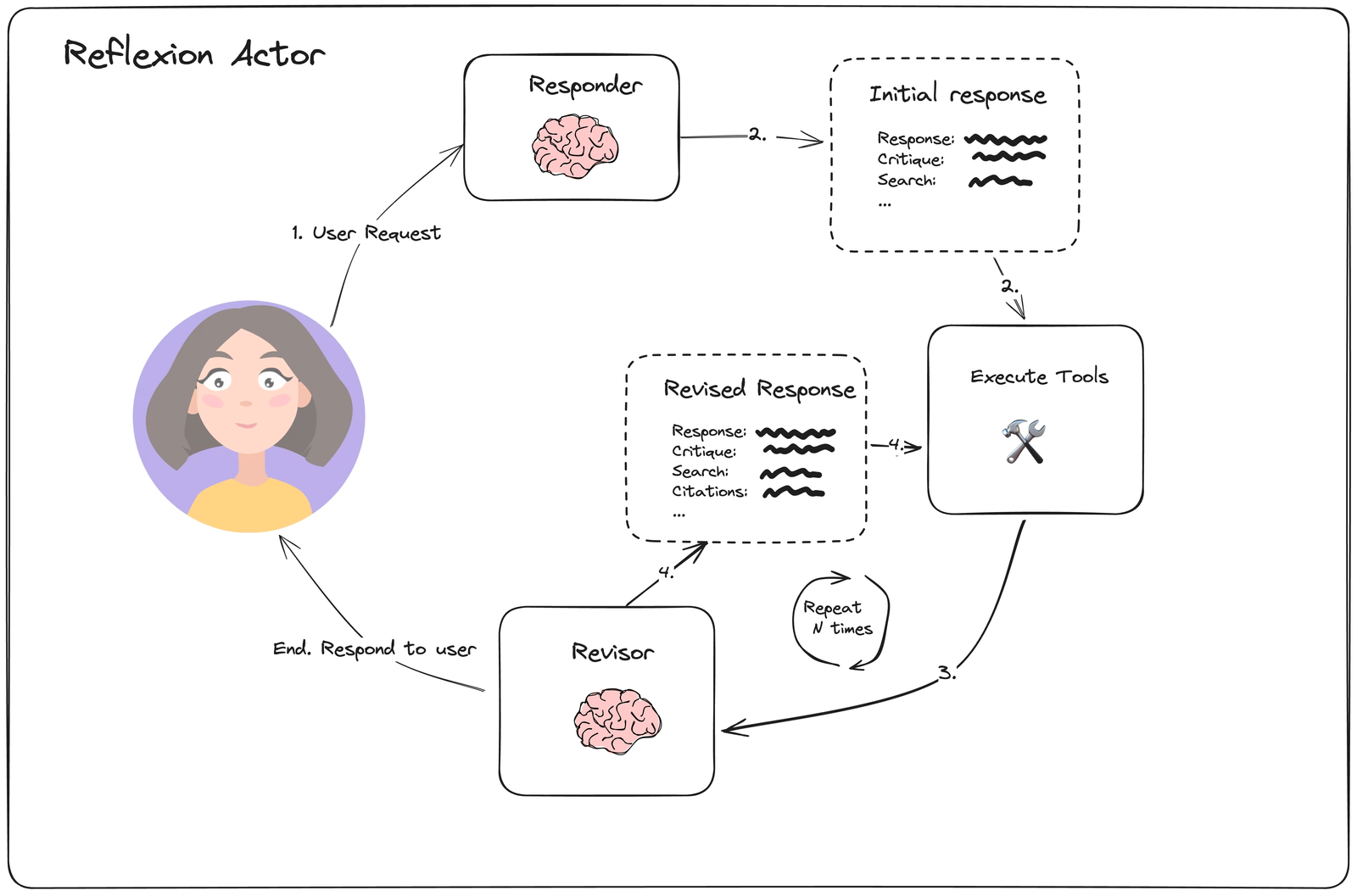
- Response: The actual/main output.
- Critique: A self-assessment of the response—pointing out limitations, potential gaps, or assumptions in the explanation.
- Search: Keywords or queries used (or that would be used) to gather accurate information and form the response.
- Citations: Verified sources or references (articles, docs, repos) that support the response or provide further reading.
LLM Response Parser System
The system converts unstructured LLM outputs into well-defined Python objects through a series of structured parsing steps, ensuring data validation and consistent formatting.
What are the key components?
- Chat Prompt Template
- Function Calling with Pydantic Schema
- Pydantic Parser
Function Calling with Pydantic Schema
Function Calling
Similar to how we make tools available to the LLM, we can also send a schema to the LLM and force it to structure it’s JSON output according to the schema.
- Pydantic: A python library that defines data structures using classes.
Pydantic Parser
- Takes the JSON output from the LLM’s function call
- Validates it against the defined Pydantic Schema (class definition)
- Creates instances of Pydantic classes with the validated data
- If the LLMs output does not match with the defined schema, it will throw an error.
Implementation
######################################################################
# schema.py
######################################################################

from pydantic import BaseModel, Field
from typing import List

class Reflection(BaseModel):
    missing: str = Field(description="Critique of what is missing.")
    superfluous: str = Field(description="Critique of what is superfluous")

class AnswerQuestion(BaseModel):
    """Answer the question."""

    answer: str= Field(
        description="~250 word detailed answer to the question."
    )
    search_queries: List[str] = Field(
        description="1-3 search queries for researching improvements to address to critique of your current answer."
    )

    reflection: Reflection = Field(
        description="Your reflectionon the initial answer."
    )

class ReviseAnswer(AnswerQuestion):
    """Revise your original answer to your question."""

    # Citations
    references: List[str] = Field(
        description="Citations motivating your updated answer."
    )

######################################################################
# chain.py
######################################################################
from langchain.prompts import ChatPromptTemplate, MessagesPlaceholder
import datetime
from langchain_google_genai import ChatGoogleGenerativeAI
from schema import AnswerQuestion, ReviseAnswer
from langchain_core.output_parsers.openai_tools import PydanticToolsParser
from langchain_core.messages import HumanMessage
import os
from dotenv import load_dotenv

load_dotenv()

pydantic_parser = PydanticToolsParser(tools=[AnswerQuestion])

# Actor Agent Prompt
actor_prompt_template = ChatPromptTemplate.from_messages(
    [
        (
            "system",
            """You re expert AI researcher.
            Current Time: {time}
            1. {first_instruction}
            2. Reflext and critique your answer. Be severe to maximize improvement.
            3. After the reflection, **list 1-3 search queries seperately** for researching improvements. Do not include them inside the reflection.""",
        ),
        MessagesPlaceholder(variable_name="messages"),
        ("system", "Answer the user's question above using the required format."),
    ]

).partial(
    # Pre populate the variable
    time=lambda: datetime.datetime.now().isoformat(),
)


llm = ChatGoogleGenerativeAI(model='gemini-1.5-flash')

first_responder_prompt_templete = actor_prompt_template.partial(
    first_instruction="Provide a detailed ~250 word answer"
)

# bind_tools help us provide tools to the llm
# tools: Array of all the tools provided to LLM
# tool_choice: force the llm to use a particular tool
first_responder_chain = first_responder_prompt_templete | llm.bind_tools(tools=[AnswerQuestion], tool_choice="AnswerQuestion")


validator = PydanticToolsParser(tools=[AnswerQuestion])


revise_instruction = """Revise your previous answer using the new information.
    - You should use the previous critique to add important information to your answer.
        - You MUST include numerical citations in your revised answer to ensure it can be verified.
        - Add a 'References' section to the bottom of your answer (which does not count towards the word limit). In from of:
            - [1] https://example.com
            - [2] https://example.com
    - You should use the previous critique to remove superfluous information from your answer and make SURE it is not more than 250 words."""

revisor_chain = actor_prompt_template.partial(
    first_instruction=revise_instruction
) | llm.bind_tools(tools=[ReviseAnswer], tool_choice="ReviseAnswer")


response = first_responder_chain.invoke({
    "messages": [HumanMessage(content="Write me a blog post on how small business can leverage AI to grow")]
})

######################################################################
# execute_tools.py
######################################################################
import json
from typing import List, Dict, Any
from langchain_core.messages import AIMessage, BaseMessage, ToolMessage, HumanMessage
from langchain_community.tools import TavilySearchResults

# Create the Tavily search tool
tavily_tool = TavilySearchResults(max_results=5)

# Function to execute search queries from AnswerQuestion tool calls
def execute_tools(state: List[BaseMessage]) -> List[BaseMessage]:
    last_ai_message: AIMessage = state[-1]

    # Extract tool calls from the AI message
    if not hasattr(last_ai_message, "tool_calls") or not last_ai_message.tool_calls:
        return []

    # Process the AnswerQuestion or ReviseAnswer tool calls to extract search queries
    tool_messages = []

    for tool_call in last_ai_message.tool_calls:
        if tool_call["name"] in ["AnswerQuestion", "ReviseAnswer"]:
            call_id = tool_call["id"]
            search_queries = tool_call["args"].get("search_queries", [])

            # Execute each search query using the tavily tool
            query_result = {}
            for query in search_queries:
                result = tavily_tool.invoke(query)
                query_result[query] = result

            # Create a tool message with the results
            tool_messages.append(
                ToolMessage(
                    content=json.dumps(query_result),
                    tool_call_id=call_id
                )
            )
    return tool_messages

# Example usage
test_state = [
    HumanMessage(
        content="Write about how small business can leverage AI to grow"
    ),
    AIMessage(
        content="",
        tool_calls=[
            {
                "name": "AnswerQuestion",
                "args": {
                    'answer': '',
                    'search_queries': [
                            'AI tools for small business',
                            'AI in small business marketing',
                            'AI automation for small business'
                    ],
                    'reflection': {
                        'missing': '',
                        'superfluous': ''
                    }
                },
                "id": "call_KpYHichFFEmLitHFvFhKy1Ra",
            }
        ],
    )
]

# Execute the tools
# results = execute_tools(test_state)

# print("Raw results:", results)
# if results:
#     parsed_content = json.loads(results[0].content)
#     print("Parsed content:", parsed_content)

######################################################################
# reflexion_graph.py
######################################################################
from typing import List
from langchain_core.messages import BaseMessage, ToolMessage
from langgraph.graph import END, MessageGraph
from chains import revisor_chain, first_responder_chain
from execute_tools import execute_tools

graph = MessageGraph()
MAX_ITERATIONS = 2

graph.add_node("responder", first_responder_chain)
graph.add_node("execute_tools", execute_tools)
graph.add_node("revisor", revisor_chain)

graph.add_edge("responder", "execute_tools")
graph.add_edge("execute_tools", "revisor")

# Condition
def event_loop(state: List[BaseMessage]) -> str:
    count_tool_visits = sum(isinstance(item, ToolMessage) for item in state)

    num_iterations = count_tool_visits
    if num_iterations > MAX_ITERATIONS:
        return END
    return "execute_tools"

graph.add_conditional_edges("revisor", event_loop)

graph.set_entry_point("responder")

app = graph.compile()

print(app.get_graph().draw_mermaid())

response = app.invoke(
    "Write about how small business can leverage AI to grow"
)


print(response)
print("#############################################################################")
print(response[-1].tool_calls[0]["args"]["answer"])
Output
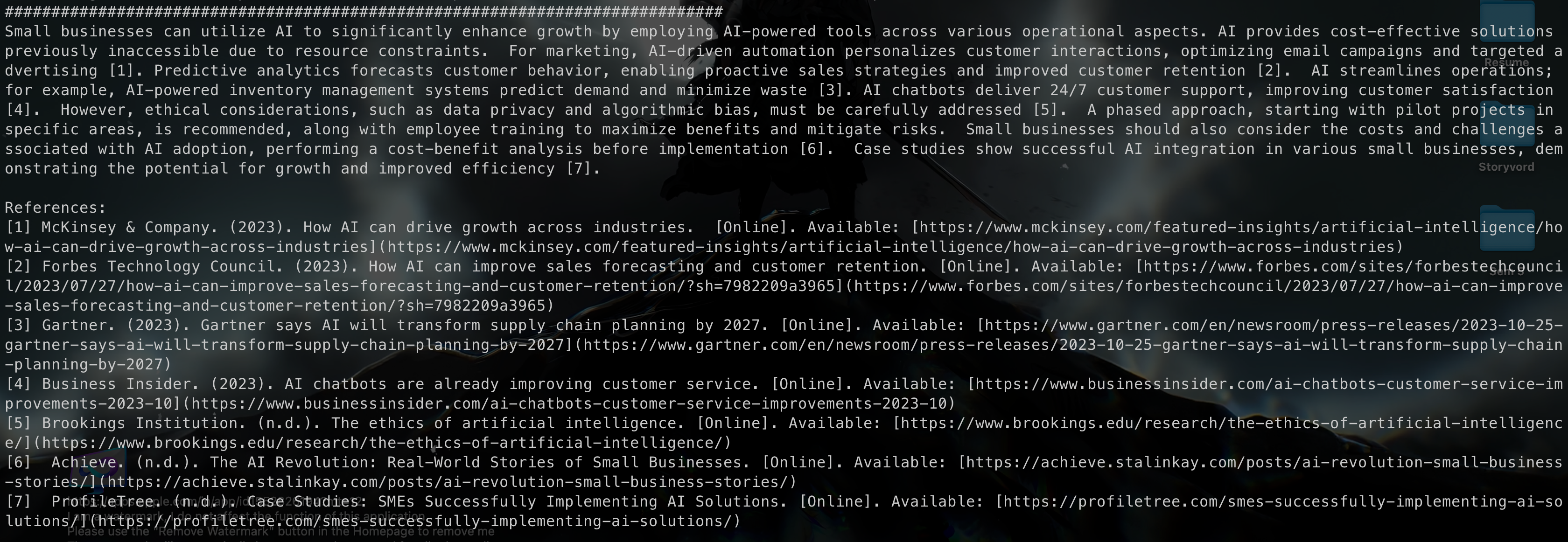
Terminal
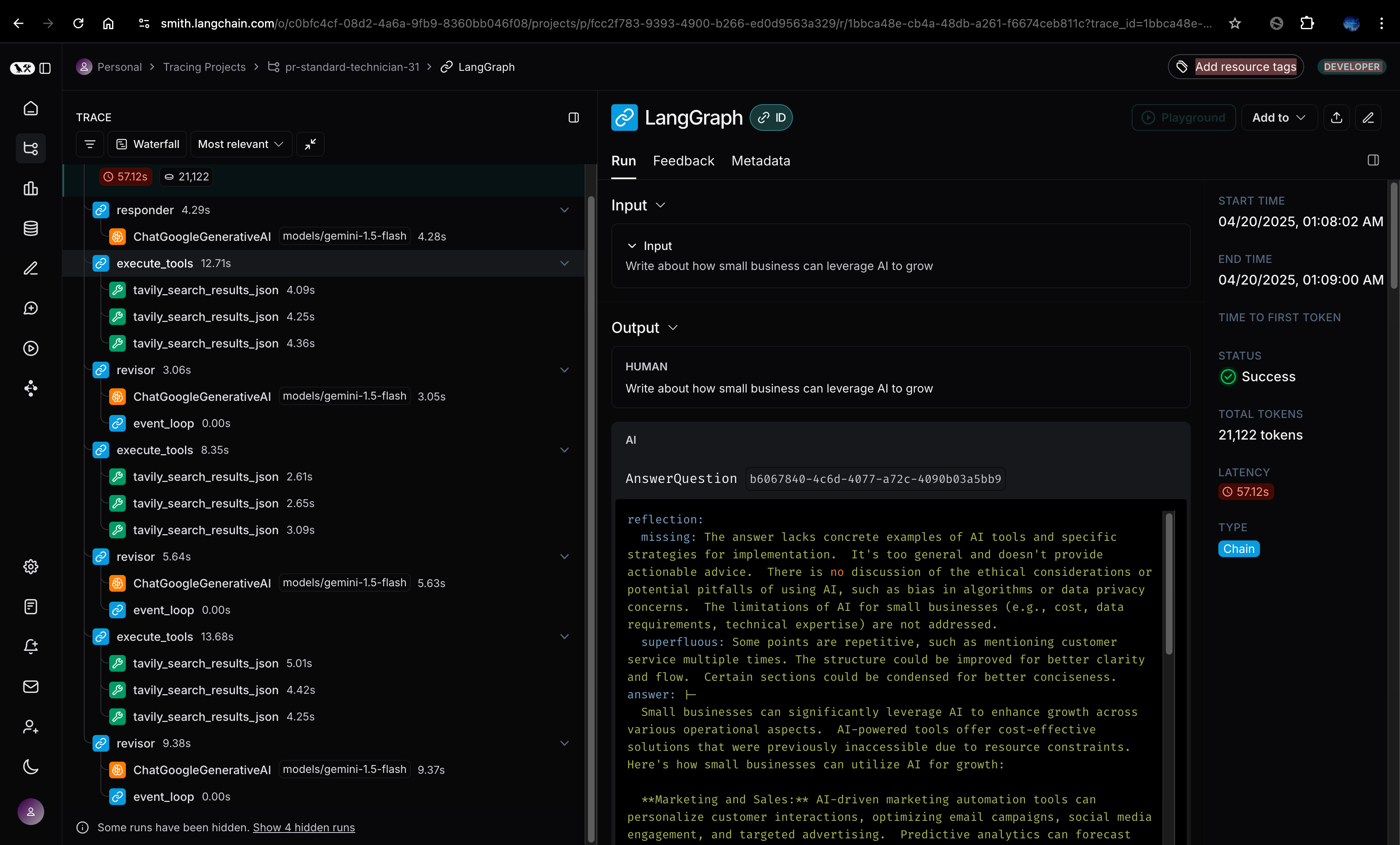
LangSmith
Reflection Agent vs Reflexion Agent in LangGraph
| Feature | Reflection Agent | Reflexion Agent |
|---|---|---|
| Purpose | Helps the agent evaluate and improve its behavior after a task or chain is complete. | Focuses on real-time, self-correcting behavior after a failure or poor outcome. |
| Trigger Time | Typically after completing a task or full execution. | Immediately after an error or failed attempt. |
| Goal | Learn from the overall process, identify what worked or didn’t, and refine strategy. | Adapt actions in the moment to recover or redirect after a failure. |
| Learning Style | Retrospective learning (post-task reflection). | Iterative real-time correction. |
| Example Use Case | After generating a full script, the agent analyzes tone/flow and adjusts strategy. | When a character generation step fails, the agent corrects and retries instantly. |
| Inspiration | Rooted in academic reflective practices (e.g., journaling, evaluation). | Inspired by reinforcement learning and trial-error feedback loops. |
| LangGraph Context | Used in memory-heavy, goal-oriented workflows. | Used in tight, outcome-sensitive workflows needing immediate correction. |