Why RAG? The Limitations of Traditional LLMs
Large Language Models (LLMs) have demonstrated remarkable capabilities in understanding and generating human-like text. However, they inherently possess certain limitations:
- Knowledge Cutoff: LLMs are trained on vast datasets, but this knowledge is static and reflects the information available up to the point of their last training. They are unaware of events or information that have emerged since.
- Hallucinations: LLMs can sometimes generate plausible-sounding but incorrect or nonsensical information, often referred to as “hallucinations.” This is particularly prevalent when queried about topics outside their training data or when forced to make inferences beyond their capabilities.
- Lack of Domain-Specific, Real-Time Information: For many practical applications, access to specific, up-to-date, or proprietary information is crucial. Traditional LLMs cannot readily access or incorporate this external knowledge.
- Difficulty in Source Attribution: When an LLM provides information, it’s often difficult to trace back the source of that information, making it hard to verify accuracy or credibility.
Retrieval Augmented Generation (RAG) emerged as a powerful paradigm to address these limitations.
What is the Actual Purpose of RAG?
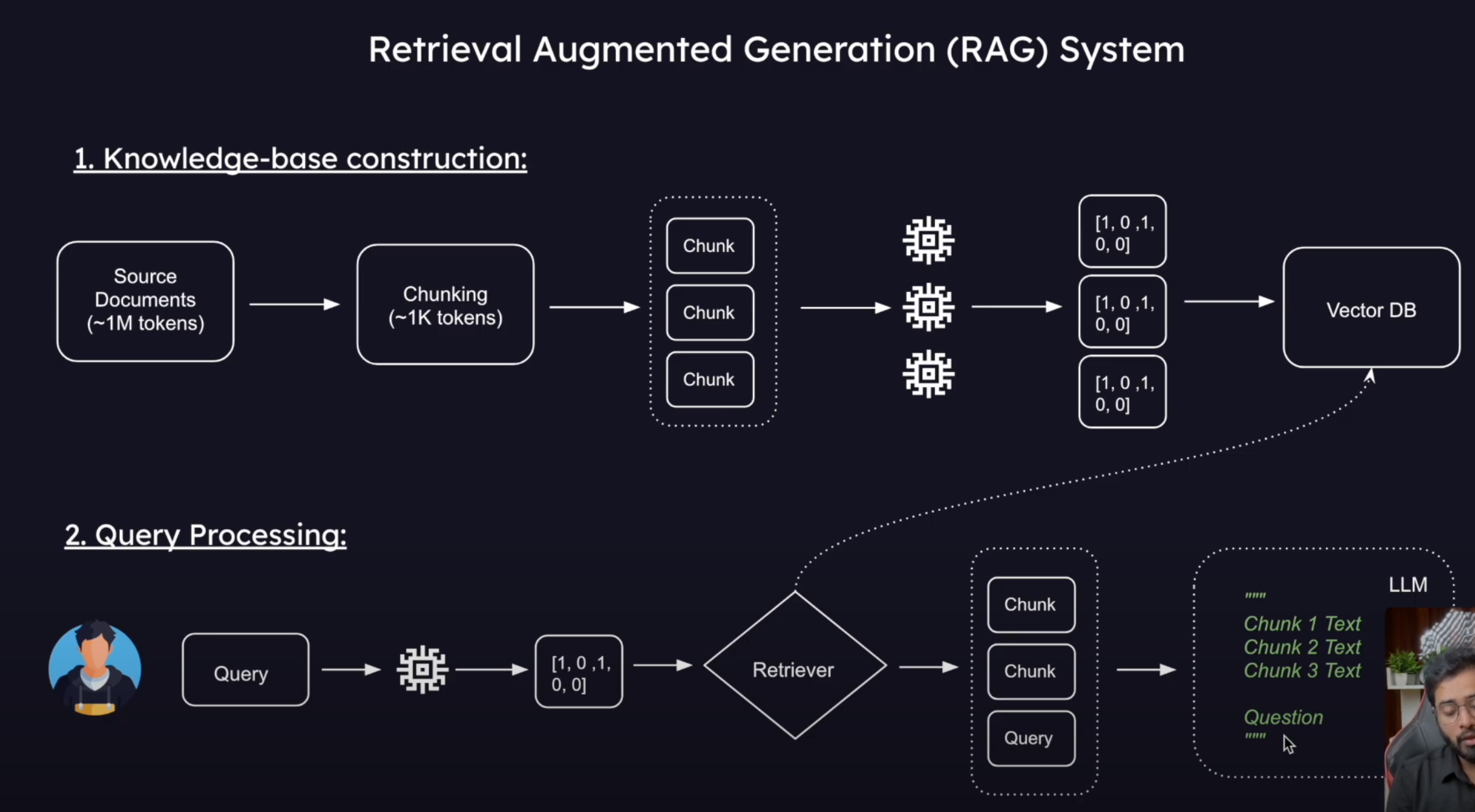
The core purpose of RAG is to ground LLMs in external, verifiable knowledge sources. It achieves this by combining the generative strengths of LLMs with a retrieval mechanism that fetches relevant information from a knowledge base before the LLM generates a response.
In essence, RAG models:
- Retrieve: When a query is posed, the RAG system first searches a specified knowledge corpus (e.g., a collection of documents, a database, web pages) for information relevant to the query.
- Augment: The retrieved information (context) is then provided to the LLM along with the original query.
- Generate: The LLM uses this augmented prompt (original query + retrieved context) to generate a more informed, accurate, and contextually relevant response.
This approach allows LLMs to:
- Access and utilize up-to-date information.
- Reduce hallucinations by basing responses on factual, retrieved data.
- Provide more specific and nuanced answers by leveraging domain-specific knowledge.
- Potentially offer source attribution by indicating the documents or data used for generation.
Where Can RAG Be Used?
RAG’s ability to integrate external knowledge makes it suitable for a wide array of applications:
- Question Answering Systems:
- Answering questions over internal company documents (e.g., HR policies, technical manuals).
- Customer support chatbots that can pull information from product documentation or FAQs.
- Educational platforms that answer student queries based on textbooks or research papers.
- Enhanced Chatbots and Virtual Assistants:
- Creating more knowledgeable and helpful conversational AI that can discuss recent events or specific domains.
- Personalized assistants that can access a user’s private documents or emails (with permission) to provide relevant information.
- Content Generation with Factual Grounding:
- Generating summaries of large documents or sets of articles.
- Assisting in writing reports or articles by providing relevant factual snippets.
- Creating product descriptions based on technical specifications.
- Fact Verification and Claim Checking:
- Systems that can check the veracity of a claim by retrieving and presenting supporting or contradictory evidence.
- Personalized Recommendation Systems:
- Recommending products, articles, or services based on a deeper understanding of their features and user preferences, drawn from extensive knowledge bases.
- Code Generation and Explanation:
- Generating code snippets based on documentation or existing codebases.
- Explaining code by retrieving relevant information from API docs or tutorials.
By bridging the gap between the generative power of LLMs and the vastness of external information, RAG significantly expands the capabilities and reliability of AI systems.
Python Example: Basic RAG Implementation
Below is a Python example demonstrating a simple RAG pipeline using LangChain:
from langchain_core.documents import Document # Changed from langchain.schema to langchain_core.documents for newer LangChain versions
from langchain_openai import OpenAIEmbeddings
from langchain_community.vectorstores import Chroma

# Initialize the embedding function using OpenAI. This will be used to convert text into numerical vectors.
embedding_function = OpenAIEmbeddings() # Ensure your OPENAI_API_KEY is set in your environment

# Define a list of documents that will form our knowledge base.
# Each document has page_content (the text) and metadata (additional information, like the source).
docs = [
    Document(
        page_content="Peak Performance Gym was founded in 2015 by former Olympic athlete Marcus Chen. With over 15 years of experience in professional athletics, Marcus established the gym to provide personalized fitness solutions for people of all levels. The gym spans 10,000 square feet and features state-of-the-art equipment.",
        metadata={"source": "about.txt"}
    ),
    Document(
        page_content="Peak Performance Gym is open Monday through Friday from 5:00 AM to 11:00 PM. On weekends, our hours are 7:00 AM to 9:00 PM. We remain closed on major national holidays. Members with Premium access can enter using their key cards 24/7, including holidays.",
        metadata={"source": "hours.txt"}
    ),
    Document(
        page_content="Our membership plans include: Basic (₹1,500/month) with access to gym floor and basic equipment; Standard (₹2,500/month) adds group classes and locker facilities; Premium (₹4,000/month) includes 24/7 access, personal training sessions, and spa facilities. We offer student and senior citizen discounts of 15% on all plans. Corporate partnerships are available for companies with 10+ employees joining.",
        metadata={"source": "membership.txt"}
    ),
    Document(
        page_content="Group fitness classes at Peak Performance Gym include Yoga (beginner, intermediate, advanced), HIIT, Zumba, Spin Cycling, CrossFit, and Pilates. Beginner classes are held every Monday and Wednesday at 6:00 PM. Intermediate and advanced classes are scheduled throughout the week. The full schedule is available on our mobile app or at the reception desk.",
        metadata={"source": "classes.txt"}
    ),
    Document(
        page_content="Personal trainers at Peak Performance Gym are all certified professionals with minimum 5 years of experience. Each new member receives a complimentary fitness assessment and one free session with a trainer. Our head trainer, Neha Kapoor, specializes in rehabilitation fitness and sports-specific training. Personal training sessions can be booked individually (₹800/session) or in packages of 10 (₹7,000) or 20 (₹13,000).",
        metadata={"source": "trainers.txt"}
    ),
    Document(
        page_content="Peak Performance Gym's facilities include a cardio zone with 30+ machines, strength training area, functional fitness space, dedicated yoga studio, spin class room, swimming pool (25m), sauna and steam rooms, juice bar, and locker rooms with shower facilities. Our equipment is replaced or upgraded every 3 years to ensure members have access to the latest fitness technology.",
        metadata={"source": "facilities.txt"}
    )
]

# Create a Chroma vector store from the documents and the embedding function.
# The Chroma vector store will index the documents by converting them into embeddings (vectors)
# and allow for efficient retrieval based on semantic similarity to a query.
# This process can take time depending on the number of documents and the complexity of the embedding model.
db = Chroma.from_documents(docs, embedding_function)


# Create a retriever from the vector store.
# This method helps to retrieve diverse and relevant documents based on the query.
# search_type="mmr" (Maximum Marginal Relevance) aims to find documents that are relevant to the query
# but also diverse among themselves, avoiding redundant information.
# k=3 specifies that we want to retrieve the top 3 most relevant and diverse documents.
retriever = db.as_retriever(search_type="mmr", search_kwargs={"k": 3})


# Test the retriever by invoking it with a sample question.
# This will fetch the 3 documents from our 'db' that are most relevant to the question.
retrieved_docs = retriever.invoke("Who founded the gym and what are the timings?")
# print(f"Retrieved docs for the first question: {retrieved_docs}") # Optional: print to see the retrieved docs

from langchain_core.prompts import ChatPromptTemplate

# Define a prompt template for the language model.
# This template structures how the retrieved context and the user's question will be presented to the LLM.
# It instructs the LLM to answer the question based *only* on the provided context.
template = """
Answer the question based only on the following context:
{context}

Question: {question}
"""

prompt = ChatPromptTemplate.from_template(template)

from langchain_core.output_parsers import StrOutputParser
from langchain_openai import ChatOpenAI

# Initialize the language model (LLM), in this case, OpenAI's gpt-4o.
# This model will generate the answer.
llm = ChatOpenAI(model="gpt-4o") # Ensure your OPENAI_API_KEY is set

# Define a helper function to format the retrieved documents into a single string.
# This string will be passed as the 'context' to the prompt.
def format_docs(docs_list):
    return "\\n\\n".join(doc.page_content for doc in docs_list)

# Create the Question-Answering (QA) chain.
# This chain defines the sequence of operations:
# 1. The input is a question (string).
# 2. A dictionary is created:
#    - "context": The retriever is invoked with the input question (x),
#                 and the retrieved documents are formatted by format_docs.
#    - "question": The original input question (x) is passed through.
# 3. This dictionary is then passed to the 'prompt' template.
# 4. The formatted prompt is passed to the 'llm' for answer generation.
# 5. The 'StrOutputParser' parses the LLM's output into a simple string.
qa_chain = (
    {
        "context": lambda x: format_docs(retriever.invoke(x)),
        "question": lambda x: x
    }
    | prompt
    | llm
    | StrOutputParser()
)

# Invoke the QA chain with a user question.
# The chain will perform retrieval, augment the prompt, and generate an answer.
answer = qa_chain.invoke("Who is the owner and what are the timings?")
print(f"Question: Who is the owner and what are the timings?\\nAnswer: {answer}")

# Example output might be:
# Question: Who is the owner and what are the timings?
# Answer: Peak Performance Gym was founded by Marcus Chen. It is open Monday through Friday from 5:00 AM to 11:00 PM and on weekends from 7:00 AM to 9:00 PM.
This example illustrates the fundamental components of a RAG system:
- Document Loading: Preparing the knowledge base.
- Embedding and Indexing: Converting documents into vectors and storing them in a vector database for efficient search.
- Retrieval: Fetching relevant documents based on a user query.
- Prompt Augmentation: Combining the retrieved documents with the user query into a prompt for the LLM.
- Generation: Using the LLM to generate an answer based on the augmented prompt.
This is a simplified example. Real-world RAG systems can be much more complex, involving more sophisticated retrieval strategies, multiple knowledge sources, and advanced prompt engineering techniques.