Overview
The 12-Factor Agents methodology provides principles for building LLM-powered software that is production-ready and reliable enough for customer-facing applications. Inspired by the 12-Factor App methodology, these patterns focus on engineering rigor rather than framework dependence.
Key Philosophy
- Agents are mostly software with LLM steps sprinkled at the right points
- Small, focused agents work better than monolithic ones
- Own your abstractions rather than relying heavily on frameworks
- Context engineering is the core skill for LLM applications
The 12 Factors
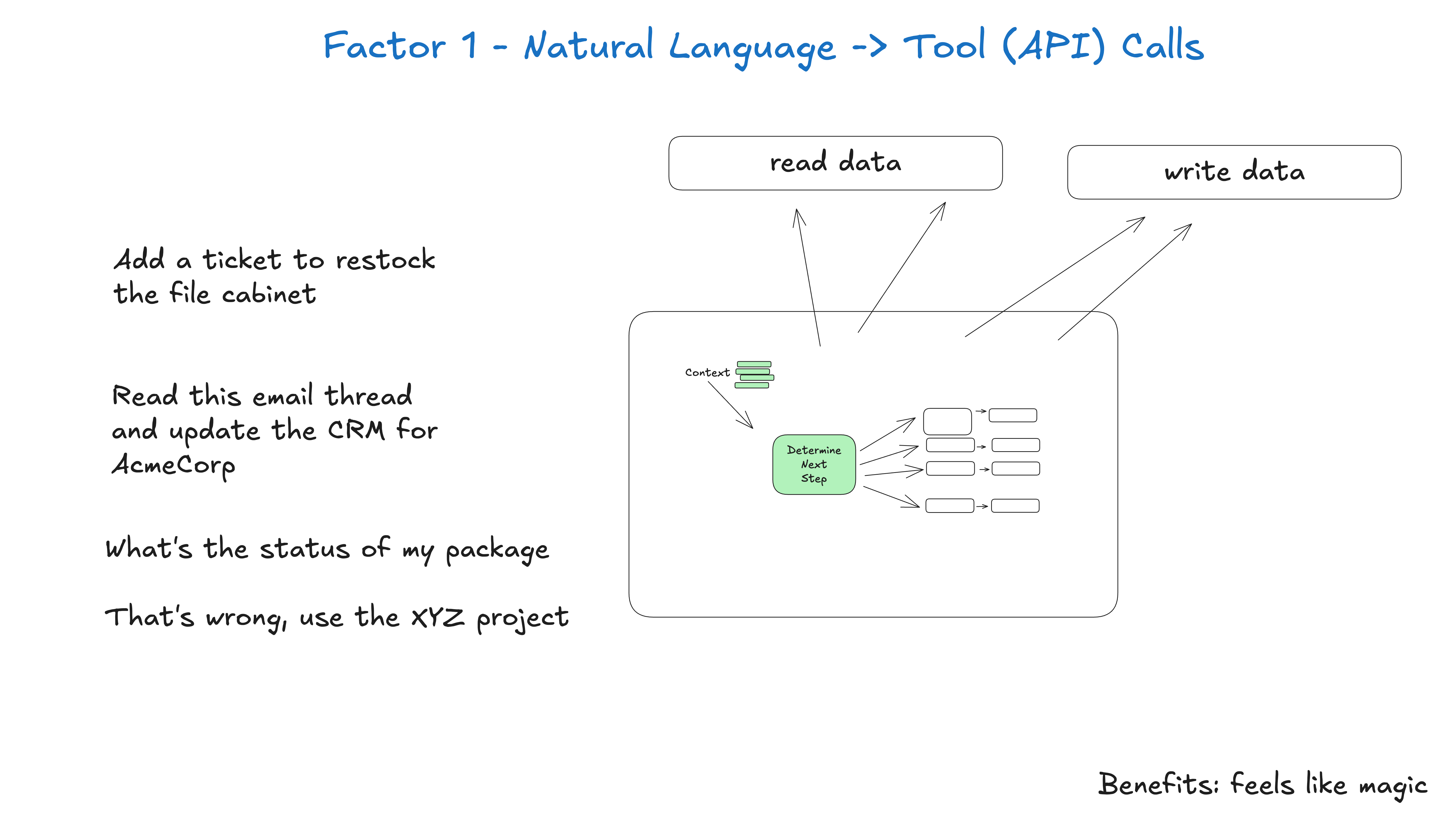
Factor 1: Natural Language to Tool Calls
Concept
Convert natural language into structured tool calls - the fundamental pattern of agent building.
Key Points
- Structured Output: Transform user requests into JSON objects that describe API calls
- Atomic Operations: Focus on single, well-defined transformations
- Deterministic Execution: LLM decides what to do, your code controls how it’s done
Example
Input: “Create a payment link for $750 to Jeff for sponsoring the February AI meetup”
Output:
{
  "function": "create_payment_link",
  "parameters": {
    "amount": 750,
    "customer": "cust_128934ddasf9",
    "product": "prod_8675309",
    "price": "prc_09874329fds",
    "quantity": 1,
    "memo": "February AI tinkerers meetup sponsorship"
  }
}Implementation:
# LLM converts natural language to structured output
nextStep = await llm.determineNextStep(
  "create a payment link for $750 to Jeff for sponsoring the february AI tinkerers meetup"
)

# Deterministic code handles the structured output
if nextStep.function == 'create_payment_link':
    stripe.paymentlinks.create(nextStep.parameters)
elif nextStep.function == 'something_else':
    # Handle other cases
    pass
else:
    # Handle unknown tools
    pass
Benefits
- Clear separation between LLM reasoning and execution
- Testable deterministic code for all actual operations
- Flexible tool expansion without changing core logic
- Reliable error handling for structured operations
Factor 2: Own Your Prompts
Concept
Maintain direct control over your prompts rather than relying on framework abstractions.
Key Points
- Version Control: Track prompt changes with git
- A/B Testing: Compare prompt variants systematically
- Iteration Speed: Quickly modify based on real-world performance
- Transparency: Know exactly what instructions your agent receives
- Role Hacking: Take advantage of non-standard API usage patterns
Implementation Strategies
# Store prompts as first-class code assets
SYSTEM_PROMPT = """
You are a deployment assistant for a production system.
Your role is to:
1. Analyze deployment requests for safety
2. Validate prerequisites
3. Execute approved deployments
4. Provide clear status updates

Available tools:
- check_system_health
- validate_deployment
- execute_deployment
- notify_team
"""

# Template with variable substitution
def build_prompt(context, tools_available):
    return f"""
    {SYSTEM_PROMPT}

    Current system context:
    {context}

    Available tools: {', '.join(tools_available)}

    What's the next step?
    """
Best Practices
- Modular prompts: Break complex instructions into reusable components
- Context-aware templating: Adapt prompts based on current state
- Performance monitoring: Track prompt effectiveness metrics
- Documentation: Comment prompt rationale and expected behaviors
Factor 3: Own Your Context Window
Concept
Take full control of how you structure and present information to the LLM - this is context engineering.
Key Points
- Everything is context engineering: Prompts, RAG documents, history, tool calls, memory
- Token efficiency: Optimize context format for both tokens and LLM understanding
- Custom formats: Don’t be limited to standard message formats
- Attention optimization: Structure context for maximum LLM attention efficiency
Standard vs Custom Context Formats
Standard Format (OpenAI-style):
[
  {
    "role": "system",
    "content": "You are a helpful assistant..."
  },
  {
    "role": "user",
    "content": "Can you deploy the backend?"
  },
  {
    "role": "assistant",
    "tool_calls": [
      {
        "id": "1",
        "name": "list_git_tags",
        "arguments": "{}"
      }
    ]
  },
  {
    "role": "tool",
    "name": "list_git_tags",
    "content": "{\"tags\": [{\"name\": \"v1.2.3\", \"commit\": \"abc123\"}]}",
    "tool_call_id": "1"
  }
]
Custom Format (More token-efficient):
<system>
You are a deployment assistant.
</system>

<user_request>
Deploy backend to production
</user_request>

<git_tags>
v1.2.3 (abc123) - 2024-03-15
v1.2.2 (def456) - 2024-03-14
v1.2.1 (ghi789) - 2024-03-13
</git_tags>

<next_step>
Which version should I deploy?
</next_step>
Context Engineering Strategies
- Information density: Pack more meaning into fewer tokens
- Structured markup: Use XML/HTML-like tags for clear section boundaries
- Prioritized information: Place most important context first
- Filtered relevance: Only include context that affects the current decision
Implementation Example
def thread_to_prompt(thread_events):
    """Convert thread events to optimized context format"""
    context_parts = []

    # System instructions
    context_parts.append("<system>You are a deployment assistant.</system>")

    # User request
    user_input = find_latest_user_input(thread_events)
    context_parts.append(f"<request>{user_input}</request>")

    # Relevant tool results (filtered and formatted)
    tool_results = extract_relevant_tool_results(thread_events)
    for result in tool_results:
        context_parts.append(f"<{result.type}>{result.formatted_data}</{result.type}>")

    # Next step prompt
    context_parts.append("<instruction>What's the next step?</instruction>")

    return "\n\n".join(context_parts)
Factor 4: Tools Are Just Structured Outputs
Concept
Tools don’t need to be complex - they’re just structured JSON output from your LLM that triggers deterministic code.
Key Points
- Simple abstraction: Tools are JSON objects with intent and parameters
- Flexible execution: Same tool call can trigger different actions based on context
- Clean separation: LLM decides what to do, your code controls how it’s done
- Extensible design: Easy to add new tools without changing core logic
Implementation Pattern
# Define tool schemas
class CreateIssue:
    intent: "create_issue"
    title: str
    description: str
    team_id: str
    assignee_id: str

class SearchIssues:
    intent: "search_issues"
    query: str
    filters: dict

# Simple execution pattern
def handle_tool_call(tool_call):
    if tool_call.intent == 'create_issue':
        # Could call different APIs based on context
        if current_environment == 'github':
            github_api.create_issue(tool_call)
        elif current_environment == 'jira':
            jira_api.create_ticket(tool_call)
    elif tool_call.intent == 'search_issues':
        return search_service.find_issues(tool_call.query, tool_call.filters)
    else:
        raise UnknownToolError(tool_call.intent)
Advanced Pattern - Context-Aware Execution
def handle_tool_call(tool_call, context):
    """Handle tool calls with context-aware execution"""

    if tool_call.intent == 'deploy_backend':
        # Different behavior based on urgency
        if context.get('urgency') == 'emergency':
            return emergency_deploy(tool_call.version)
        else:
            return standard_deploy_with_approval(tool_call.version)

    elif tool_call.intent == 'request_human_input':
        # Route to different humans based on context
        if context.get('domain') == 'security':
            return notify_security_team(tool_call.question)
        else:
            return notify_default_approver(tool_call.question)
Benefits
- Flexibility: Same tool definition can have different implementations
- Testability: Easy to mock and test tool execution logic
- Observability: Clear log of what tools were called with what parameters
- Maintainability: Changes to tool implementation don’t affect LLM interface
Factor 5: Unify Execution State and Business State
Concept
Simplify your architecture by unifying execution state (current step, retry counts) with business state (what’s happened so far).
Key Points
- Reduce complexity: Avoid separate systems for execution vs business state
- Single source of truth: One unified event log captures everything
- Simplified debugging: All state changes in one place
- Easy serialization: Trivial to save/restore agent state
State Categories
Execution State:
- Current step in workflow
- Next step to execute
- Waiting status
- Retry counts
- Error states
Business State:
- OpenAI messages
- Tool calls and results
- Domain-specific data
- User interactions
Unified Event Log Pattern
# Single event log captures both types of state
thread = {
    "id": "thread_123",
    "events": [
        {"type": "user_input", "data": "Deploy backend v1.2.3"},
        {"type": "tool_call", "data": {"intent": "check_health", "service": "backend"}},
        {"type": "tool_result", "data": {"status": "healthy", "response_time": "45ms"}},
        {"type": "tool_call", "data": {"intent": "request_approval", "version": "v1.2.3"}},
        {"type": "human_response", "data": {"approved": true, "approver": "alice@company.com"}},
        {"type": "tool_call", "data": {"intent": "deploy", "version": "v1.2.3", "environment": "prod"}},
        {"type": "tool_result", "data": {"status": "success", "deployment_id": "dep_456"}}
    ]
}
Benefits
- Simplified architecture: One data structure for all state
- Easy pause/resume: Serialize the event log and restart from any point
- Perfect audit trail: Complete history of what happened and why
- Human interfaces: Trivial to convert to readable format or UI
- Debugging: All state changes visible in chronological order
Implementation
def add_event(thread, event_type, data):
    """Add an event to the unified thread log"""
    thread["events"].append({
        "type": event_type,
        "data": data,
        "timestamp": datetime.utcnow().isoformat()
    })

def get_current_state(thread):
    """Derive current state from event log"""
    state = {"status": "active", "retries": 0, "waiting_for": None}

    for event in thread["events"]:
        if event["type"] == "tool_call" and event["data"]["intent"] == "request_approval":
            state["waiting_for"] = "human_approval"
        elif event["type"] == "human_response":
            state["waiting_for"] = None
        elif event["type"] == "error":
            state["retries"] += 1

    return state
Factor 6: Launch/Pause/Resume with Simple APIs
Concept
Agents should support simple programmatic control for launching, pausing, and resuming workflows.
Key Points
- Simple APIs: Easy integration with other systems and workflows
- Durable execution: Agents can be paused and resumed across system restarts
- External control: Other systems can manage agent lifecycle
- Async operations: Support for long-running operations that don’t block
API Design
# Simple agent control API
class AgentController:
    def launch(self, thread_id: str, initial_input: str) -> dict:
        """Start a new agent workflow"""
        thread = {
            "id": thread_id,
            "status": "active",
            "events": [{"type": "user_input", "data": initial_input}]
        }
        return self.process_thread(thread)

    def pause(self, thread_id: str) -> dict:
        """Pause an active workflow"""
        thread = self.get_thread(thread_id)
        thread["status"] = "paused"
        self.save_thread(thread)
        return {"status": "paused", "thread_id": thread_id}

    def resume(self, thread_id: str) -> dict:
        """Resume a paused workflow"""
        thread = self.get_thread(thread_id)
        thread["status"] = "active"
        return self.process_thread(thread)

    def status(self, thread_id: str) -> dict:
        """Get current workflow status"""
        thread = self.get_thread(thread_id)
        return {
            "thread_id": thread_id,
            "status": thread["status"],
            "last_event": thread["events"][-1] if thread["events"] else None,
            "waiting_for": self.get_waiting_state(thread)
        }
Integration Examples
# Cron job integration
@schedule.every().hour
def check_system_health():
    agent_controller.launch(
        thread_id=f"health_check_{datetime.now().isoformat()}",
        initial_input="Run comprehensive system health check"
    )

# Webhook integration
@app.route('/webhook/deployment', methods=['POST'])
def handle_deployment_webhook():
    payload = request.json
    return agent_controller.launch(
        thread_id=f"deploy_{payload['version']}",
        initial_input=f"Deploy version {payload['version']} to {payload['environment']}"
    )

# Pipeline integration
def deployment_pipeline(version):
    # Step 1: Run tests
    test_result = run_tests(version)

    # Step 2: Agent-managed deployment
    deployment = agent_controller.launch(
        thread_id=f"deploy_{version}_{int(time.time())}",
        initial_input=f"Deploy {version} to production with test results: {test_result}"
    )

    # Step 3: Monitor deployment
    while deployment["status"] == "active":
        time.sleep(30)
        deployment = agent_controller.status(deployment["thread_id"])

    return deployment
Pause/Resume Scenarios
- Long-running operations: Pause while waiting for external services
- Human approval: Pause for manual review and approval
- Resource constraints: Pause during high-load periods
- Scheduled maintenance: Pause before system updates
- Error recovery: Pause for manual intervention on errors
Factor 7: Contact Humans with Tool Calls
Concept
Treat human interaction as just another tool call, enabling structured human-in-the-loop workflows.
Key Points
- Structured requests: Use tool calls to define what kind of human input is needed
- Multiple humans: Support different types of human interactions and roles
- Inner vs Outer loop: Enable agent-initiated workflows, not just human-initiated
- Async communication: Humans respond when available, not in real-time
Human Interaction Tools
class RequestApproval:
    intent: "request_approval"
    question: str
    context: str
    options: dict
    urgency: str = "normal"
    required_role: str = "any"

class RequestClarification:
    intent: "request_clarification"
    question: str
    suggested_options: list
    timeout_action: str = "cancel"

class NotifyHuman:
    intent: "notify_human"
    message: str
    channel: str = "default"
    priority: str = "normal"
Implementation Pattern
def handle_human_tool_call(tool_call, thread_id):
    """Handle tool calls that require human interaction"""

    if tool_call.intent == "request_approval":
        # Generate response URL for human
        response_url = f"/thread/{thread_id}/response"

        # Send notification to appropriate human(s)
        notification_service.send(
            recipients=get_users_by_role(tool_call.required_role),
            message=tool_call.question,
            context=tool_call.context,
            response_url=response_url,
            urgency=tool_call.urgency
        )

        # Return tool call with response mechanism
        return {
            "intent": tool_call.intent,
            "status": "waiting_for_response",
            "response_url": response_url,
            "data": tool_call.__dict__
        }

# API endpoint for human responses
@app.route('/thread/<thread_id>/response', methods=['POST'])
def handle_human_response(thread_id):
    """Process human response and continue agent workflow"""
    thread = get_thread(thread_id)

    # Add human response to thread
    thread["events"].append({
        "type": "human_response",
        "data": request.json,
        "timestamp": datetime.utcnow().isoformat()
    })

    # Resume agent processing
    return agent_controller.resume(thread_id)
Context Window Example
<deployment_request>
    From: @alex
    Channel: #deployments
    Text: Can you deploy backend v1.2.3 to production?
</deployment_request>

<system_check>
    Health: All systems operational
    Tests: Passing (98.5% success rate)
    Dependencies: Compatible
</system_check>

<request_approval>
    intent: "request_approval"
    question: "Deploy v1.2.3 to production?"
    context: "High test success rate, all systems healthy"
    urgency: "normal"
    required_role: "deployment_approver"
</request_approval>

<human_response>
    approved: true
    response: "Approved - looks good to go"
    user: "alice@company.com"
    timestamp: "2024-03-15T10:30:00Z"
</human_response>

<deploy_backend>
    intent: "deploy_backend"
    version: "v1.2.3"
    environment: "production"
    approved_by: "alice@company.com"
</deploy_backend>
Benefits
- Clear instructions: Structured tool calls specify exactly what’s needed from humans
- Multiple access points: Support for various communication channels
- Audit trail: Complete record of human decisions and rationale
- Scalable: Easy to route requests to appropriate humans based on expertise/availability
Factor 8: Own Your Control Flow
Concept
Maintain direct control over your agent’s execution loop rather than delegating to framework abstractions.
Key Points
- Explicit control: You decide when to call the LLM, when to execute tools, when to loop
- Custom logic: Insert your own logic between LLM calls and tool execution
- Pause points: Ability to pause execution at any point for human input or external processes
- Error handling: Custom error recovery and retry logic
- Observability: Full visibility into execution flow
Basic Agent Loop
async def run_agent(thread):
    """Core agent execution loop with full control"""

    while True:
        # Convert thread to prompt format
        prompt = thread_to_prompt(thread["events"])

        # Ask LLM for next step
        next_step = await llm.determine_next_step(prompt)

        # Add tool call to thread
        thread["events"].append({
            "type": "tool_call",
            "data": next_step.__dict__
        })

        # Check if we're done
        if next_step.intent == "done":
            return next_step.final_answer

        # Execute the tool call
        try:
            result = await execute_tool_call(next_step, thread)

            # Add result to thread
            thread["events"].append({
                "type": "tool_result",
                "data": result
            })

        except Exception as e:
            # Add error to context for self-healing
            thread["events"].append({
                "type": "error",
                "data": format_error(e)
            })

        # Custom pause points
        if should_pause(next_step, thread):
            return await pause_and_wait(thread)

        # Rate limiting, cost controls, etc.
        await apply_rate_limits(thread)
Advanced Control Flow
async def advanced_agent_loop(thread):
    """Agent loop with sophisticated control logic"""

    max_iterations = 20
    iteration_count = 0

    while iteration_count < max_iterations:
        iteration_count += 1

        # Pre-processing hooks
        await pre_step_hooks(thread)

        # Dynamic prompt adjustment
        prompt = build_context_aware_prompt(thread, iteration_count)

        # LLM call with retries
        next_step = await llm_call_with_retries(prompt, max_retries=3)

        # Validation layer
        if not validate_tool_call(next_step):
            await handle_invalid_tool_call(next_step, thread)
            continue

        # Record decision
        thread["events"].append({
            "type": "tool_call",
            "data": next_step.__dict__,
            "iteration": iteration_count,
            "confidence": next_step.confidence if hasattr(next_step, 'confidence') else None
        })

        # Terminal conditions
        if next_step.intent in ["done", "error", "requires_human"]:
            return await handle_terminal_state(next_step, thread)

        # Tool execution with monitoring
        result = await monitored_tool_execution(next_step, thread)

        # Post-processing
        await post_step_hooks(thread, next_step, result)

        # Dynamic loop control
        if should_escalate_to_human(thread):
            return await escalate_to_human(thread)

        if should_switch_strategy(thread):
            return await switch_agent_strategy(thread)

    # Max iterations reached
    return await handle_max_iterations_exceeded(thread)
Control Flow Patterns
Conditional Execution:
if next_step.intent == "deploy" and not is_business_hours():
    # Pause until business hours
    await schedule_for_business_hours(thread)
    return
Human Checkpoints:
if next_step.intent in HIGH_STAKES_OPERATIONS:
    # Always require human approval for high-stakes operations
    approval_step = RequestApproval(
        question=f"Approve {next_step.intent}?",
        context=format_operation_details(next_step),
        urgency="high"
    )
    return await request_human_approval(approval_step, thread)
Error Recovery:
if isinstance(result, Exception):
    if attempt_count < max_retries:
        await exponential_backoff(attempt_count)
        continue
    else:
        return await escalate_error_to_human(result, thread)
Benefits
- Full control: Complete visibility and control over execution flow
- Custom logic: Insert business rules, security checks, rate limits
- Debugging: Step through execution with full context
- Testing: Easy to mock and test individual components
- Monitoring: Instrument every step of the execution
Factor 9: Compact Errors into Context Window
Concept
When tools fail, add the error information to the context window to enable LLM self-healing.
Key Points
- Self-healing: LLMs can often recover from errors by reading error messages
- Context preservation: Errors become part of the conversation history
- Learning from failures: Subsequent tool calls can be informed by previous errors
- Graceful degradation: Try alternative approaches when initial attempts fail
Implementation Pattern
async def execute_with_error_handling(thread, next_step):
    """Execute tool calls with error recovery"""

    try:
        result = await handle_tool_call(thread, next_step)

        # Add successful result to context
        thread["events"].append({
            "type": "tool_result",
            "data": result,
            "status": "success"
        })

        return result

    except Exception as e:
        # Format error for LLM understanding
        error_info = {
            "error_type": type(e).__name__,
            "error_message": str(e),
            "attempted_action": next_step.intent,
            "parameters": next_step.__dict__,
            "suggestions": get_error_suggestions(e, next_step)
        }

        # Add error to context window
        thread["events"].append({
            "type": "error",
            "data": error_info,
            "status": "failed"
        })

        return error_info

def get_error_suggestions(error, attempted_action):
    """Generate helpful suggestions based on error type"""

    if isinstance(error, AuthenticationError):
        return [
            "Check if API credentials are valid",
            "Verify required permissions are granted",
            "Try refreshing authentication tokens"
        ]
    elif isinstance(error, RateLimitError):
        return [
            "Wait before retrying the request",
            "Use a different API endpoint if available",
            "Batch multiple operations together"
        ]
    elif isinstance(error, ValidationError):
        return [
            "Check the format of input parameters",
            "Verify all required fields are provided",
            "Review parameter constraints and limits"
        ]
    else:
        return [
            "Review the error message for specific details",
            "Try an alternative approach to achieve the same goal",
            "Consider if this operation can be broken into smaller steps"
        ]
Error Context Example
<user_request>
Deploy the latest version to production
</user_request>

<tool_call>
intent: "get_latest_version"
repository: "backend-service"
</tool_call>

<error>
error_type: "AuthenticationError"
error_message: "Invalid GitHub token - token has expired"
attempted_action: "get_latest_version"
suggestions: [
  "Check if API credentials are valid",
  "Verify required permissions are granted",
  "Try refreshing authentication tokens"
]
</error>

<tool_call>
intent: "refresh_github_token"
</tool_call>

<tool_result>
status: "success"
new_token: "ghp_xxxxxxxxxxxx"
expires_at: "2024-04-15T10:00:00Z"
</tool_result>

<tool_call>
intent: "get_latest_version"
repository: "backend-service"
</tool_call>

<tool_result>
status: "success"
latest_version: "v2.1.4"
commit_hash: "abc123def456"
</tool_result>
Error Recovery Strategies
Automatic Retry with Backoff:
def add_error_with_retry_info(thread, error, attempt_count):
    thread["events"].append({
        "type": "error",
        "data": {
            "error": str(error),
            "attempt": attempt_count,
            "max_attempts": 3,
            "next_retry_in": calculate_backoff(attempt_count),
            "alternative_approaches": suggest_alternatives(error)
        }
    })
Error Classification and Routing:
def classify_and_handle_error(error, context):
    if is_transient_error(error):
        return {
            "type": "transient_error",
            "action": "retry_with_backoff",
            "details": str(error)
        }
    elif is_configuration_error(error):
        return {
            "type": "configuration_error",
            "action": "request_human_intervention",
            "details": str(error),
            "suggested_fixes": get_config_suggestions(error)
        }
    else:
        return {
            "type": "unknown_error",
            "action": "escalate_to_human",
            "details": str(error)
        }
Benefits
- Resilient workflows: Agents can recover from common errors automatically
- Reduced human intervention: Many errors can be resolved without human input
- Learning behavior: Agents get better at handling similar errors over time
- Transparent debugging: Full error history available for troubleshooting
Factor 10: Small, Focused Agents
Concept
Build small, focused agents that do one thing well rather than monolithic agents that try to handle everything.
Key Points
- Manageable context: Smaller context windows lead to better LLM performance
- Clear responsibilities: Each agent has a well-defined scope and purpose
- Better reliability: Less chance of getting lost in complex workflows
- Easier testing: Simpler to test and validate specific functionality
- Improved debugging: Easier to identify and fix issues
Design Principles
Agent Scope Guidelines:
- 3-10 steps maximum for most agents
- Single domain focus (e.g., deployments, customer support, data analysis)
- Clear input/output contracts
- Well-defined success criteria
Example: Focused Agent Architecture
Deployment Agent (Small and Focused):
class DeploymentAgent:
    """Focused on application deployment tasks only"""

    tools = [
        "check_system_health",
        "validate_version",
        "execute_deployment",
        "verify_deployment",
        "rollback_if_needed"
    ]

    max_steps = 8
    domain = "deployment"

    def should_handle(self, request):
        deployment_keywords = ["deploy", "release", "rollback", "version"]
        return any(keyword in request.lower() for keyword in deployment_keywords)
Customer Support Agent (Small and Focused):
class CustomerSupportAgent:
    """Focused on customer inquiry resolution"""

    tools = [
        "search_knowledge_base",
        "check_account_status",
        "escalate_to_human",
        "send_response"
    ]

    max_steps = 6
    domain = "customer_support"

    def should_handle(self, request):
        return self.classify_as_support_request(request)
Agent Coordination Patterns
Router Agent Pattern:
class AgentRouter:
    """Routes requests to appropriate specialized agents"""

    def __init__(self):
        self.agents = {
            "deployment": DeploymentAgent(),
            "support": CustomerSupportAgent(),
            "analysis": DataAnalysisAgent(),
            "monitoring": MonitoringAgent()
        }

    async def route_request(self, request):
        # Use LLM to classify request
        classification = await self.classify_request(request)

        # Route to appropriate agent
        if classification.domain in self.agents:
            agent = self.agents[classification.domain]
            return await agent.handle(request)
        else:
            return await self.handle_unknown_domain(request)
Sequential Agent Pipeline:
async def deployment_pipeline(version):
    """Chain of specialized agents for deployment"""

    # Step 1: Testing Agent
    test_result = await testing_agent.run_tests(version)
    if not test_result.passed:
        return {"status": "failed", "reason": "tests_failed"}

    # Step 2: Security Agent
    security_result = await security_agent.security_scan(version)
    if security_result.has_vulnerabilities:
        return {"status": "failed", "reason": "security_issues"}

    # Step 3: Deployment Agent
    deploy_result = await deployment_agent.deploy(version)
    return deploy_result
Context Window Management
Before (Monolithic Agent - 50+ steps):
# Large, unwieldy context
context = f"""
You are a comprehensive business automation agent. You can:
- Handle customer support inquiries
- Deploy applications to production
- Analyze business metrics
- Manage user accounts
- Process billing issues
- Monitor system health
- Generate reports
- Send notifications
- ...and 20 more capabilities

Current conversation history: {50_previous_interactions}
Available tools: {30_different_tools}
Business context: {complex_business_rules}

What should I do next?
"""
After (Focused Agent - 5-8 steps):
# Clean, focused context
context = f"""
You are a deployment specialist. Your only job is to safely deploy applications.

Available tools:
- check_system_health
- validate_deployment_package
- execute_deployment
- verify_deployment_success

Current deployment request: {current_request}
System status: {health_check_results}

What's the next deployment step?
"""
Benefits of Small Agents
- Performance: Better LLM performance with focused, smaller context
- Reliability: Fewer failure modes and edge cases
- Maintainability: Easier to update and modify individual agents
- Testing: Comprehensive testing of smaller, well-defined functionality
- Scaling: Independent scaling of different capabilities
- Specialization: Deep expertise in specific domains
Future-Proofing
As LLMs improve and can handle longer contexts, small focused agents can gradually expand their scope:

Gradual Expansion Strategy:
- Start with 3-5 step workflows
- Validate high reliability (>95% success rate)
- Gradually add 1-2 more steps
- Monitor performance degradation
- Find the optimal scope for your use case
Factor 11: Trigger from Anywhere, Meet Users Where They Are
Concept
Enable agents to be triggered from multiple sources and interaction points, not just traditional chat interfaces.
Key Points
- Multi-channel support: Slack, email, webhooks, APIs, cron jobs, monitoring alerts
- Outer loop agents: Agents initiated by events, not just user messages
- User context preservation: Maintain state across different interaction channels
- Flexible response routing: Send responses through appropriate channels
Trigger Sources
Event-Driven Triggers:
# Monitoring alert triggers
@app.route('/webhook/alert', methods=['POST'])
def handle_monitoring_alert():
    alert_data = request.json

    return agent_controller.launch(
        thread_id=f"alert_{alert_data['alert_id']}",
        initial_input=f"System alert: {alert_data['message']}",
        context={
            "trigger_source": "monitoring",
            "severity": alert_data['severity'],
            "affected_services": alert_data['services']
        }
    )

# Scheduled triggers
@schedule.every().day.at("09:00")
def daily_report_agent():
    return agent_controller.launch(
        thread_id=f"daily_report_{date.today()}",
        initial_input="Generate daily business metrics report",
        context={"trigger_source": "cron", "report_type": "daily"}
    )

# GitHub webhook triggers
@app.route('/webhook/github', methods=['POST'])
def handle_github_event():
    event = request.json

    if event['action'] == 'opened' and event['pull_request']:
        return agent_controller.launch(
            thread_id=f"pr_review_{event['pull_request']['id']}",
            initial_input=f"Review pull request: {event['pull_request']['title']}",
            context={
                "trigger_source": "github",
                "pr_id": event['pull_request']['id'],
                "author": event['pull_request']['user']['login']
            }
        )
Multi-Channel User Interfaces:
class MultiChannelAgent:
    """Agent that can interact across multiple channels"""

    def __init__(self):
        self.channels = {
            "slack": SlackChannel(),
            "email": EmailChannel(),
            "web": WebChannel(),
            "sms": SMSChannel()
        }

    async def handle_request(self, request, channel_type):
        # Create thread with channel context
        thread_id = f"{channel_type}_{request.user_id}_{int(time.time())}"

        thread = await agent_controller.launch(
            thread_id=thread_id,
            initial_input=request.message,
            context={
                "channel": channel_type,
                "user_id": request.user_id,
                "user_preferences": await self.get_user_preferences(request.user_id)
            }
        )

        # Route response back to appropriate channel
        return await self.send_response(thread, channel_type)

    async def send_response(self, thread, channel_type):
        """Send agent response through the appropriate channel"""

        response = thread["events"][-1]["data"]
        channel = self.channels[channel_type]

        if channel_type == "slack":
            return await channel.send_message(
                text=response.message,
                attachments=response.get('attachments', []),
                thread_ts=thread.get('slack_thread_ts')
            )
        elif channel_type == "email":
            return await channel.send_email(
                subject=f"Re: {thread['original_subject']}",
                body=response.message,
                recipient=thread['context']['user_id']
            )
        # ... handle other channels
Cross-Channel State Management
Unified User Context:
class UserContextManager:
    """Manage user state across different channels"""

    async def get_user_context(self, user_id):
        """Get unified user context from all channels"""

        context = {
            "user_id": user_id,
            "preferences": await self.get_user_preferences(user_id),
            "recent_interactions": await self.get_recent_interactions(user_id),
            "active_threads": await self.get_active_threads(user_id),
            "preferred_channels": await self.get_preferred_channels(user_id)
        }

        return context

    async def update_user_context(self, user_id, interaction_data):
        """Update user context based on new interaction"""

        await self.store_interaction(user_id, interaction_data)
        await self.update_preferences(user_id, interaction_data)
        await self.sync_across_channels(user_id)
Outer Loop Agent Patterns
Proactive Monitoring Agent:
async def system_monitoring_agent():
    """Proactive agent that monitors systems and takes action"""

    while True:
        # Check system health
        health_status = await system_health_checker.get_status()

        if health_status.has_issues():
            # Launch intervention agent
            thread_id = f"health_intervention_{int(time.time())}"

            intervention_result = await agent_controller.launch(
                thread_id=thread_id,
                initial_input=f"System health issues detected: {health_status.issues}",
                context={
                    "trigger_source": "monitoring",
                    "urgency": "high",
                    "auto_resolve": True
                }
            )

            # If agent can't resolve automatically, alert humans
            if intervention_result["status"] == "requires_human":
                await alert_on_call_engineer(intervention_result)

        await asyncio.sleep(300)  # Check every 5 minutes
Workflow Orchestration Agent:
async def deployment_orchestrator():
    """Agent that orchestrates complex deployment workflows"""

    # Triggered by CI/CD pipeline
    deployment_request = await get_pending_deployments()

    for deployment in deployment_request:
        thread_id = f"deploy_{deployment.version}_{deployment.environment}"

        result = await agent_controller.launch(
            thread_id=thread_id,
            initial_input=f"Orchestrate deployment of {deployment.version} to {deployment.environment}",
            context={
                "trigger_source": "cicd_pipeline",
                "deployment_id": deployment.id,
                "requester": deployment.requester,
                "approval_required": deployment.environment == "production"
            }
        )

        # Update deployment status in external systems
        await update_deployment_status(deployment.id, result["status"])
Benefits
- User Convenience: Meet users in their preferred communication channels
- Automation: Enable fully automated workflows triggered by events
- Scalability: Handle requests from multiple sources simultaneously
- Integration: Easy integration with existing tools and workflows
- Flexibility: Support both human-initiated and system-initiated interactions
Implementation Tips
- Channel Adapters: Create consistent interfaces for different communication channels
- Context Preservation: Maintain user and conversation context across channels
- Response Routing: Ensure responses go back through the appropriate channel
- Error Handling: Gracefully handle channel-specific failures
- Rate Limiting: Respect rate limits and usage policies for each channel
Factor 12: Make Your Agent a Stateless Reducer
Concept
Design your agent as a pure function that takes a thread (state) and returns an updated thread, enabling predictable behavior and easy testing.
Key Points
- Pure functions: Agent execution is deterministic given the same input
- Immutable state: Never modify the input thread, always return a new version
- Testability: Easy to test with known inputs and expected outputs
- Reproducibility: Same thread state always produces the same result
- Concurrency: Safe to run multiple agent instances simultaneously
Stateless Agent Pattern
Pure Function Design:
async def agent_reducer(thread: Thread, max_steps: int = 10) -> Thread:
    """
    Pure function that takes a thread and returns an updated thread.
    No side effects, no external state modifications.
    """

    # Create a copy to avoid mutating input
    updated_thread = copy.deepcopy(thread)

    step_count = 0

    while step_count < max_steps:
        # Check if we're in a terminal state
        if is_terminal_state(updated_thread):
            break

        # Determine next step (pure function)
        next_step = await determine_next_step(updated_thread)

        # Add the decision to thread
        updated_thread["events"].append({
            "type": "tool_call",
            "data": next_step.__dict__,
            "step": step_count
        })

        # Execute the step (the only place with side effects)
        result = await execute_step(next_step, updated_thread)

        # Add the result to thread
        updated_thread["events"].append({
            "type": "tool_result",
            "data": result,
            "step": step_count
        })

        step_count += 1

    # Return the updated thread (never modify the original)
    return updated_thread

def is_terminal_state(thread: Thread) -> bool:
    """Pure function to check if thread is in terminal state"""

    if not thread["events"]:
        return False

    last_event = thread["events"][-1]

    return (
        last_event["type"] == "tool_call" and
        last_event["data"]["intent"] in ["done", "error", "requires_human"]
    )
Separation of Concerns
Pure Agent Logic (no side effects):
class AgentLogic:
    """Pure functions for agent decision making"""

    @staticmethod
    async def determine_next_step(thread: Thread) -> ToolCall:
        """Pure function - same thread always returns same result"""

        prompt = thread_to_prompt(thread["events"])

        # This is the only external call, but it's deterministic
        # for the same prompt (assuming deterministic LLM settings)
        return await llm.predict_next_step(prompt)

    @staticmethod
    def should_continue(thread: Thread, step_count: int) -> bool:
        """Pure function to determine if agent should continue"""

        max_steps = thread.get("config", {}).get("max_steps", 10)

        if step_count >= max_steps:
            return False

        return not is_terminal_state(thread)

    @staticmethod
    def calculate_confidence(thread: Thread) -> float:
        """Pure function to calculate confidence in current state"""

        successful_steps = sum(
            1 for event in thread["events"]
            if event["type"] == "tool_result" and event["data"].get("status") == "success"
        )

        total_steps = len([
            event for event in thread["events"]
            if event["type"] == "tool_call"
        ])

        return successful_steps / total_steps if total_steps > 0 else 1.0
Side Effect Management (isolated):
class ToolExecutor:
    """Handles all side effects in isolation"""

    async def execute_step(self, tool_call: ToolCall, context: Thread) -> dict:
        """Execute tool call with proper side effect management"""

        try:
            if tool_call.intent == "send_email":
                return await self.send_email(tool_call, context)
            elif tool_call.intent == "deploy_service":
                return await self.deploy_service(tool_call, context)
            elif tool_call.intent == "query_database":
                return await self.query_database(tool_call, context)
            else:
                return {"status": "error", "message": f"Unknown tool: {tool_call.intent}"}

        except Exception as e:
            return {
                "status": "error",
                "error_type": type(e).__name__,
                "error_message": str(e)
            }

    async def send_email(self, tool_call: ToolCall, context: Thread) -> dict:
        """Send email - side effect properly isolated"""

        # Extract parameters
        recipient = tool_call.recipient
        subject = tool_call.subject
        body = tool_call.body

        # Perform side effect
        result = await email_service.send(
            to=recipient,
            subject=subject,
            body=body
        )

        return {
            "status": "success",
            "message_id": result.message_id,
            "sent_at": result.timestamp
        }
Testing Patterns
Pure Function Testing:
import pytest

class TestAgentLogic:
    """Test pure agent logic functions"""

    def test_determine_next_step_consistency(self):
        """Same thread should always produce same result"""

        thread = {
            "events": [
                {"type": "user_input", "data": "Deploy version 1.2.3"}
            ]
        }

        # Should produce same result multiple times
        result1 = AgentLogic.determine_next_step(thread)
        result2 = AgentLogic.determine_next_step(thread)

        assert result1 == result2

    def test_should_continue_logic(self):
        """Test continuation logic"""

        # Thread at max steps should not continue
        thread_at_limit = {
            "config": {"max_steps": 5},
            "events": [
                {"type": "tool_call", "data": {"intent": "action"}},
                {"type": "tool_result", "data": {"status": "success"}},
                # ... 5 steps total
            ]
        }

        assert not AgentLogic.should_continue(thread_at_limit, 5)

        # Thread with terminal state should not continue
        thread_terminal = {
            "events": [
                {"type": "tool_call", "data": {"intent": "done"}}
            ]
        }

        assert not AgentLogic.should_continue(thread_terminal, 2)

    def test_confidence_calculation(self):
        """Test confidence calculation"""

        thread = {
            "events": [
                {"type": "tool_call", "data": {"intent": "action1"}},
                {"type": "tool_result", "data": {"status": "success"}},
                {"type": "tool_call", "data": {"intent": "action2"}},
                {"type": "tool_result", "data": {"status": "error"}},
            ]
        }

        confidence = AgentLogic.calculate_confidence(thread)
        assert confidence == 0.5  # 1 success out of 2 attempts
Integration Testing with Mocks:
class TestAgentReducer:
    """Test the full agent reducer with mocked side effects"""

    @pytest.mark.asyncio
    async def test_agent_reducer_flow(self):
        """Test complete agent flow with mocked tools"""

        initial_thread = {
            "events": [
                {"type": "user_input", "data": "Send welcome email to john@example.com"}
            ]
        }

        # Mock the tool executor
        mock_executor = Mock()
        mock_executor.execute_step.return_value = {
            "status": "success",
            "message_id": "msg_123"
        }

        # Run the agent
        result_thread = await agent_reducer(
            initial_thread,
            tool_executor=mock_executor
        )

        # Verify the flow
        assert len(result_thread["events"]) == 3  # input + tool_call + tool_result
        assert result_thread["events"][1]["type"] == "tool_call"
        assert result_thread["events"][2]["type"] == "tool_result"
        assert result_thread["events"][2]["data"]["status"] == "success"
Benefits
- Predictability: Same input always produces same output
- Testability: Easy to test with known inputs and expected outputs
- Debugging: Reproducible behavior makes debugging easier
- Concurrency: Safe to run multiple instances simultaneously
- Rollback: Easy to revert to previous states
- Audit Trail: Complete state evolution is captured
Implementation Guidelines
- Immutability: Never modify input parameters
- Pure Functions: Separate pure logic from side effects
- Deterministic: Same thread state should always produce same decisions
- Error Isolation: Handle errors without corrupting state
- State Validation: Validate thread state before and after operations
References and Additional Resources
Primary Source
- GitHub Repository: humanlayer/12-factor-agents
- License: Apache 2.0 (Code), CC BY-SA 4.0 (Content)
Related Methodologies
- 12-Factor App - The original methodology for building SaaS applications
- Building Effective Agents (Anthropic)
Technical Resources
- BAML - Schema Aligned Parsing
- Function Calling vs Structured Outputs vs JSON Mode
- OpenAI JSON vs Function Calling