Docker Storage
Statefulness
- Stateless: The application does not store any data on the server-side. It is a design pattern that is used to make applications scalable and easy to maintain.
- Stateful: The application stores data on the server-side. It is a design pattern that is used to make applications more complex and harder to maintain.
- Many docker containers are “stateless”, or at least stateless in the persistent sense. That is, when you create a new container from the same image, it won’t store any information from before. When you remove the docker/getting-started container and run a new one from the image, for example, you’re starting from scratch. (A stop/start or restart of the same container keeps its writable layer; the data is lost on
docker rm.)
Docker Volumes
- Volumes: Volumes are the preferred mechanism for persisting data generated by and used by Docker containers. While bind mounts are dependent on the directory structure of the host machine, volumes are completely managed by Docker.
Reference
- Image = Game Disk
- Container = Game
- Volume = Save Game/Memory Card
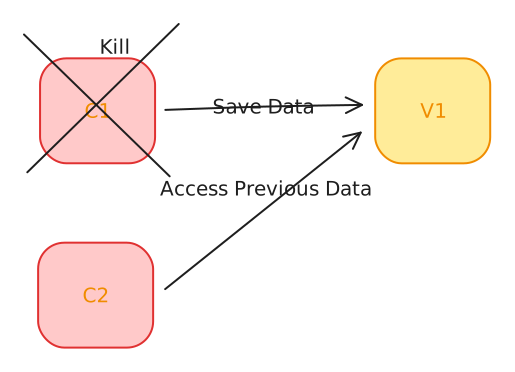
Docker Volume Commands
-
To create a volume, you can use the following command:
docker volume create <volume_name> -
To list all the volumes, you can use the following command:
docker volume ls -
To inspect a volume, you can use the following command:
docker volume inspect <volume_name>
Example - Ghost CMS
-
To run a Ghost CMS container with a volume, you can use the following command:
docker run -d -e NODE_ENV=development -e url=http://localhost:3001 -p 3001:2368 -v ghost-vol:/var/lib/ghost/content ghost-d: Run the container in detached mode.-e NODE_ENV=development: Set the environment variableNODE_ENVtodevelopment.-e url=http://localhost:3001: Set the environment variableurltohttp://localhost:3001.-p 3001:2368: Map port 3001 of the host machine to port 2368 of the container.-v ghost-vol:/var/lib/ghost/content: Create a volume namedghost-voland mount it to the/var/lib/ghost/contentdirectory inside the container.
-
Create a new post in Ghost CMS, then remove the container and run a new one with the same volume. The post should still be available (it lives in
ghost-vol, not in the container’s writable layer).:w